ESP ZeroCode AI · Community
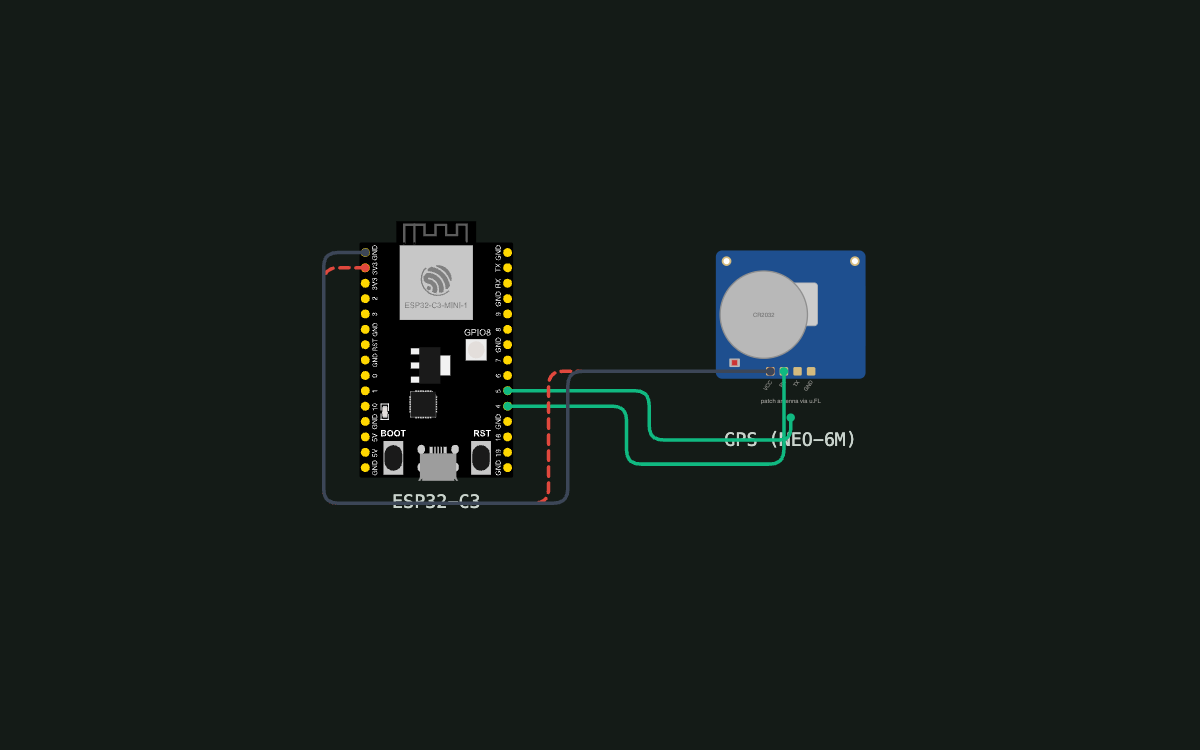
Web server based GPS (fork)
A GPS location tool that serves the current GPS location on a local WiFi network
What it does
- GPS receiver — an NEO-6M on UART: ESP GPIO4 (TX) → module RX, ESP GPIO5 (RX) ← module TX, 9600 baud NMEA
- Live position — an open page shows where the device is right now and keeps updating as it moves
- Route logging — records one point every second in the C3's on-board flash (rolling window: oldest points discarded once full), saving nothing while there is no valid fix
- Track readout — the page shows coordinates, speed, altitude and time, and has a button to download the recorded track as a GPX file to open on a PC or phone elsewhere
- Before the first fix the page simply says "no fix yet" — nothing is logged until there is a valid position
- Joins the local Wi-Fi network as a station so any phone or PC on the same network can reach it — no internet connection is used or needed
- Web page — served by the device itself on port 80, showing live position and the recorded track
- First-run setup — device starts its own setup Wi-Fi network (SoftAP) for entering home Wi-Fi credentials, shows the IP it gets, and is then reachable by name (mDNS)
- Status on the DevKit's on-board RGB LED (GPIO8) — searching for satellites vs. position valid vs. Wi-Fi problem
- Recovery via the DevKit's BOOT button (GPIO9) — hold ~5 s to redo Wi-Fi setup keeping the track, ~10 s to wipe everything
Manual
Device Type
A small always-on GPS readout built on an ESP32-C3-DevKitM-1 with an NEO-6M GPS module. It answers two questions over the local Wi-Fi network, with no app and no cloud: where am I right now, and where have I been. Someone leaves it powered where the sky is visible (a windowsill, a vehicle, a boat), then opens a web page from any phone or laptop on the same network to read the live position or download the recorded track.
Hardware
chip: esp32c3 — board: esp32-c3-devkitm-1 — gpios: GPIO4: UART TX to the GPS module's RX (ESP talks to the module for configuration) — GPIO5: UART RX from the GPS module's TX (NMEA sentences arrive here) — GPIO8: on-board WS2812 RGB LED — status indicator, nothing to wire — GPIO9: on-board BOOT button — recovery/re-provisioning, nothing to wire — peripherals: part: u-blox NEO-6M GPS module (with antenna) — interface: UART, 9600 baud, NMEA 0183 output at 1 Hz — pins: VCC → 3V3, GND → GND, TX → ESP GPIO5, RX → ESP GPIO4 — notes: The module's own UART pins are 3.3 V; the breakout's VCC pin accepts 3.3–5 V. Position, speed and time all come from the module, so the device needs no separate clock. First fix outdoors typically takes 30 s–2 min cold; it will not get a fix indoors. — power: 5 V in over the DevKit's USB-C connector from a plain USB supply. No battery, no charging circuit.
Inputs
kind: button — label: BOOT (on-board, GPIO9) — hardware: DevKit's BOOT button, active-low, already on the board — behavior: Held ~5 s: forget the Wi-Fi credentials and restart into setup mode, keeping the recorded track. Held ~10 s: also erase the stored track (full wipe) before restarting. A short press does nothing — it is not a user control in normal use. · kind: sensor — label: GPS position — hardware: NEO-6M on UART (GPIO4/GPIO5) — behavior: NMEA sentences are parsed continuously. A reading is only used when it carries a valid fix; readings without a fix are discarded rather than stored as zeros.
Outputs
kind: webpage — label: Position and track page — hardware: HTTP server on the ESP32-C3, port 80 — behavior: One page, no login, plain HTML that works on any phone browser. Shows: current latitude/longitude, speed, altitude, satellites used, time of last fix and whether a fix is valid right now; a live position that refreshes about every 2 s; the number of stored track points and how far back the oldest one reaches; a button to download the track as a GPX file; and buttons to delete the stored track and to restart the device. Before the first fix the position area reads "no fix yet". Nothing on the page needs internet access. · kind: led — label: Status LED (on-board WS2812, GPIO8) — hardware: DevKit's addressable RGB LED — behavior: Slow blue breathing = setup mode, waiting for Wi-Fi credentials on the setup page. Amber blink = trying to join the known network. Solid green = Wi-Fi connected and a valid position is being tracked. Slow white breathing = Wi-Fi connected, still searching for satellites. Red slow blink = cannot join the network, and the device is about to fall back to setup mode. LED off = power off.
Connectivity
stack: Wi-Fi — transport: station — purpose: Joins the home network so phones and PCs on it can open the page at the device's IP or mDNS name. No cloud service, no broker, no account. · stack: mDNS — transport: local name resolution — purpose: Device is reachable as a fixed .local name (e.g. gps-tracker.local) so the user does not have to remember an IP. The setup page and the main page both display the current IP as a fallback, since some Android and Windows setups do not resolve mDNS. · stack: Wi-Fi — transport: SoftAP (setup only) — purpose: Temporary setup network created on first boot or after a reset/moved network, so credentials can be entered without a serial cable.
Commissioning
method: SoftAP, first-run web page — payload: Wi-Fi SSID and password, stored in NVS — instructions: Out of the box (or after a Wi-Fi reset) the device broadcasts its own setup network. The user joins it from a phone or laptop and opens the setup page, picks or types the home Wi-Fi network name, enters the password and saves. The LED breathes blue while waiting, turns amber while joining, then goes green or white once joined. The setup page then shows the IP address the device obtained and the .local name to use from now on; it is reachable there for the rest of its life. The page has no login — it is intended for a trusted home network.
Business Logic
powerOnBehavior: Within a second of power-up the LED starts breathing blue and, if no Wi-Fi network is stored, the device opens its setup network so the user can provision it. If credentials are stored it joins the network silently (amber blink, a few seconds), then starts reading the GPS. The web page is served from the moment Wi-Fi is up, showing "no fix yet" until the receiver produces a valid position — typically half a minute to a couple of minutes outdoors, and never while indoors with a poor view of the sky. — automationRules: While a valid fix is held the track is written at a fixed cadence of one point per second — the log is a steady timeline of where the device was, with no gaps and no filtering of stationary periods. A reading without a valid fix is never stored, so time spent still hunting for satellites simply leaves no points behind. · Each stored point carries the position, altitude and the GPS-supplied UTC time, so the track can be replayed in order after any power loss without a real-time clock. · The track is a ring buffer in its own flash partition: once full the oldest points are dropped without warning and the newest are always kept. · If a valid fix is lost (antenna unplugged, brought indoors) logging simply pauses; the live readout on the page reflects "no fix yet" again and resumes by itself when the signal returns. — dayToDayOperation: The user powers it and forgets about it. A glance at the LED says whether it has a fix (green) or is still searching (white). To read it they open the page on a phone: coordinates, speed and altitude update a couple of times a second, and the point count and oldest-timestamp tell them how much history is stored. When they want the track they press download and get a GPX file they can open in any map application. There is no schedule, no mode and nothing to switch — the device only ever does these two things at once.
Factory Reset
trigger: Hold the on-board BOOT button (GPIO9) for about 5 seconds for a network reset, or about 10 seconds to also erase the recorded track. — effect: Wi-Fi credentials are cleared from NVS and the device reboots into setup mode (LED breathing blue) with its setup network up; the track log is preserved in the 5-second case and erased in the 10-second case. This recovers a device that cannot join a network, was provisioned with a wrong password, or has moved to a new home — no serial cable or reflash needed. The track can also be deleted from the web page without a reset.
Failure Modes
scenario: Wi-Fi credentials wrong, or the router is off / out of range — behavior: The device retries for about a minute with an amber blink, then turns the LED red and falls back to its setup network so the user can re-enter credentials. The GPS keeps working and keeps logging into flash throughout — no track points are lost because the network is down. · scenario: GPS antenna disconnected, or the device is indoors — behavior: No fix is ever produced. The page reports "no fix yet", the LED stays in the searching-white state, and nothing is logged. The device stays reachable and healthy; it recovers on its own once it sees the sky again. · scenario: Power blip or a deliberate unplug/replug — behavior: The track survives because it is in flash, and each point carries its own GPS time, so there is no clock to reset and no gap to explain. It rejoins the network and resumes logging without user action. · scenario: The flash partition for the track fills up — behavior: The oldest points are overwritten silently; the page always reflects how far back the stored track actually reaches, so the user can see the window shrinking rather than being surprised. Nothing else degrades. · scenario: The .local name does not resolve on the user's phone or PC — behavior: Nothing breaks — the setup page and the main page both display the IP address to type instead. The device's behaviour does not change. · scenario: No internet on the home network, or the internet is down — behavior: No effect at all. The device never contacts the internet and the whole page works offline; only map applications the user opens elsewhere would need connectivity.
Power Management
batteryPowered: false — notes: Mains/USB powered from a plain 5 V USB supply through the DevKit's USB-C connector. Always on, no sleep: the receiver needs continuous power to hold its fix, and the device is meant to be left running so the track keeps filling in. Typical draw is a few tens of mA for the DevKit plus roughly 45 mA for the GPS module.
Custom Behavior
The product deliberately has no cloud, no account and no companion app — it is a self-contained server on the user's own network. Two details are worth calling out for whoever builds it: the live page uses a small JSON endpoint that the page polls every couple of seconds rather than a push channel, which keeps the page trivially cacheable and light on the ESP32; and the track is stored as compact fixed-size binary records (position, altitude, time) in a dedicated flash partition rather than as text or a filesystem file, because a rolling ring buffer of uniform records is what makes the overwrite-oldest behaviour cheap and safe against power loss. With 1 Hz logging the partition should be sized as large as the flash budget allows (a few megabytes holds tens of thousands of points, i.e. many hours of continuous movement), since at a fixed one point per second the history window is bought purely with partition size.
Published 30 Sep 2026
Built with ESP ZeroCode AI — describe a device, get production firmware.
Terms of Service · Privacy Policy