ESP ZeroCode AI · Community
USB Security Key
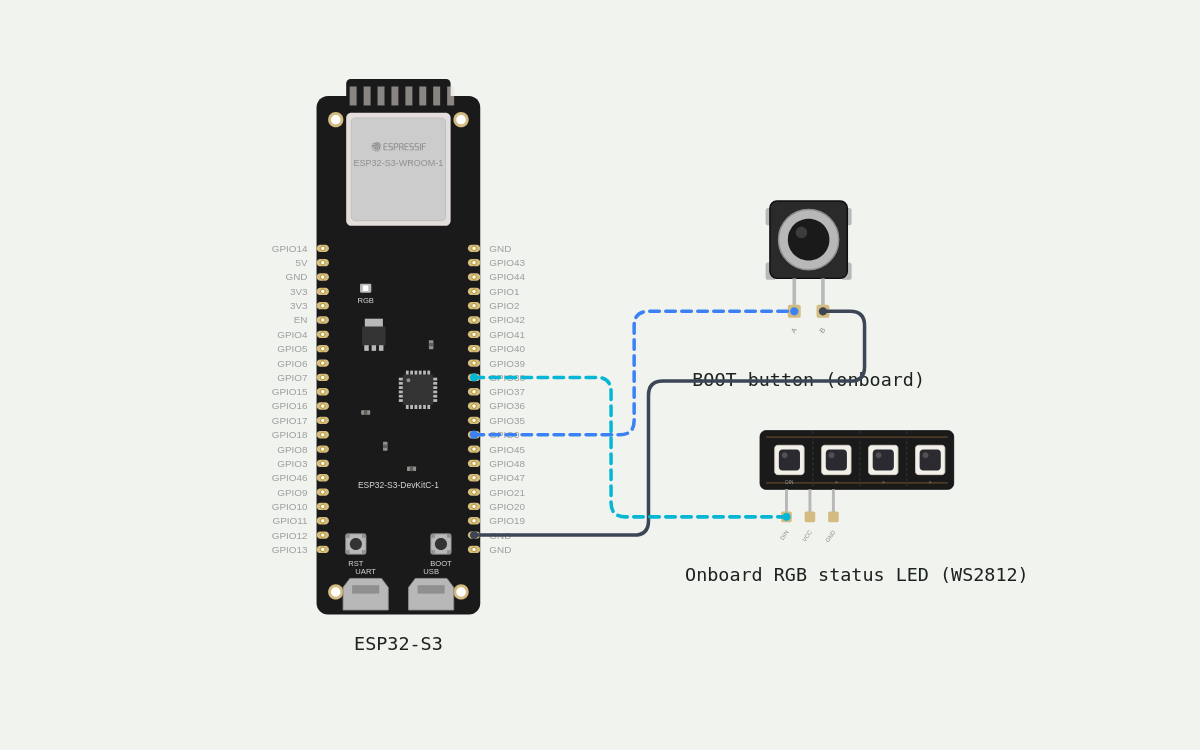
I want to build my own hardware security key, like a YubiKey, that I can plug into my computer by USB and use as two-factor authentication for my online logins (Google, GitHub, etc.). It should work with the normal "security key" / passkey prompts in browsers, with no special drivers or apps. FUNCTIONALITY - It should act as a FIDO2/WebAuthn key (CTAP2) and also support the older U2F standard, so it works on both modern and older sites. - It should support registering on a site, then logging in with it later. Each time, it signs a challenge using ECDSA P-256 (ES256). - It should support passkeys (discoverable credentials), with room for around 25 of them. Other credentials should be stored without using device memory, by encoding them into the credential ID. - It should support an optional PIN, set from the browser or OS, with a retry limit and lockout after too many wrong attempts. - Secrets must be properly protected. Generate a random master secret on first boot using the hardware RNG and store it encrypted. Never send private keys out of the device. Keep a signature counter that survives power loss. Enable flash encryption and secure boot for the final version. - It should show up as a standard USB HID FIDO device, using the CTAPHID protocol. HARDWARE NEEDED - An ESP32-S3 dev board with native USB (the port connected to GPIO19/GPIO20, not the UART/serial port). - Only the board's built-in BOOT button and onboard LED. No extra parts needed. If the board has an RGB LED, use it. If not, use a single LED on a free GPIO. - Please include a clear pin and wiring list in case I want to add an external button or LED later. CONTROLS - A short press of the BOOT button confirms "yes, it's me" for every registration and login. The key must never sign anything without a physical touch. - If I don't touch the button within about 30 seconds, the request should time out and fail safely. - Holding the button for around 10 seconds right after plugging it in starts the factory reset process (see below). - PIN entry happens through the browser or OS, not on the device. RESET & RECOVERY - A factory reset wipes all credentials, the PIN and the master secret. It should need a deliberate action (plugging in, then holding the button within the first few seconds), so it can't happen by accident or be triggered remotely. - If I forget the PIN and get locked out, a factory reset should be the recovery path. Warn me that this deletes every credential, and that I'd need to re-register on each site. - Please make two build modes. A "development" mode with no permanent chip changes, so I can test and reflash freely. A "production" mode that turns on flash encryption, secure boot and disables debug access. Explain clearly, with a warning, that the production eFuse changes are one-time and can't be undone. - Remind me to register a backup key on each site, since a lost or reset key means losing access otherwise. - If the stored data gets corrupted, it should safely reinitialize rather than get stuck. FEEDBACK & INDICATORS - LED idle (plugged in and ready): dim, slow pulse or steady dim light. - LED waiting for a touch: blinking fast, so I know to press the button. - LED success: solid green for about 1 second. - LED error, timeout or wrong PIN: red flash. - LED locked out (too many PIN attempts): slow red pulse. - LED factory reset in progress: alternating colors, then a solid confirmation. - In the development mode only, print debug logs over serial for USB packets and commands. Turn these off in production. Please keep the code well commented, mention anywhere you simplified the FIDO spec, and tell me how to test it with webauthn.io and libfido2 (fido2-token -L). Also tell me any limitation of the ESP32-S3 here, like having no secure element, and how you've worked around it.
What it does
- USB HID FIDO transport — enumerates as a standard CTAPHID security key on the native USB port (GPIO19/20), no drivers or apps
- FIDO2/WebAuthn (CTAP2) — register and later sign a challenge with ECDSA P-256 (ES256) key pairs; private keys never leave the device
- U2F (CTAP1) compatibility — so older sites that still ask for a classic security key keep working
- Passkeys (discoverable credentials) — up to 25 resident credentials stored on the device
- Non-resident credentials — encoded into the credential ID, consuming no device flash
- Optional PIN — set from the browser or OS, with a retry limit and lockout after too many wrong attempts
- Master secret — generated from the hardware RNG on first boot and stored encrypted; device reinitializes safely if stored data is corrupt
- Signature counter that survives power loss
- Touch to confirm — a short BOOT button press approves every registration and login; nothing is ever signed without a physical touch
- Touch timeout — if the button is not pressed within ~30 s the request fails safely instead of signing
- Factory reset — plug in, let the key boot, then hold BOOT ~10 s within the first few seconds (never held during power-up, which would enter ROM download mode instead) wipes all credentials, the PIN and the master secret
- Storage-full behavior — once all 25 passkey slots are used a new registration is refused with a clear 'security key is full' error in the browser; nothing is ever overwritten silently, so a slot is only freed by deleting that passkey on the site
- Status LED (onboard WS2812, GPIO38) — dim idle, fast blink = waiting for touch, solid green ~1 s = success, red flash = error/timeout/wrong PIN, slow red pulse = locked out, alternating colours = reset in progress
- Development build mode — no permanent chip changes, debug logs of USB packets/commands over serial, freely reflashable
- Production build mode — flash encryption + secure boot on, debug access disabled (one-time eFuse burn, cannot be undone)
- Expansion pins documented — free GPIO for an external button or LED if added later
Manual
Device Type
summary: A self-built, USB-A/C plug-in FIDO2/U2F hardware security key (YubiKey-style) built on an ESP32-S3-DevKitC-1. — problem: Second-factor and passkey authentication that the owner controls, works with the stock browser/OS security-key prompts on Google, GitHub and similar sites, and stores its secrets on hardware they hold rather than a cloud account. — formFactor: The bare ESP32-S3-DevKitC-1 board used as the key itself: plug the native USB port into the computer, key sits on the port or on a short cable. No enclosure required for v1; a 3D-printed shell is optional. — notInScope: USB-CDC/serial console during normal operation (the port is claimed by the FIDO HID interface) · NFC, BLE/UWB transport, FIDO2 over wireless · On-device PIN entry or display · Cloud sync or vendor account
Hardware
chip: esp32s3 — board: esp32-s3-devkitc-1 — boardLabel: ESP32-S3-DevKitC-1 — gpios: gpio: GPIO0 — role: BOOT button (onboard) — user presence / factory reset, active low, board pull-up — onBoard: true · gpio: GPIO38 — role: Onboard addressable RGB LED (WS2812, RMT channel 0) — single-wire, status indicator — onBoard: true · gpio: GPIO19 — role: USB D- of the native USB port (USB-Serial-JTAG peripheral) — FIDO HID transport, do not use for anything else — reserved: true · gpio: GPIO20 — role: USB D+ of the native USB port (USB-Serial-JTAG peripheral) — FIDO HID transport, do not use for anything else — reserved: true · gpio: GPIO43 — role: UART0 TXD — console in development builds only — reserved: console · gpio: GPIO44 — role: UART0 RXD — console in development builds only — reserved: console · gpio: GPIO45 — role: Strapping (VDD_SPI voltage, boot level 0) — leave alone — reserved: strapping · gpio: GPIO46 — role: Strapping (ROM log / boot mode, pull-down) — leave alone — reserved: strapping · gpio: GPIO35 — role: Flash/PSRAM — not usable — reserved: flash · gpio: GPIO36 — role: Flash/PSRAM — not usable — reserved: flash · gpio: GPIO37 — role: Flash/PSRAM — not usable — reserved: flash — peripherals: part: BOOT button (onboard tactile switch) — connection: GPIO0 to GND, external pull-up on the board — notes: Active low. Short press = user presence. Held 10 s after boot = factory reset. Holding it while power is applied enters the ROM download mode, so reset detection starts only after the application boots. · part: WS2812 addressable RGB LED (onboard) — connection: GPIO38 data in; 5 V rail on the DevKitC-1 v1.1 feeds it through a level shifter — notes: Driven with the RMT peripheral. One pixel = the whole status palette; brightness capped (~15%) because it is a bare LED a few cm from the user's eye. — expansionHeader: note: Free pins kept clear so an external button or LED can be added later without re-cabling anything used now. — externalButton: gpio: GPIO4 — wiring: Button between GPIO4 and GND; enable the internal pull-up. Second, parallel path to 'user presence' — either button confirms. — externalLed: gpio: GPIO39 — wiring: LED anode via 220 Ω to GPIO39, cathode to GND. Mirrors the onboard status palette (single colour; states that use colour collapse to on/off). — power: 3V3 (pin 1) and GND (pin 2 / pin 7) on the left header, or 5V if the external part needs it. — billOfMaterials: ESP32-S3-DevKitC-1 (with onboard BOOT button and WS2812 RGB LED) — 1 · Optional: 6 mm tactile button + 2 dupont wires for an external touch button · Optional: 3 mm LED + 220 Ω resistor for an external status LED · Optional: 3D-printed shell — limitations: No secure element (no ATECC608 or SE050). The master secret therefore lives in ESP32-S3 flash, protected by flash encryption (AES-XTS, key in eFuse) plus the HMAC/DS peripherals rather than by a separate tamper-resistant die. A determined attacker with physical access and equipment can still extract it; a real YubiKey has an EAL5+ element. · The ESP32-S3 USB peripheral is the fixed USB-Serial-JTAG controller: it enumerates on pins 19/20 only, cannot be routed elsewhere, and while it is in use the USB serial console is unavailable (serial logs in development builds go out over UART0, GPIO43/44, not over USB). · Flash wear: the signature counter and credential store are written to flash; the counter is written on each new value with wear-levelling, which is fine for human-paced logins but not for high-rate automated use. · CTAP2 is implemented to the mainstream subset (see customBehavior.simplifications) — no large-blob, no biometric/UV, no authenticator config beyond what is listed.
Inputs
kind: button — label: Touch / user presence — hardware: Onboard BOOT button on GPIO0 (active low, internal pull-up). Optional second button on GPIO4. — behavior: A single press shorter than 1 s while a request is pending = 'yes, it's me'. The device never signs without it. Presses when no request is pending are ignored (and stop the idle animation briefly). Debounced 20 ms; press is latched so a press just before the prompt appears still counts for 2 s. · kind: button-longpress — label: Factory reset — hardware: Same BOOT button on GPIO0. — behavior: Within the first 5 s after boot, holding the button continuously for 10 s starts the factory reset. Releasing early cancels silently with no state change. · kind: host — label: Commands from the computer — hardware: USB HID CTAPHID frames on GPIO19/20. — behavior: Registration, authentication, PIN, credential management and reset commands all arrive from the browser/OS; they are never initiated by the device.
Outputs
kind: rgb-led — label: Status RGB LED — hardware: Onboard WS2812 on GPIO38 (RMT). Optional mirrored single LED on GPIO39. — behavior: See state table below. All animations run from a non-blocking LED task so USB responses are never delayed by an animation. Colour-blind fallback: states also differ in blink rhythm, not only in colour. · kind: serial-log — label: Debug console (development mode only) — hardware: UART0 on GPIO43/44 at 115200, compiled out of production builds. — behavior: Hex dump of every HID packet in/out, parsed command names, CBOR decode results, timing of user-presence waits, counter and storage events. Never prints the master secret, private keys or PIN — only their lengths and hashes.
Connectivity
stack: USB 2.0 Full Speed (ESP32-S3 USB-Serial-JTAG peripheral) — transport: USB HID, usage page 0xF1D0 (FIDO), 64-byte interrupt IN/OUT endpoints — purpose: CTAPHID framing (CTAP2 and CTAP1/U2F messages). Enumerates with FIDO's own VID/PID so browsers show the standard security-key prompt.
Commissioning
method: none — no network. First run happens on the computer, not on the device. — instructions: 1. Build in development mode and flash over the native USB port. The board shows its ROM download-mode port when BOOT is held during reset; normal flashing over USB-Serial-JTAG does not need that. · 2. First boot: the device generates a 32-byte master secret from the hardware RNG, derives a per-credential key scheme, and initialises the credential store and counter. LED: white flash, then dim blue idle. · 3. Open https://webauthn.io in Chrome/Edge/Safari/Firefox. Enter a username, click 'Register', choose 'security key' (not 'this device'), press BOOT when the LED blinks amber. Solid green = registered. · 4. Click 'Authenticate': the browser asks for the key, press BOOT again, the site reports success and shows the ES256 signature count. · 5. Verify the device from a terminal: `fido2-token -L` lists it as /dev/hidrawN with its vendor/product; `fido2-token -I /dev/hidrawN` prints the AAGUID, supported versions (FIDO_2_0, U2F_V2), options and the current PIN retry count. · 6. Set a PIN from the browser's security-key management page (or `fido2-token -S /dev/hidrawN`) if passkeys are wanted — CTAP2 requires a PIN client-side-wrapped before the first resident credential. · 7. To test U2F, use https://www.u2f-toy.appspot.com or any legacy U2F demo; press BOOT the same way. · 8. Nothing needs to be entered per device: there is no server, API key or credential the user supplies at flash time.
Business Logic
powerOnBehavior: Power comes from USB VBUS; the device is on whenever it is plugged in. · Initialise storage (NVS + credential partition): if the master-secret record or the credential partition fails to read/validate, re-initialise it from the hardware RNG, log the event, and continue in 'empty key' state rather than hanging (LED: white flash, then idle). · Start the USB HID FIDO interface, the LED animation task and the button scanner. · Start the 5 s factory-reset window timer. · No requests are ever issued by the device; it answers the host only. — automationRules: Every MAKE_CREDENTIAL and GET_ASSERTION waits for user presence: LED amber 8 Hz, button armed, hard 30 s deadline. On deadline: CTAP2_ERR_ACTION_TIMEOUT (CTAP1_ERR_OTHER for U2F), red flash, no signing. · On the last user-presence millisecond the request is abandoned — the signature is never produced speculatively and discarded, because the private key operation itself runs only after the presence latch is set. · Resident credentials: up to 25. A new registration when the store is full returns CTAP2_ERR_KEY_STORE_FULL; the browser surfaces 'security key is full'. Nothing is evicted automatically. · Non-resident credentials carry the key material inside the credential ID (encrypted, authenticated with the master secret), so they cost no flash and are not counted against 25. · PIN: 4–63 Unicode characters, stored as left(SHA-256(UTF-8 PIN), 16) — the CTAP2 §5.5.4 verifier, NOT a PBKDF2 output — with the retries extension. PBKDF2 is deliberately not used: the host computes left(SHA-256(pin),16) itself and sends it (AES-encrypted) as pinHashEnc, so the device must store that same value or every correct PIN compares unequal, burns a retry and eventually locks the user out of their own key (that was tried and reverted). Offline brute-force resistance rests on the PIN's own entropy plus the retry counters, not on the KDF. minPINLength is NOT advertised, because a min pin length of 4 is the default a client assumes in its absence. 8 attempts, then lockout (CTAP2_ERR_PIN_AUTH_BLOCKED / CTAP1_ERR_PIN_AUTH_BLOCKED) until a power cycle; after 16 total failures the PIN is discarded and only a factory reset recovers the key. · Signature counter: 32-bit, persisted before the assertion reply is sent so it never repeats or goes backwards across power loss. · Touch while idle does nothing except pulse the LED; touch during an animation never interferes with a finished operation. — dayToDayOperation: Plug the key into the computer → dim blue light. Pick the key in the browser's security-key prompt (or, for passkeys, in the account chooser) → amber blink → press BOOT → solid green and the browser completes the registration or login. Unplug when done. Because it is USB, no charging and no Bluetooth pairing exist.
Factory Reset
trigger: Plug in, wait for the white boot flash (application running), then hold BOOT for 10 s within the first 5 s of boot. Holding BOOT at power-up must be avoided: the ROM would enter USB download mode instead of running the key. — confirmation: No extra confirmation step — the 10 s hold is the confirmation. LED shows magenta/white alternating during the hold; releasing early cancels with no data loss. — effect: Wipe the credential partition (all 25 resident credentials, any non-resident key records) · Wipe the PIN and reset its retry counter · Wipe the master secret, then generate a new one from the hardware RNG immediately (the key is usable right away, but every previously registered credential ID becomes invalid) · Reset the signature counter to 0 · LED: solid white for 2 s, then idle — userWarning: This deletes every credential. Each site must be re-registered with the key (and the old entry removed from the site's security-key list, or the site may report 'key not recognised'). Registering a second, backup security key on every site is strongly recommended, because a lost or reset key otherwise means losing access.
Failure Modes
scenario: Computer does not see the key (port chosen is the UART port, or the USB port is not the native one) — behavior: The device still shows dim blue idle because it is powered, but nothing enumerates. LED does not blink amber, so the user sees the key is powered yet no prompt appears — the fix is to move to the other USB port (the one on the ESP32-S3 side / marked USB, not UART). · scenario: Request times out — user does not touch the button — behavior: Red triple flash, request fails with ACTION_TIMEOUT, browser says the operation was not completed. Nothing is signed; no state changes; the key returns to idle and the next request works normally. · scenario: USB unplugged or computer sleeps mid-request — behavior: HID state machine resets, the pending user-presence wait is abandoned, no signature is produced. On re-plug the device boots and is immediately usable; no partial credential is left behind because a registration commits only after the touch. · scenario: Stored data corrupted (bad flash page, interrupted write, aborted reset) — behavior: The affected record fails its integrity check; the credential store re-initialises empty and the master secret is regenerated if unreadable. The device never hangs or bricks; log an error in development builds. Sites report 'credential not found' rather than the key refusing to work. · scenario: PIN entered wrongly too many times — behavior: Slow red pulse. Requests fail with PIN_AUTH_BLOCKED until the key is unplugged and re-plugged; after the hard limit the PIN is discarded and only a factory reset recovers it. · scenario: Credential store full — behavior: New registration refused (KEY_STORE_FULL) with red flash and browser message; existing passkeys keep working. Delete a passkey on a site to free a slot. · scenario: Power blip / brownout during a write — behavior: Brownout detector resets the chip; the counter or credential record that was mid-write is restored from the previous value (write-then-commit journal in flash), so the counter cannot go backwards and a credential is either fully present or absent. · scenario: Production-mode device flashed with a different build / secure boot key mismatch — behavior: The device refuses to boot that image (secure boot rejects it) and stays in the bootloader. This is expected and irreversible by design; develop on a development-mode board, not on the production one.
Power Management
batteryPowered: false — notes: Powered entirely from USB VBUS; no charger, no battery, no sleep. USB suspend is not used to power down the LED because the idle glow tells the user the key is alive.
Custom Behavior
buildModes: dev: Plain build, no eFuse changes. Flash encryption and secure boot OFF, ROM download mode available, UART0 debug log on GPIO43/44, `esptool` flashing over USB-Serial-JTAG works normally. Use this for everything until the firmware is final. — production: idf.py with CONFIG_SECURE_FLASH_ENC_ENABLED + FLASH_ENC_MODE_RELEASE, CONFIG_SECURE_BOOT (v2, RSA-3072), CONFIG_SECURE_BOOT_REVOKE/disable ROM download mode and JTAG, UART log compiled out. WARNING: burning these eFuses is a one-time, irreversible act — a mistake permanently bricks the board's ability to flash custom firmware. Burn on a board dedicated to production, and keep the signing key backed up: without it the device can never be updated again. — securityArchitecture: Master secret: 32 random bytes from esp_random() on first boot, stored in a dedicated NVS namespace. In production builds that partition is inside the flash-encryption scope, so it is ciphertext at rest. · Credential private keys are never stored: for resident credentials the key seed is stored (encrypted, integrity-protected) — the P-256 private key is derived from it; for non-resident credentials the seed is sealed into the credential ID with AES-256-GCM under a key derived from the master secret, so nothing is written to flash at all. · AAGUID: fixed, random per-firmware value reported in CTAP2 makeCredential responses; helps sites distinguish this key from a vendor one. · The optional ESP32-S3 HMAC peripheral is used where available to keep the master-secret-derived key out of ordinary RAM for the GCM nonce/AAD step; the DS peripheral cannot sign ES256-with-SHA-256 in the form CTAP2 needs, so signing uses mbedTLS in software. — simplifications: CTAP2 subset: makeCredential, getAssertion, getInfo, clientPIN (get/set PIN, PIN auth), credential management (delete one / list RPs) and reset. Omitted: largeBlob, hmac-secret, biometric/UV (no fingerprint sensor), credProtect, FIDO2.1 authenticatorConfig, and the enterprise attestation features. · Attestation is 'none' by default (self-attestation if a site insists), so the key is not a batch-attestation device — which is what most sites actually want. · Resident credentials are not garbage-collected by RP-ID ownership; the host must delete them (credential management) before the store fills. · Flash wear-leveling is done by NVS rather than a custom secure element-style counter, so the counter is 'persistently monotonic', not tamper-proof against a physical attacker who can roll flash back. · U2F is implemented over the same CTAPHID transport at version U2F_V2 with the standard 32-byte key handle format. — testing: browser: webauthn.io for register/authenticate; chrome://settings/securityKeys or the OS security-key dialog for PIN and reset flows; GitHub's Security → Passkeys to validate a real relying party. — cli: `fido2-token -L` (list), `fido2-token -I /dev/hidrawN` (info, AAGUID, versions, retries), `fido2-token -S /dev/hidrawN` (set PIN), `fido2-token -D` (delete a resident credential), `fido2-cred`/`fido2-assert` for scripted CTAP2 checks. — serial: In development builds, watch the UART log at 115200 on GPIO43/44 to see each CTAP command decode and the 30 s user-presence wait. Run `fido-selftest` for encoder checks, the CTAP2 request decoders, a FULL CTAP2 makeCredential happy path, and an end-to-end U2F register->authenticate whose emitted signature is verified against a spec-derived digest; run `fido-sim` for the receive/transmit path. Both are host-free and need no touch from the operator (a latched touch is consumed by the real presence gate). Side effects, stated precisely: the CTAP2 makeCredential check writes no flash and consumes no resident slot (rk omitted); the U2F authenticate check advances the persisted signature counter by one, exactly as a real U2F login does.
Published 22 Oct 2026
Firmware and source licensed Apache-2.0; photos and text CC-BY-4.0.
The firmware includes open-source software — open-source licences and notices; some components may be used only with Espressif chips.
Built with ESP ZeroCode AI — describe a device, get production firmware.
Terms of Service · Privacy Policy