ESP ZeroCode AI · Community
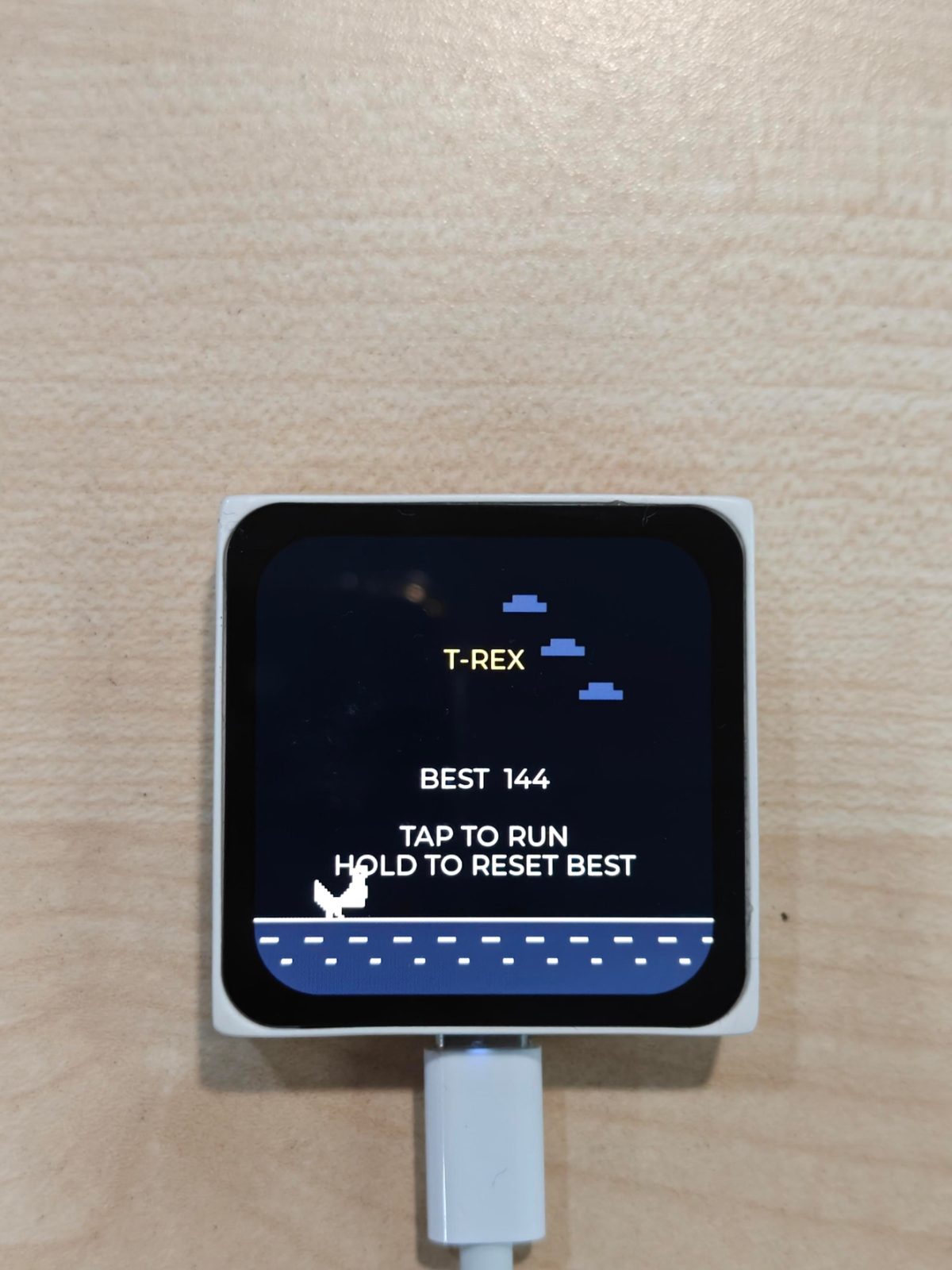
T-Rex
Chrome dino inspired T-Rex Game on ESP32-S31
What it does
- T-Rex endless runner — the Chrome offline dinosaur game runs full screen on the Mosaico's on-board AMOLED LCD, one game loop at a fixed frame rate
- Touch control — the on-board CST9217 touchscreen is the only input: tap anywhere to jump, hold to duck. No physical buttons used.
- Obstacles and difficulty — ground cacti and flying birds, scroll speed ramps up the longer you survive
- Score readout — running score climbs as you survive, game-over screen shows the run's score and the all-time best score
- Standalone device — pure offline game, no Wi-Fi, no cloud, no smart-home stack
- Game audio — jump, score-milestone and crash sound effects played through the on-board ES8311 speaker/amp, with the audio power rail enabled at boot
- Haptic feedback — on-board vibration motor buzzes briefly on jump and gives a longer buzz at collision
- Persistent best score — the all-time high score is stored in flash and survives reboot and power loss
- Run life cycle — boots into a title screen showing the best score, tap to start a run, tap again on the game-over screen for an immediate restart
Manual
Device Type
Handheld retro game console. A self-contained, single-game device: it boots straight into the Chrome offline T-Rex endless runner and does nothing else. No network, no app, no configuration. The problem it solves is having a pocketable, always-ready game on a display board with a touchscreen — power it on and play.
Hardware
chip: esp32s31 — board: esp-mosaico — peripherals: name: display_lcd — part: co5300 — type: display_lcd — role: On-board AMOLED LCD. All game rendering goes here — full-screen, one frame per game tick. · name: lcd_touch — part: cst9217 — type: lcd_touch — role: On-board capacitive touchscreen. The only user input: tap = jump / start / restart, hold = duck. · name: audio_dac — part: es8311 — type: audio_codec — role: On-board speaker path for game sound effects; the ES8311 DAC/amp output drives the on-board speaker. · name: audio_power — type: power_ctrl — role: Audio power-enable rail. Driven active at boot so the speaker path is live, and kept on for the life of the session. · name: vibration_motor — type: gpio_ctrl — role: On-board haptic motor for jump and collision feedback. · name: status_led — type: gpio_ctrl — role: On-board LED, left available for boot/diagnostic indication; not part of gameplay. · name: ai_button — type: button — role: On-board button, intentionally unused — touchscreen is the sole control. · name: boot_button — type: button — role: On-board button, intentionally unused. — notes: Zero external components. The Mosaico board is the entire product: display, touch, speaker, haptics and flash storage are all on-board. No free GPIO is consumed, so no pin-assignment constraints apply and no wiring mistakes are possible.
Inputs
kind: touch — label: Touchscreen tap — hardware: cst9217 touchscreen on GPIO 6 — behavior: On the game-over screen, a tap immediately starts a new run. During play, a tap makes the dinosaur jump; while airborne, taps are ignored. On the title screen, a tap starts the first run. · kind: touch — label: Touchscreen press-and-hold — hardware: cst9217 touchscreen on GPIO 6 — behavior: Holding the finger down makes the dinosaur duck (lower stance), letting birds pass overhead. Releasing stands him back up. Ducking on the ground also lets low hazards be avoided without a jump.
Outputs
kind: display — label: AMOLED game screen — hardware: co5300 LCD — behavior: Full-screen game graphics: sky and ground scroll, the dinosaur runs on the left, obstacles come from the right. States are visually distinct — title screen (best score shown), running play, and game-over screen (final score + best score, with a new record highlighted). · kind: speaker — label: Game sound effects — hardware: es8311 codec on the on-board speaker, audio power rail on GPIO 56 — behavior: Short blips on jump, a rising tone on each score milestone, and a crash sound when a run ends. Effects are non-blocking — audio never stalls the game loop — and silence is possible by disabling effects at build time. · kind: haptic — label: Vibration motor — hardware: on-board vibration motor on GPIO 8 — behavior: A short pulse confirms a jump; a longer buzz signals the collision that ends the run. Haptics fire in sync with the matching sound effect. · kind: indicator — label: Status LED — hardware: on-board LED on GPIO 3 — behavior: Not part of gameplay. Optionally used as a boot/self-test blink so the user can tell the board is alive before the display comes up.
Business Logic
powerOnBehavior: On power-up the audio power rail (GPIO 56) is enabled, the display and touch controller initialize, and the game loads the best score from flash and shows the title screen with that score. The game does not auto-start — the player taps to begin a run. — automationRules: Difficulty ramps with survival time: scroll speed increases stepwise as the score passes thresholds, so obstacle spacing and closing speed both get harder. · Obstacle selection is semi-random but never places a bird at a height that is unavoidable, and never spawns an obstacle too close behind another for the current speed. · Score increments automatically with distance travelled; a milestone tone plays at fixed score intervals. · A new best score is written to flash immediately when the run ends, not at reboot, so an abrupt power-off cannot lose the record. — dayToDayOperation: Power on → title screen with the best score → tap to run. The dinosaur runs automatically; the user taps to jump or holds to duck. Collision with a cactus or bird ends the run: the dinosaur stops, the game-over screen shows the run's score and the all-time best, and haptics plus audio mark the crash. A tap restarts instantly at speed one — no menus, no loading, no confirmation. This loop repeats indefinitely. The device is single-purpose; there is no other mode to get lost in.
Factory Reset
trigger: None required for normal use. To clear the saved best score, hold the touchscreen down for the whole title screen (a deliberate long press at boot) — the title screen then shows the best score reset to zero with a brief confirmation. — effect: Erases only the stored best-score value from flash. The game is otherwise stateless, so nothing else can get stuck; power-cycling is always a safe recovery.
Failure Modes
scenario: Display or touch controller fails to initialize at boot — behavior: The board does not enter the game loop. The status LED blinks a repeating fault pattern and a diagnostic line is written to the console log so the failure is identifiable rather than a black screen with no explanation. · scenario: Audio codec or audio power rail does not come up — behavior: The game runs normally and silently. Audio initialization failure is caught and non-fatal; the game is fully playable without sound. · scenario: Flash write of the best score fails (wear, corruption) — behavior: The run's score is still shown on the game-over screen; the failure is logged and the stored best score is left unchanged. The game keeps working with the previous best score. · scenario: Power blip or abrupt power loss mid-run — behavior: The device reboots to the title screen. Only an in-progress run is lost; the best score written by earlier completed runs is intact in flash. · scenario: Wi-Fi or cloud unreachable — behavior: Not applicable — the device has no radio operations at all, so there is no network-dependent failure mode.
Published 5 Oct 2026
Built with ESP ZeroCode AI — describe a device, get production firmware.
Terms of Service · Privacy Policy