ESP ZeroCode AI · Community
Spot It!
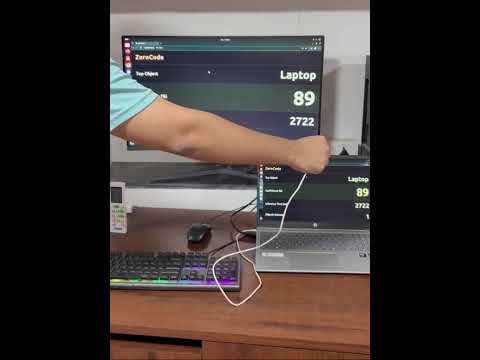
Spot It! runs YOLO11n entirely on the Seeed XIAO ESP32-S3 Sense, detecting objects across 80 COCO classes using its onboard camera. All computation and web hosting happen directly on the microcontroller, with no cloud or external processing required. A built-in Wi-Fi dashboard displays detected objects, confidence scores, inference latency, and object counts in real time.
What it does
- On-device object detection — camera frames run through a quantized YOLO11n model locally via ESP-DL; no cloud, server or laptop in the inference path
- Dashboard — exactly four read-only rows, in this order: Top Object (COCO class name of the highest-confidence detection), Confidence (%), Inference Time (ms), Objects Detected (total in latest frame)
- Data panel only — no camera preview, no bounding boxes, no FPS counter, no charts or confidence bars, no extra status panels, no WebSockets or MJPEG streaming
- Values published on the native ZeroCode parameter bus — class ID (u8), confidence percentage (u8), inference time (u32), object count (u8); the dashboard translates the class ID to its COCO name
- Dashboard look — native ESP32-hosted HTML/CSS/JS, dark background #0b1114, orange header #ffb975, large green numeric readings, native ZeroCode full-width rows with ~0.9 s polling
- Password-protected Wi-Fi SoftAP — the device is its own network at http://192.168.4.1/, so it works with no router present
- First-boot credential provisioning — a unique Wi-Fi password generated on first boot, stored in NVS, printed to USB serial on later boots
- USB-powered, self-contained — one cable for power and serial console; no battery
- Continuous detection on a fixed cadence — each cycle is capture, inference, publish, then a 1500 ms delay; the dashboard polls the latest result every ~0.9 s; no button or on-demand trigger
- Empty frame behaviour — Top Object shows `none` (class ID 255 means no object), Confidence 0, Objects Detected 0, and the row keeps that frame's real measured inference time; previous detections are never held over
- Model — official `espressif/coco_detect` v0.4.2 from the ESP-IDF Component Registry, using `COCODetect` with quantized YOLO11N_320_S8_V1 at 320x320 input and all 80 COCO classes in the component's own ordering
- Model loading — `CONFIG_COCO_DETECT_MODEL_IN_FLASH_PARTITION=y`, `CONFIG_COCO_DETECT_YOLO11N_320_S8_V1=y`, `CONFIG_FLASH_COCO_DETECT_YOLO11N_320_S8_V1=y`, in a dedicated `coco_det` flash partition; the ~2.8 MB model is flashed with the build (address 0x420000) rather than uploaded
- Real inference only — no placeholder weights, no substitute model variant, no simulated detections; if the registry component or its model assets can't be fetched the build reports that instead of shipping
- Network name `ZeroCode-XXXX` — fixed prefix plus a short per-device suffix, so several units can sit side by side without confusion. The Wi-Fi name is the ZeroCode network name and deliberately does not follow the product's public name
Manual
Device Type
Spot It! — a self-contained, USB-powered object-recognition appliance. Plug it into any USB power source, point it at a scene, join its own Wi-Fi network, and a web page on the device shows what it sees: the single most confident object, how sure it is, how long the detection took, and how many objects were found. All inference runs on the ESP32-S3 itself; there is no cloud, no account, and no companion app. It solves the 'what is this thing seeing right now?' question with a device that needs nothing but power.
Hardware
chip: esp32s3 — board: xiao-esp32s3-sense — gpios: note: No external wiring. Every peripheral is already soldered or on the Sense expansion board. — camera_dvp: 10 · 11 · 12 · 13 · 14 · 15 · 16 · 17 · 18 · 38 · 39 · 40 · 47 · 48 — boot_button: 0 — microsd: 7 · 8 · 9 · 21 — audio_adc: 41 · 42 — free: 1 · 2 · 3 · 4 · 5 · 6 — reserved: 43: console UART TXD — 44: console UART RXD — peripherals: part: camera — detail: On-board camera on the Sense expansion board via FPC — sensor is OV3660 on the unit we are targeting; newer batches ship OV5640 with auto-focus and earlier ones OV2640, so the camera init must follow the detected sensor rather than hard-coding a single PID. — role: the only image source; frames are captured at QVGA (320x240) RGB565 into one PSRAM framebuffer and passed to the model, whose own preprocessing resizes them to the network's 320x320 input · part: boot_button — detail: GPIO0, on-board. Deliberately UNUSED — no detection trigger, no reset gesture. Kept free so the product behaviour matches the reference implementation. — role: none · part: microsd — detail: On-board slot, UNUSED. The model lives in the flash partition, never on SD. — role: none · part: audio_adc — detail: On-board mic array (GPIO41/42), UNUSED. — role: none — flashLayout: note: 8 MB flash. A custom partition table is REQUIRED: the coco_detect component needs a partition literally named `coco_det` big enough for the ~2.8 MB model, and the default table has no room for it. — nvs: 0x9000, 0x6000 — phy_init: 0xf000, 0x1000 — factory: 0x10000, 0x400000 — coco_det: 0x420000, 0x350000 — rationale: `coco_det` starts at the reference implementation's 0x420000 and is sized 3.3 MB, comfortably holding the 2.8 MB espdl model.
Inputs
kind: camera — label: Scene in front of the lens — hardware: on-board OV3660 (DVP) on the Sense expansion board — behavior: Continuous detection on a fixed cycle. Each cycle is: capture a frame, run the model, publish the four results, then wait 1500 ms before the next capture. There is no shutter, no button, and no request/response — the device detects on its own for as long as it is powered, at roughly one result every 2.5 s (1500 ms delay plus ~1 s of model time on this chip). · kind: button — label: BOOT button — hardware: on-board GPIO0 — behavior: Intentionally unused at runtime. It remains the chip's normal boot-mode button and nothing in the product reacts to it.
Outputs
kind: web-dashboard — label: Spot It! dashboard — hardware: served by the ESP32 over its own SoftAP, native HTML/CSS/JS in firmware — behavior: Exactly four read-only rows, always in this order, nothing else on the page. The page itself carries the native ZeroCode header ('ZeroCode'), which is deliberate: the dashboard header, the console prompt ('Spot It!> ') and the Wi-Fi SSID ('ZeroCode-XXXX') are three different names by design - the first is the ZeroCode dashboard shell, the second is the product, the third is the ZeroCode network name. The product is publicly called Spot It!. — styling: background: #0b1114 — header: #ffb975 — readings: large green numerals — layout: native ZeroCode full-width rows, same typography and spacing as the reference ZeroCode dashboard — refresh: JavaScript polls roughly every 0.9 seconds; no WebSockets, no push, no streaming — explicitlyAbsent: camera preview / any image · bounding boxes · FPS counter · charts, graphs, confidence bars · extra status panels or metrics · any additional row or layout change · kind: serial — label: USB serial console — hardware: USB-C on the XIAO — behavior: Human-readable boot log: the generated Wi-Fi password, the network name, the dashboard address, and inference startup status. This is the recovery channel for the password.
Connectivity
stack: webui — transport: wifi — purpose: The device raises its own WPA2 SoftAP (SSID `ZeroCode-XXXX`, suffix derived from the device MAC) and serves the dashboard plus the parameter-bus endpoints at http://192.168.4.1/. It never joins a home router and needs no internet. · stack: webui — transport: mdns — purpose: The dashboard is also reachable as http://zerocode-XXXX.local/ on networks/clients that resolve mDNS; the 192.168.4.1 address is the primary, always-printed route.
Commissioning
method: softap — payload: Per-device Wi-Fi password of 10 characters, generated on first boot. — instructions: 1) Plug the device into USB power with the camera board fitted. 2) On first boot it generates a unique 10-character Wi-Fi password, stores it in NVS, and prints it to USB serial along with the network name. 3) On a phone or laptop, join the Wi-Fi network `ZeroCode-XXXX` using that password. 4) Open http://192.168.4.1/ - the four-row dashboard appears and starts updating within a few seconds. 5) On every later boot the stored password is re-printed to USB serial, so an owner who forgets it only needs a USB cable and a serial terminal - never a re-flash.
Business Logic
powerOnBehavior: Power on -> camera initialises, the YOLO11N_320_S8_V1 model is loaded from the `coco_det` flash partition, Wi-Fi SoftAP starts, the password and network name are printed to serial, and the capture/inference/publish/delay loop begins. The dashboard shows the latest published values as soon as a browser connects; before the first inference has ever completed every row reads `--`, which is distinct from a completed inference that found nothing (Top Object `none`, Confidence 0, Objects Detected 0, with that frame's real measured inference time retained). — automationRules: Each inference seeds top_class = 255 and top_score = 0.0, then keeps the highest-confidence valid COCO detection from that frame's result list. · The four values are published on the ZeroCode parameter bus as class ID (u8), confidence percentage (u8, rounded), inference time (u32 ms), object count (u8). · A separate boolean occupancy parameter is published on the same bus for every completed inference, set when a COCO class-0 (person) detection scores at least 35 %. It is an internal event-bus reading and is not a fifth dashboard row. Nothing in this composition consumes it yet: it exists for behaviours or endpoints bound to occupancy in a product variant, and is published unconditionally so such a binding works without firmware changes. · The dashboard converts class ID to text in its own JavaScript: `--` before any inference has completed, `none` for class ID 255 (a completed inference with no objects), and otherwise the COCO class name for that ID (0-79). · The dashboard is strictly read-only: no controls, no settings, no write-back to the device. — dayToDayOperation: There is nothing to operate. The device is left pointing at whatever it should watch, powered from any USB source, and anyone who joins its Wi-Fi network can read the four rows. Detection results are not stored or transmitted beyond the dashboard - the readings describe the most recent completed inference only, and are replaced on the next one. Each cycle is capture, inference (~961 ms of model time plus ~15 ms of pre/post-processing on this chip), publish, then a 1500 ms delay, so a new result appears roughly every 2.5 s. The page polls every 900 ms.
Factory Reset
trigger: No reset button or gesture exists (the BOOT button is deliberately unused). The defined recovery path is the USB serial console: every boot re-prints the stored Wi-Fi password. A full wipe (erasing NVS and re-flashing) generates a new password and returns the device to first-boot state. — effect: Clearing NVS discards the stored Wi-Fi password; the next boot generates a new one, prints it to serial, and raises the SoftAP with it. Nothing else is user state - detection settings are compiled in.
Failure Modes
scenario: Camera fails to initialise (FPC not seated, wrong sensor PID, sensor fault) — behavior: No inference can run. The device stays up on Wi-Fi and the serial log carries an explicit camera-init error so the fault is diagnosable; the dashboard does not fabricate readings - it holds the initial values rather than inventing detections. · scenario: Model missing or `coco_det` partition too small / incorrectly flashed — behavior: Model load fails at boot, the error is logged on serial with the partition name, and inference never starts. The device still raises its AP, so the fault is visible as an unchanging dashboard rather than a crash loop. · scenario: Nothing recognisable in view — behavior: Not an error. Top Object `none`, Confidence 0, Objects Detected 0, and the Inference Time row keeps reporting the real measured latency of that frame. · scenario: No browser connected / phone leaves the SoftAP — behavior: Inference continues uninterrupted. The dashboard simply resumes reading the current values when a client reconnects; no state is lost and nothing needs restarting. · scenario: Wi-Fi down / no home network — behavior: Not applicable in a meaningful sense: the product has no dependency on an existing network or the internet. It is the network. Loss of internet is invisible to it. · scenario: Power blip or unplug — behavior: The device is not battery-backed; it simply restarts when power returns, reloads the model from flash, and comes back with the same stored Wi-Fi password. Detection resumes automatically with no user action. · scenario: USB power supply too weak — behavior: Inference and Wi-Fi together draw well beyond a low-current charger's limit under load; a brownout shows as a reset loop that clears on serial. The device expects a normal 5 V USB source.
Custom Behavior
buildRequirements: Declare `espressif/coco_detect` version 0.4.2 in main/idf_component.yml and let the ESP-IDF component manager resolve the package and its model assets at build time (the archive is ~25 MB and yields build/espdl_models/coco_detect.espdl at ~2.8 MB, flashed to the `coco_det` partition at 0x420000). Required Kconfig: CONFIG_COCO_DETECT_MODEL_IN_FLASH_PARTITION=y, CONFIG_COCO_DETECT_YOLO11N_320_S8_V1=y (default model selector), CONFIG_FLASH_COCO_DETECT_YOLO11N_320_S8_V1=y (flash it with the build). Do NOT select YOLO11N_S8_V1 and do NOT use SD-card model location - the 640x640 variant needs 8 MB PSRAM of model parameters and the SD path is unsupported at this PSRAM size. — inferenceContract: Use the component's own COCODetect API - construct COCODetect(COCODetect::YOLO11N_320_S8_V1, true) and call run(frame) with the captured QVGA RGB565 frame as a dl::image::img_t of pixel type DL_IMAGE_PIX_TYPE_RGB565BE; ESP-DL's own preprocessing performs the resize to the network's 320x320 input, so the firmware adds no resizing or extra frame copies. Preserve the component's original COCO class ordering. No alternative model, no re-mapping of class IDs, no simulated results. — nonGoals: Explicitly out of scope, per the reference implementation: video or image streaming off the device, bounding-box overlays, FPS reporting, detection history or logging to persistent storage or off the device, persistence beyond the Wi-Fi password in NVS, configurable thresholds in a UI, cloud/smart-home integration, and any hardware beyond the XIAO ESP32S3 Sense board. Note: the firmware does emit per-frame detection results to the USB SERIAL console as bring-up diagnostics, per the product owner's explicit instruction. That is a serial-only diagnostic channel and is not detection history - nothing is stored, nothing is retained across frames, and nothing leaves the device other than on the local USB serial line.
Published 14 Nov 2026
Firmware and source licensed Apache-2.0; photos and text CC-BY-4.0.
The firmware includes open-source software — open-source licences and notices; some components may be used only with Espressif chips.
Built with ESP ZeroCode AI — describe a device, get production firmware.
Terms of Service · Privacy Policy