ESP ZeroCode AI · Community
Sense to pixel
okay so i Have flexitac sensor made up of FPC i want a code or firmware which flashes the esp and then opens a heatmap which visualizes wherveer and whenever the flexitac is pressed
What it does
- Tactile input — FlexiTac FPC pad on its readout board streams 12 × 32 taxel frames at 2 Mbaud into the ESP32 over UART
- Frame parser — locks onto the 0xAA 0x55 frame header, buffers whole 512-byte frames, drops corrupt/incomplete ones and resyncs automatically
- Baseline & auto-zero — the resting level of every taxel is tracked continuously so touch is shown as deviation from rest, not raw resistance drift
- Press detection — each contact reports peak pressure, contact area and centroid position in millimetres on the pad, with start/end events
- Live heatmap — the 32 × 12 taxel grid (64 × 24 mm, 2 mm pitch) drawn as a colour-coded pressure map on a fixed scale, refreshed in real time
- Readout speed — frames can be decimated to lighten the link, and the page shows the measured true frame rate next to the configured one
- Self-hosted web UI — the ESP32 runs its own open Wi-Fi access point and serves the heatmap page; nothing to install
- Station mode — join a lab network from the page for a stable address (flexitac.local), falling back to its own AP if that network is missing
- Machine-readable stream — binary WebSocket pushing every frame (timestamp + 384 taxel values) so a Python/robotics client gets the same data as the browser
- Demo mode — with no readout board attached the ESP32 synthesises frames (climbing press, travelling contact, tap pulses, idle noise) so the heatmap can be flashed and verified before the sensor exists
- Terminal heatmap — the same pressure map printed as ASCII to the USB serial console, plus a small Python client that draws it from the WebSocket, so a desktop or terminal works without a browser
- History & replay — the page keeps the last seconds of frames and can scrub back through them instead of only watching live
- Session recording — record up to ~30 s to on-board flash and download it as a CSV of taxel frames for offline analysis
- Status LED — on-board LED distinguishes AP-up, streaming, no-signal-from-sensor and station-connected states
- Tare button — a short press of the board's BOOT button re-zeros the baseline while the pad is untouched
- Factory reset — holding the BOOT button for 5 s clears saved Wi-Fi and baseline settings back to defaults
- USB powered — runs off the DevKit's USB cable, no battery
Manual
Device Type
summary: A bench instrument that makes an invisible force visible: a FlexiTac flexible piezoresistive tactile pad, read by FlexiTac's multi-channel readout board, bridged to Wi-Fi by an ESP32 so the pressure image of whatever touches the pad appears as a live heatmap in a browser and as a frame stream a robot-learning script can consume. — problem: FlexiTac pads only speak serial at 2 Mbaud — they cannot be watched, they cannot be viewed from a phone, and they cannot be piped into a training pipeline without a laptop tethered to the sensor. This puts the pad on the network and gives it a screen anyone can open. Crucially it can be built and proven before the sensor is in hand: the firmware carries a synthetic frame source, so the heatmap, the page, the terminal view and the client stream are all verifiable on a bare ESP32 with nothing attached. — whoItIsFor: A robotics / tactile-sensing researcher or student working at a bench: verifying a freshly fabricated pad, checking taxel uniformity, and capturing press data for learning experiments.
Hardware
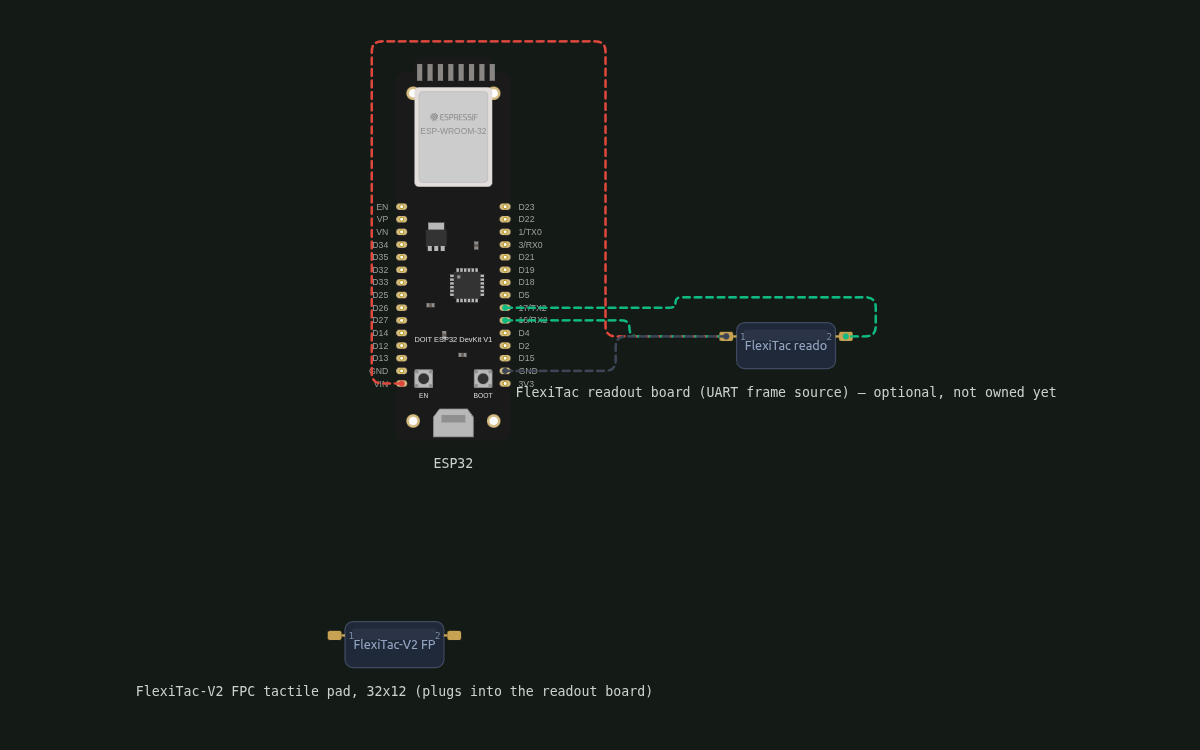
chip: esp32 — board: doit-esp32-devkit-v1 — boardNotes: ESP32-WROOM-32 module, no PSRAM — all buffers are sized for internal RAM plus a flash partition for recording. Uses the board's existing GPIO2 status LED and GPIO0 BOOT button; no external LED or button is added. — gpios: gpio: GPIO16 — role: UART2 RX — receives the readout board's frame stream · gpio: GPIO17 — role: UART2 TX — reserved for readout-board control/baud negotiation (unused in v1) · gpio: GPIO2 — role: on-board LED, status indicator · gpio: GPIO0 — role: on-board BOOT button, tare / factory reset · gpio: GPIO1 / GPIO3 — role: untouched — UART0 console for logs and flashing — peripherals: part: FlexiTac multi-channel readout board (stock firmware) — NOT YET OWNED — link: UART 2,000,000 baud, 8N1 — power: 5 V from the DevKit's 5V pin and common ground — notes: Optional at first: until the board arrives the firmware runs its demo frame generator and the product is fully usable. When it arrives, confirm its serial logic level — 3.3 V connects straight to GPIO16, 5 V needs a divider or level shifter on the TX line because ESP32 pins are not 5 V tolerant. It is the only external part in the build. · part: FlexiTac-V2 FPC tactile pad — link: FPC tail plugs into the readout board (no ESP32 pins) — notes: 32 × 12 taxels, 2 mm pitch, 64 × 24 mm sensing area. Wired to readout mux channels 4–15, so the pad occupies the lower 12 rows of the 16-row frame. — wireProtocol: uart: 2,000,000 baud, 8N1, no flow control — frame: 0xAA 0x55 header followed by 512 unsigned 8-bit taxel values (16 rows × 32 columns, row-major) — padSlice: Frames are always 512 bytes; only rows 4–15 contain the pad's 12 rows (32 columns), i.e. bytes 128–511 of the payload — sync: Parser hunts for the 0xAA 0x55 pair, then reads exactly 512 payload bytes; on timeout or a header found mid-frame it discards the partial frame and resyncs. Frames are checksum-free, so a gap in the stream is treated as a dropped frame rather than garbage data. — rate: ~100 Hz from the stock firmware
Inputs
kind: sensor — label: FlexiTac tactile pad — hardware: FlexiTac-V2 FPC pad on the readout board, streamed into UART2 (GPIO16) — behavior: Read continuously at the incoming frame rate. Every taxel keeps a running baseline (slow attack, no update while that taxel is above threshold) so slow drift and temperature effects are cancelled and rest reads as zero. Touch value = max(0, raw − baseline). Decimation to 50/25/10 Hz is available from the page for slow links; the parser never stops consuming frames, it only forwards fewer of them. · kind: button — label: BOOT button (on-board) — hardware: GPIO0, active low, already on the DevKit — behavior: Short press (<1 s): tare — re-zero every taxel's baseline to the current reading; the page confirms 'baseline reset' and the operator should press with nothing touching the pad. Hold 5 s: factory reset with LED confirmation. · kind: synthetic-source — label: Built-in demo frame generator — hardware: firmware only — no external part, selected on the page, in the terminal, or automatically when no sensor is present — behavior: A frame source used in place of the UART. Patterns: a contact that walks across the pad (proves the centroid and the millimetre mapping), a press that ramps up and back down (proves the colour scale and the press events), discrete taps at random taxels (proves event detection), and low-level noise everywhere (proves the baseline tracker). It emits 32 × 12 uint8 frames exactly like the sensor, so the parser, baseline, press detector, heatmap, WebSocket and CSV recording all run their real code paths. Any valid frame from the readout board immediately pre-empts it, with no reset. · kind: web-ui — label: Heatmap page controls — hardware: browser — behavior: Frame-source selector (sensor / demo pattern), readout rate selector, colour-scale mode (fixed / auto-range / lock-current), tare button, pause/resume live view, scrub bar for the recent-history ring buffer, record start/stop and CSV download, and the Wi-Fi station-join form.
Outputs
kind: web heatmap — label: Pressure heatmap — hardware: browser rendering of the 32 × 12 grid — behavior: Cells drawn at 2 mm pitch with a smooth colour ramp; fixed scale by default so the same press always looks the same, auto-range when proving a new pad. Live view shows the current frame; when paused or scrubbing it shows the selected historical frame plus its age. Overlays: peak taxel marker, contact outline and centroid dot with millimetre coordinates, and a frame-rate/connection status line. · kind: stream — label: Binary WebSocket frame stream — hardware: WebSocket at /ws — behavior: One binary message per frame: 0x01 marker, uint32 little-endian timestamp in ms since boot, then 384 bytes of taxel values (12 rows × 32 columns, row-major, pad slice only). Status and configuration changes travel as JSON text messages on the same socket so a client can tell data from control. A Python client is: connect, read binary, slice off 5 bytes, reshape to 12 × 32. · kind: led — label: On-board status LED — hardware: GPIO2 — behavior: Breathing = streaming to at least one client. Solid = AP up, nobody watching. Fast blink (5 Hz) = no sensor frames arriving and the demo is running in its place (also the normal state before the readout board is bought) — the page and terminal say 'DEMO — no sensor' at the same time. Short double-flash = station mode connected and idle. Long off periods with a brief pulse = factory-reset countdown in progress. · kind: terminal — label: ASCII heatmap over USB serial — hardware: UART0 console at 115200 baud, read with any serial terminal — behavior: Prints one text frame per refresh: a 32 × 12 grid of characters from blank to '#', with column markers and a header line carrying the frame source (SENSOR or DEMO), the measured frame rate and the peak taxel. Throttled to ~10 Hz so a terminal can keep up and the log stays readable. This is the zero-dependency view — it works with nothing but the USB cable, and is what you watch first when the board is flashed and no sensor exists yet. · kind: desktop-client — label: Python client (WebSocket viewer) — hardware: a small script run on the desktop/laptop, using the same WebSocket the page uses — behavior: Under 100 lines: connect to ws://<board>/ws, unpack each binary message into a 12 × 32 array, and either print a colourised terminal frame or draw it in a matplotlib window. Ships with the source tree so a robotics user has a working starting point to paste their own model or logger into. It is the same data path as the browser, so anything it shows can be trusted as what the device emits. · kind: recording — hardware: flash partition, served for download — behavior: Recording captures up to ~30 s (about 3,000 frames at 100 Hz) into a dedicated flash partition. Download produces a CSV: header row of taxel indices, then one row per frame prefixed by its timestamp. Recording stops automatically when the partition is full and the page reports how many frames were kept.
Connectivity
stack: Wi-Fi (2.4 GHz) — transport: ESP32 soft-AP by default — purpose: Serves the heatmap page and WebSocket; SSID FlexiTac-XXXX from the MAC, open (no password) so any phone or laptop can connect without setup — it carries no private data and is not routed to the internet. · stack: Wi-Fi station — transport: optional, joined from the page — purpose: Puts the board on the lab network for a stable address; advertised as flexitac.local over mDNS. Credentials are kept in NVS. If the network is not found within 20 s of boot the board raises its own AP instead, so it is never unreachable. · stack: HTTP — transport: port 80 — purpose: Serves the single-page heatmap UI (embedded in firmware flash) and the CSV download. · stack: WebSocket — transport: port 80, /ws — purpose: Binary frame stream plus JSON control/status messages; multiple simultaneous clients allowed (browser and Python script at once).
Commissioning
method: flash-and-open — no framework, no pairing, no cloud account — instructions: Flash over USB — that alone is the whole setup, and it works with no sensor attached. Serial at 115200 baud immediately prints a live ASCII heatmap driven by the demo generator, which is how you confirm the flash worked. The board also raises an open Wi-Fi network named FlexiTac-XXXX (XXXX from its MAC); join it and open http://192.168.4.1 for the graphical heatmap. Nothing needs to be typed in. When the FlexiTac readout board is bought, wire its TX to GPIO16 and GND, power it (3V3 if it is 3.3 V logic, otherwise 5V plus a divider on TX) — real frames take over from the demo automatically. Optionally, on the page's Network tab, join a lab Wi-Fi and use http://flexitac.local from then on.
Business Logic
powerOnBehavior: Boot takes about 3 s: LED does a self-test flash, the UART starts listening at 2 Mbaud, the Wi-Fi AP comes up, and both the heatmap page and the serial ASCII view are live immediately. The board waits 3 s for a valid sensor frame; if none arrives it starts the demo generator, so a bare ESP32 with nothing attached still produces a moving heatmap — page banner and terminal header both read 'DEMO - no sensor'. Real frames always win: the demo stops within a frame of the first valid one, with no reset. Until the FlexiTac readout board is bought, demo is the normal state, not an error. — automationRules: Baseline per taxel: follows the raw value slowly while at rest; frozen while that taxel is above threshold, so a sustained press does not fade away and is not learned as the new rest. · Press begin: when the touched area (taxels above threshold) rises above a minimum count; press end after the area falls back and stays back for ~150 ms, which stops one press being reported as many. · Colour scale: fixed by default; auto-range only changes the maximum smoothly and never resets abruptly mid-press. · Recording auto-stops at the end of the flash partition and never overwrites a completed recording without an explicit new start. · History ring buffer keeps 5 s of frames in RAM (decimated if the link cannot hold the full rate) and is not persisted across reboot. — dayToDayOperation: Until the sensor arrives: power over USB, open the serial terminal (or the web page) and watch the demo patterns — the heatmap, frame rate, press events, recording and CSV all behave exactly as they will with a real pad. With the pad connected: same screens, now showing real touches; presses appear in the event list with peak, area and centroid in millimetres. For a capture session, hit record, do the manipulation, stop, download the CSV. Everything else — classification, learning, plotting against robot state — happens on the client side; the device deliberately does not interpret the touch beyond measurements.
Factory Reset
trigger: Hold the on-board BOOT button for 5 s (LED pulses during the countdown). — effect: Saved Wi-Fi station credentials are erased, the heatmap goes back to its own AP, colour scale and readout rate return to defaults, and the stored baseline is cleared. The recorded session in flash is kept; a second 5 s hold after a successful one also clears it.
Failure Modes
scenario: Readout board not attached yet (not bought), unplugged, unpowered, or at the wrong baud — behavior: The demo generator supplies frames, so the heatmap keeps moving and every surface agrees on the state: page banner, terminal header and LED all indicate DEMO / no sensor. The UART parser keeps hunting for the 0xAA 0x55 header in the background, so the instant real frames arrive the demo yields to the sensor — no reset, no re-flash. This is the expected first-run state. · scenario: Frame stream has gaps or a corrupted header — behavior: Partial frames are discarded and the parser resyncs on the next header. Dropped frames are counted and surfaced as a stream-quality indicator next to the frame rate; the UI never renders a half-frame. · scenario: Wi-Fi client disconnects or the browser tab sleeps — behavior: The device keeps reading the sensor and holding the ring buffer; the page reconnects on its own and resumes live view. The LED drops from breathing to solid to reflect that nobody is watching. · scenario: Station network missing at boot or drops out later — behavior: If it is not found within 20 s of boot, the board raises its own AP instead of retrying forever. If it drops while running, it retries in the background for 60 s, then falls back to the AP so the device is always reachable. · scenario: Too many or too slow clients — behavior: Frames are broadcast to all clients; a client that cannot keep up is dropped rather than stalling the sensor loop, and the page reports 'stream lagging'. Decimation is the operator-side fix. · scenario: Recording partition full — behavior: Recording stops cleanly and keeps what it captured; the page reports the frame count and offers the download. · scenario: Pad left pressed for a long time — behavior: The frozen baseline keeps the press visible rather than fading it, so a wedged or loaded pad can be spotted; a short BOOT press tares when the operator is ready. · scenario: Power blip or USB unplug — behavior: Nothing to corrupt — the device is stateless apart from Wi-Fi settings and returns to streaming on the next boot. A recording in progress is lost and the page says so after reboot.
Power Management
batteryPowered: false — notes: Mains/USB powered; no sleep modes. The sensor link runs at 2 Mbaud continuously, and the ESP32 keeps its modem awake while clients are attached. Sleep is deliberately excluded because a tactile instrument that misses the moment of contact is useless.
Custom Behavior
demoFrameGenerator: The demo source is a firmware-side frame synthesiser, not a mock hidden in the UI. It writes the same 512-byte, 16 x 32 wire frames the readout board would, at the same rate, into the parser's output buffer. That is deliberate: parser resync, baseline tracking, press detection, heatmap rendering, CSV writing and the WebSocket broadcast all run exactly the code paths a real pad will use, so connecting the sensor later is a cable change rather than a new integration. Patterns are generated in floating point and quantised to bytes, filling only the pad slice (rows 4-15) so the geometry matches the real sensor. — sensorNotPresentYet: The readout board is expected to be bought later. Until then the entire product is testable: flash the ESP32 alone, open the serial terminal or the web page, and watch synthetic presses. The planned wiring to GPIO16 stays as specified so the day the board arrives the only question is its logic level — a 3.3 V board connects directly, a 5 V one needs a divider on its TX line. This is why the firmware is written sensor-optional rather than sensor-required. — padGeometry: The wire frame is always 16 rows × 32 columns (512 bytes), but the FlexiTac-V2 pad is wired to mux channels 4–15 — so rows 4–15 carry real data and rows 0–3 are always empty. The firmware slices those 12 rows and pads them out for display, and the heatmap draws 32 × 12 with 2 mm cells, so the on-screen image is millimetre-accurate and can be compared against gripper geometry directly. — measuredNotInferred: The device reports measurements only — pressure maps, contact centroid, area, peak. It does not classify materials, slip or objects; that is left to the client, because a research rig should not bake in a model its owner may want to replace. — levelShifterWarning: If the readout board is a 5 V logic board (an AVR-based one, for example), its serial TX must not be wired straight into GPIO16. A resistive divider or a proper level shifter is required. If it is 3.3 V logic, connect directly and power it from 3V3 rather than 5V. — wireCosts: 384 taxels × ~100 frames/s is ~38 kB/s raw: comfortably within the ESP32's Wi-Fi throughput, but it is why frames are sent binary rather than as JSON, and why the browser history is decimated while the CSV recording captures at full rate.
Published 19 Oct 2026
Firmware and source licensed Apache-2.0; photos and text CC-BY-4.0.
The firmware includes open-source software — open-source licences and notices; some components may be used only with Espressif chips.
Built with ESP ZeroCode AI — describe a device, get production firmware.
Terms of Service · Privacy Policy