ESP ZeroCode AI · Community
Reverse Indicator
I want to build a reverse indicator i have esp32 s3 and ultrsonic sensor conneted to esp32 s3 , trig = GPIO 1 and echo is GPIO 2 and also have connected a buzzer on gpio 4 so host a http server on esp32 s3 and show distance on it and it should be seen from mobile as well
What it does
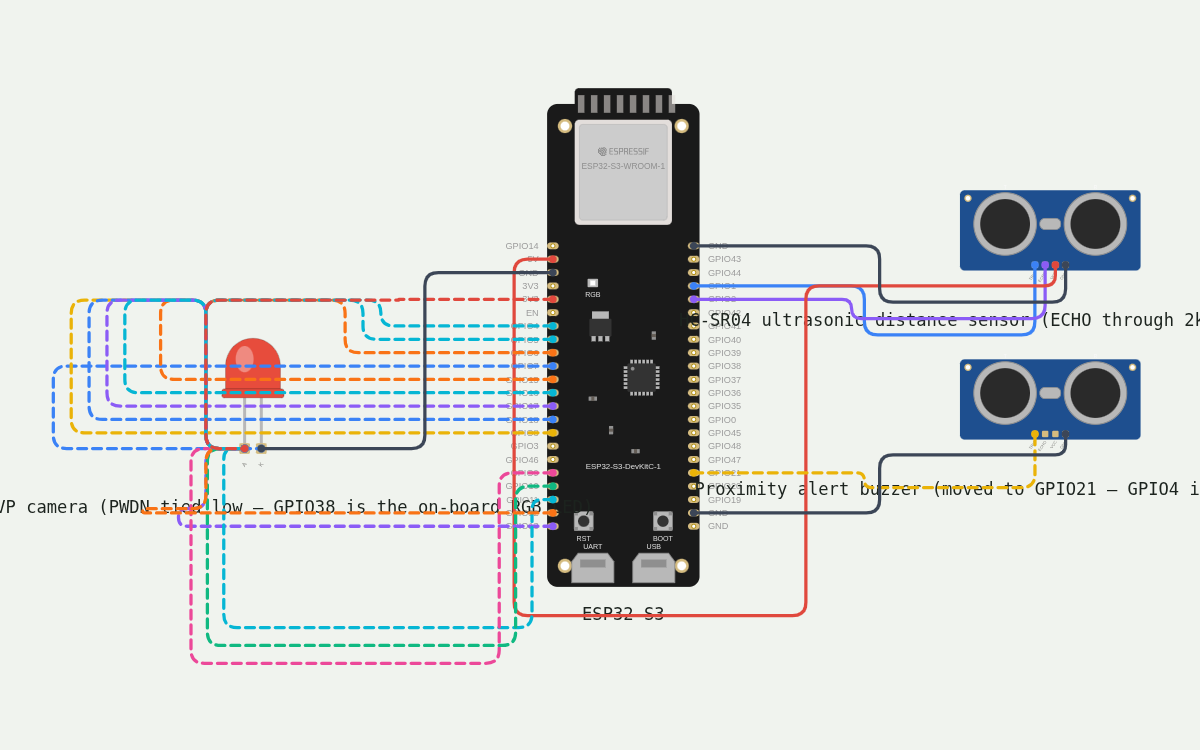
- Distance sensing — HC-SR04 ultrasonic, TRIG on GPIO 1, ECHO on GPIO 2 (through a 2k/1k divider: it is a 5 V output), sampled continuously at ~10 readings/s
- Full-screen distance page — mobile-first web UI showing live distance as huge digits plus the camera view: side by side when the phone is horizontal, camera stacked below the digits when vertical, no scrolling
- Proximity buzzer — GPIO 21 (moved off GPIO 4, which the camera now needs for its I2C data line). Parking-sensor ladder: silent above 60 cm, slow beeps 60→30 cm, fast beeps 30→15 cm, solid tone under 15 cm
- Zone colouring — page shows green (clear, >60 cm), amber (caution, 60→15 cm), red (stop, <15 cm) using the same thresholds as the buzzer
- Live updates — page refreshes the numbers several times a second without reloading, over a stream or lightweight polling
- No reading — if the path was clear this shows a clear "—" / "OUT OF RANGE" instead of a stale number and the buzzer stays silent; if the vehicle was already inside the warning band (< 30 cm), a lost echo means the obstruction is likely still there, so the tone keeps sounding rather than going quiet
- Stable readings — median of several pings so a single bad echo cannot make the buzzer jump or the page flicker
- Wi-Fi setup — first boot opens its own setup hotspot with a web page to join the home/barn Wi-Fi
- Easy to find — reachable at reverse-indicator.local over mDNS once on the network
- Works without internet — page and all its assets served from the device, so it opens on a phone with no mobile signal
- On-board WS2812 status LED — breathes while connecting to Wi-Fi, solid when the page is being served, off while idle
- Factory reset — hold the on-board BOOT button for 5 seconds while the device is running to forget Wi-Fi and return to the setup hotspot
- OV5640 camera — 8-bit parallel DVP: VSYNC 6, HREF 7, PCLK 13, XCLK 15, SIOD 4, SIOC 5, D0–D7 = 11, 9, 8, 10, 12, 18, 17, 16, powered from 3.3 V; PWDN tied to GND (GPIO38 is the on-board status LED) and no RESET wire — software reset over SCCB
- Live camera feed over WebSocket — JPEG frames at VGA 640×480 (~10 fps) pushed as binary messages on a WebSocket and drawn into a canvas on the page, on its own connection so video congestion can never stall the distance number
- Camera survives failure — if the sensor stops answering, the page keeps the distance readout and the buzzer working and shows a "camera unavailable" placeholder instead of breaking the view
- Mirrored camera view — the feed is flipped left/right like a reversing mirror, so left and right match the door mirrors, with a small on-page toggle to un-mirror it
- Always-current video — the page acknowledges each frame it draws and the device waits for that ack (or a short timeout) before sending the next, so a slow link drops frames instead of queueing them: the view may be choppy but is never more than a frame or two behind real time
- Video reconnects itself — if the WebSocket drops, the page retries with a short backoff and the camera panel shows a "reconnecting" state rather than going blank
- Self-healing — a task that stalls for 10 seconds is caught by the watchdog and the device reboots itself, then returns to ranging and sounding the buzzer within a few seconds, with no one having to touch it
- Stability over hours, not minutes — fixed memory footprint with no growth per frame or per reading, so a session left open for hours behaves exactly like the first minute
- Survives the car's electrical environment — built for an accessory socket that dips and cuts with the ignition, with the brownout detector armed and the device coming back cleanly rather than half-initialised
- Always reachable — if a phone cannot resolve reverse-indicator.local, the device reports its own IP address in the console log and on the setup page, so a name-resolution failure never locks the user out
- Faults are visible, not silent — the last reset reason (power-on, brownout, watchdog, panic) is reported on boot, so a device that misbehaved can be diagnosed instead of simply power-cycled
- Never silently silent — the indicator comes up ARMED out of the box and after a factory reset, so a unit that has never been touched always warns; the arm state is a device setting persisted in NVS, and can also be driven from the console
- Arm switch on the page — a large ARMED / quiet toggle in the corner, red when live and grey when quiet, that silences the buzzer without stopping ranging or the distance readout; the state lives on the device, so a page reload cannot change it
Manual
Device Type
A reverse/parking indicator for a vehicle. An ESP32-S3 sits at the rear of the car with an HC-SR04 ultrasonic sensor aimed backwards and an OV5640 camera looking the same way. It measures the gap behind, sounds a buzzer that escalates as the gap closes, and serves a full-screen web page that a phone in the cab opens to show the same distance as giant digits next to a live mirrored camera view. It replaces a single-purpose cable-and-sensor kit with a phone-readable display the driver can actually watch while reversing — depth from the ultrasonic, context from the camera.
Hardware
chip: esp32s3 — board: esp32-s3-devkitc-1 — gpios: pad: GPIO1 — role: HC-SR04 TRIG — output pulse to start a ping · pad: GPIO2 — role: HC-SR04 ECHO — input, echo pulse width; fed through a 2k/1k resistor divider so the 5 V ECHO never exceeds 3.3 V · pad: GPIO4 — role: OV5640 SCCB data (SIOD) — camera register bus. The buzzer moved OFF this pin; GPIO4 is no longer the buzzer · pad: GPIO5 — role: OV5640 SCCB clock (SIOC) · pad: GPIO6 — role: OV5640 VSYNC — frame start, input · pad: GPIO7 — role: OV5640 HREF — line valid, input · pad: GPIO13 — role: OV5640 PCLK — pixel clock, input · pad: GPIO15 — role: OV5640 XCLK — master clock output generated by the ESP32-S3's LEDC · pad: GPIO8, GPIO9, GPIO10, GPIO11, GPIO12, GPIO16, GPIO17, GPIO18 — role: OV5640 pixel data D2, D1, D3, D0, D4, D7, D6, D5 respectively — the 8-bit DVP parallel bus, all inputs · pad: GPIO21 — role: Buzzer drive (relocated from GPIO4). On/off for an active buzzer, or a ~2.7 kHz LEDC square wave for a passive one · pad: GPIO38 — role: On-board WS2812 RGB status LED (already on the board — do not add an external LED) · pad: GPIO0 — role: On-board BOOT button (already on the board) — used as the factory-reset / WiFi re-provision button — peripherals: part: HC-SR04 ultrasonic distance sensor — power: VCC from 5V (5V pin), GND to GND — wiring: TRIG→GPIO1, ECHO→(2k series / 1k to GND divider)→GPIO2 — range: 2 cm – 400 cm on the datasheet, but the practical reliable floor is about 20–25 cm (transducer ring-down swallows close echoes). The alert ladder (60 / 30 / 15 cm) is deliberately placed so the amber warning starts at 60 cm — well inside the sensor's reliable range — and the red stop zone starts at 15 cm, just above the floor. — note: Mount so the transducers face straight back and clear of the bumper by a few cm; the sensor's own minimum range sets the effective zero point. · part: Buzzer on GPIO21 — wiring: IN→GPIO21, GND→GND — note: An active buzzer (with internal oscillator) is driven as a plain on/off output. A passive piezo would be driven with LEDC at ~2.7 kHz. Either way the timing pattern is identical. This moved from GPIO4 because the camera took GPIO4 for its I2C data line. · part: OV5640 camera module (parallel DVP, 8-bit) — power: VCC/DOVDD/AVDD from 3.3V, GND to GND. The OV5640's core runs at 1.5 V internally via its own regulator on a breakout board — do not feed it 5 V. — wiring: VSYNC→GPIO6, HREF→GPIO7, PCLK→GPIO13, XCLK→GPIO15, SIOD→GPIO4, SIOC→GPIO5, D0→GPIO11, D1→GPIO9, D2→GPIO8, D3→GPIO10, D4→GPIO12, D5→GPIO18, D6→GPIO17, D7→GPIO16. PWDN tied to GND (camera permanently enabled). RESET not wired — the driver performs a software reset over SCCB. — note: XCLK is generated by the ESP32-S3 (about 20 MHz via LEDC) and fed to the camera; the camera does not have its own oscillator. PWDN is deliberately not on a GPIO: the obvious pin, GPIO38, is the board's on-board WS2812 status LED, and driving it from the camera would fight the LED. GPIO19/GPIO20 are the native USB pins and are left alone, so USB serial stays available but JTAG does not.
Inputs
kind: sensor — label: Distance behind the vehicle — hardware: HC-SR04 — TRIG on GPIO1, ECHO on GPIO2 via 2k/1k divider — behavior: Pinged continuously at about 20 Hz. Each ping: drive TRIG high for 10 µs, measure the ECHO pulse width, convert to centimetres as (pulse_µs / 58). The shorter interval matters because the whole 60→15 cm alert band can be crossed in a couple of seconds when reversing. The last several readings are median-filtered so one stray echo does not move the buzzer or the display, and a gap in the filter is never filled with an invented value. A pulse that never returns, or one that lands outside 2–400 cm, is reported as 'no reading'. · kind: web-control — label: Arm / quiet toggle — hardware: A button in the corner of the web page, backed by a POST the device applies to its own buzzer gate — behavior: Tapping it flips the device between ARMED (buzzer follows the ladder) and quiet (buzzer muted, ranging and the distance readout keep running, zones keep colouring). The state lives on the DEVICE as a persisted parameter, not in the page, so a page reload cannot change it, the same source drives the LED and the console, and a power cut restores what the driver last chose. It boots ARMED out of the box and after a factory reset, so a unit nobody has configured always warns. The console exposes the same switch for a bench tech. This exists because a reversing aid that beeps at every garage manoeuvre gets disconnected by its owner — a deliberate mute is far safer than a wire pulled out of the board. · kind: button — label: BOOT button (on-board) — hardware: GPIO0, built into the DevKitC-1 — behavior: Held for 5 seconds while the device is running → clears stored Wi-Fi credentials and reboots into the setup hotspot. A short press does nothing. Must be a hold-while-running, never a hold-at-power-up, because GPIO0 is a strapping pin: holding it during reset puts the chip in ROM download mode and the application never starts. · kind: camera — label: Live view behind the vehicle — hardware: OV5640 on the 8-bit DVP bus — VSYNC GPIO6, HREF GPIO7, PCLK GPIO13, XCLK GPIO15, SCCB SIOD GPIO4 / SIOC GPIO5, data D0–D7 on GPIO11, 9, 8, 10, 12, 18, 17, 16 — behavior: The ESP32-S3 generates the camera's master clock (XCLK, ~20 MHz) and configures the sensor over SCCB at power-up: VGA 640×480, ~10 fps, fixed focus. Frames are captured into PSRAM by the DVP peripheral, JPEG-encoded, and pushed to every connected page as binary WebSocket messages, one JPEG per message, which the page decodes and paints into a canvas. The page sends a one-byte acknowledgement after each frame it has drawn; the device holds the next frame until that ack arrives or a short timeout expires, so a slow link drops whole frames and the picture stays live instead of sliding backwards in time. The feed is mirrored on the canvas so it reads like a reversing mirror — the left of the picture is on the driver's left, matching the door mirrors — with a small toggle to turn the mirroring off. Fixed focus from roughly 20 cm to infinity means it shows the parking space, the wall or the car behind, while the last 20 cm of bumper travel stays the ultrasonic's and the buzzer's job. If the socket drops the page reconnects with a short backoff; if the camera itself stops delivering frames the page falls back to a placeholder and nothing else degrades.
Outputs
kind: web-ui — label: Full-screen distance and camera page — hardware: Served by the ESP32-S3's HTTP server, viewed on a phone in the cab — behavior: The whole viewport is the dashboard, no scrolling, no chrome, laid out by orientation. Landscape (phone mounted sideways on the dash): distance digits on the left, camera view filling the right half. Portrait: distance digits on top taking roughly the upper third, camera view stacked directly below filling the rest. Both blocks are sized in viewport units so the pair always fills the screen exactly in either orientation. The camera view is a canvas that the WebSocket handler paints each incoming frame into, with the mirroring applied as a canvas transform, so the video needs no browser-side plugin and no reload if the socket blips. The distance renders as huge digits with the unit beneath. Colour follows the zone: green above 1.5 m, amber from 1.5 m down to 0.3 m, red below 0.3 m. When there is no valid reading the digits show '—' / 'OUT OF RANGE' in neutral grey. The camera panel carries a thin border in the same zone colour, so the whole screen changes colour together. A live connection dot sits in a corner, and a small mirror toggle sits on the camera panel. Distance values update several times a second and the video runs independently on its own socket, so a slow frame never freezes the numbers. · kind: actuator — label: Proximity buzzer — hardware: Active buzzer on GPIO21 (relocated from GPIO4, which the camera now uses for SIOD) — behavior: Distance ladder, evaluated on every filtered reading: above 60 cm — silent; 60 cm to 30 cm — slow beeps (about 300 ms on, 700 ms off); 30 cm to 15 cm — fast beeps (about 120 ms on, 180 ms off); below 15 cm — continuous tone. The buzzer follows readings even when no phone is connected. What happens when the echo goes missing depends on where the last good reading was, and this distinction is safety-critical: if the path was CLEAR or only in the slow-beep band, a dropped echo is noise — hold the last state for a couple of cycles, then report 'no reading' and fall silent. If the vehicle was ALREADY inside the near band or the stop zone, a lost echo is almost certainly the obstruction defeating the sensor, not the obstacle disappearing, so the tone must NOT go quiet; it holds the fast beep or solid tone rather than declaring the path clear. Going silent at the moment of closest approach is the one failure this device must never have. · kind: led — label: On-board RGB status LED — hardware: WS2812 on GPIO38, already soldered on the DevKitC-1 — behavior: Blue breathing while joining Wi-Fi, solid green once connected and serving, a brief dim flash on each accepted HTTP request so you can tell someone is watching, off after a few minutes of no clients, and orange breathing in setup-hotspot mode.
Connectivity
stack: WiFi — transport: 2.4 GHz station on the home/barn network — purpose: Serves the distance page to the phone and answers mDNS · stack: WiFi — transport: SoftAP during first-run provisioning — purpose: Setup hotspot so the device can be given the network without a cable · stack: HTTP — transport: HTTP server on port 80 — page assets, the setup form, and the distance readout as a small JSON poll (the page polls a few times a second) — purpose: Delivers the page and the safety-critical distance number on a channel that video traffic can never block · stack: WebSocket — transport: Binary WebSocket stream (ws://reverse-indicator.local/ws/camera) carrying one JPEG frame per message, ~10 fps at VGA — purpose: Streams the live camera feed — a dedicated socket so video congestion, a stalled phone or a reconnect never touches the distance channel · stack: mDNS — transport: reverse-indicator.local — purpose: Find the page without hunting for an IP address
Commissioning
method: softap — payload: Wi-Fi SSID + password, entered on the device's own setup page — instructions: On first power-up (or after a factory reset) the device is not yet provisioned. It starts its own Wi-Fi access point, shown on the status LED as orange breathing. On the phone, join that hotspot and open the setup page it serves (an address hint is printed on the page the device shows at its own hostname). Pick the home or garage Wi-Fi from the scan list, type the password, and save. The device reboots, joins the network, LED turns solid green, and the page is then reachable at http://reverse-indicator.local. Bookmark it on the phone's home screen for one-tap access before you get in and reverse.
Business Logic
powerOnBehavior: The board is powered from the car (USB adapter / 12 V-to-5 V). On boot it re-joins the saved Wi-Fi within a few seconds while the LED breathes blue, initialises the camera over SCCB (this takes a moment — the first frame appears a second or two after the page loads), then starts ranging and starts the HTTP server. Ranging and the buzzer work immediately whether or not a phone has connected, and whether or not the camera initialised: the page is a viewer of what the device is already measuring. The unit powers up ARMED, with the arm state restored from NVS, so an ignition cycle never silently leaves it quiet. Video is only encoded while at least one page is watching, so an idle car does not burn power on frames nobody sees. — automationRules: Distance → zone: >60 cm clear (green, silent), 60–30 cm caution far (amber, slow beeps), 30–15 cm caution near (amber, fast beeps), <15 cm stop (red, continuous tone). The ladder only sounds while the unit is ARMED; disarmed, the zones still colour the page and drive the digits but the buzzer is muted. · No valid reading → 'out of range' state with a grey '—' on the page. The buzzer's response is deliberately zone-aware, not simply silent: from a clear or far reading it goes quiet after a couple of cycles; from inside the warning band it keeps sounding, because a lost echo at close range means the obstruction is still there and has defeated the sensor. A missing echo is never reinterpreted as 'far away'. · Median filter over the last 5 valid readings before the zone is evaluated, so the buzzer does not chatter at a threshold boundary. Readings are taken at about 20 Hz rather than 10 Hz, because at reversing speed the whole 60→15 cm approach can be crossed in a couple of seconds. · Zone changes are latched for at least one beep period so a single reading cannot produce a half-beep. · Camera encoding starts only when a client is watching the stream and stops when the last one disconnects; the distance loop never blocks on a frame, so a slow JPEG encode cannot delay a ping or a beep. · The camera WebSocket is write-only-with-ack from the device's side: a frame is sent, the page acks it once drawn, and the next frame waits for that ack or a short timeout. A congested phone therefore loses frames rather than accumulating a backlog, keeping the picture a frame or two behind real time instead of seconds. · The video socket is completely separate from the distance channel, so a stalled or reconnecting socket cannot delay the number the driver relies on. — dayToDayOperation: Get in, power the board with the car's USB supply, mount the phone face-up or sideways on the dash and open the bookmarked page. The screen is split by orientation — digits and camera side by side when horizontal, digits above and camera below when vertical — so the driver sees the camera view of what is behind (mirrored, like the door mirrors) and the distance closing in, in one glance. The colour goes amber then red as the bumper closes and the buzzer escalates, so it can be reversed on sound alone and the screen checked for the exact number in centimetres.
Factory Reset
trigger: Hold the on-board BOOT button for 5 continuous seconds while the device is running (not during power-up — GPIO0 is a strapping pin). — effect: Stored Wi-Fi credentials are erased and the arm state is returned to its default of ARMED, the device reboots, and it comes back up broadcasting its own setup hotspot with the LED breathing orange. Ranging and the buzzer continue to work in the meantime.
Failure Modes
scenario: Camera fails to initialise, is unplugged, or its ribbon works loose — behavior: The page shows a 'camera unavailable' placeholder in the camera panel — greyed out with a camera-with-slash icon — while the distance digits, the zone colour and the buzzer all carry on normally. The device keeps retrying the SCCB probe every few seconds and restores the stream automatically if the sensor comes back. The camera is never allowed to take the safety features down with it. · scenario: Wi-Fi too weak for video (car at the far end of a driveway, garage with thick walls) — behavior: Video is bandwidth-hungry. If the link cannot sustain VGA at 10 fps the ack-paced WebSocket simply sends fewer frames — the picture becomes a choppy slideshow but stays current, and the small distance payload on the HTTP channel is unaffected. If video fails entirely the buzzer ladder keeps running on the device, so reversing is still protected by sound. · scenario: Camera WebSocket drops (phone sleeps, Wi-Fi blips, page backgrounded then reopened) — behavior: The canvas keeps showing the last frame dimmed with a 'reconnecting' badge while the distance digits carry on updating. The page retries with a short backoff and resumes the stream the moment the socket is back — no page reload and no lost distance data. · scenario: Two phones open the page at once — behavior: Each gets its own video WebSocket and its own paced frame flow, so one slow phone cannot slow the other down. The device keeps encoding until the last client disconnects. Nobody is locked out. · scenario: Home Wi-Fi down or out of range (device in a garage it cannot reach) — behavior: The device keeps ranging and buzzing — the safety-critical part never depends on Wi-Fi. The phone cannot load the page, so the driver falls back to the buzzer ladder alone. The LED keeps breathing blue to show it is still trying to reconnect. · scenario: Phone not connected / page never opened — behavior: Normal — the buzzer works standalone according to the device's arm state, which defaults to ARMED. The page is a viewer and an arm control, not a switch that has to be present for the device to warn. · scenario: Wi-Fi credentials changed at home — behavior: The device cannot join, LED breathes blue, page unreachable. Hold BOOT for 5 s to re-provision through the setup hotspot. · scenario: Ultrasonic sensor unplugged, wet, or blocked — behavior: ECHO never pulses → 'out of range', page shows '—', buzzer silent. The LED flashes orange briefly on each failed ping so the fault is visible at the board rather than silently ignored. · scenario: Power blip when the car's accessory socket is cut by the ignition — behavior: The board reboots and re-joins Wi-Fi automatically; the bookmarked page reconnects on its own within a few seconds. Nothing is lost. · scenario: Two readings conflict at a zone boundary (e.g. 1.49 / 1.51 m) — behavior: The median filter and the minimum beep period hold the zone steady; the buzzer does not stutter. · scenario: Unreliable close-in readings — the HC-SR04's floor — behavior: The HC-SR04 datasheet claims 2–400 cm, but in practice its reliable floor is about 20–25 cm: below that the transducer is still ringing from its own transmit pulse and the returning echo is swallowed. The thresholds are therefore set at 60 / 30 / 15 cm — the whole amber warning band sits in the sensor's reliable range, and only the last centimetres below 15 cm blur out, which is why the solid tone starts there rather than later. Mitigations the firmware must still apply: a missing echo is NEVER treated as 'far away' — it is its own state, so silence is chosen only on a genuine long-distance reading; sampling runs at about 20 Hz so a short approach is not stepped over; the median filter never invents a reading to fill a gap; and a dead or unplugged sensor must be distinguishable from a near obstruction. Shortening the transmit pulse and adding a settle delay after each ping widens the usable floor slightly. Expect the reading to become intermittent inside roughly 15 cm — at that point the buzzer has already been on continuously for a while, so it is a confirmation rather than an alarm.
Custom Behavior
The device is a distance display, a camera view and a buzzer with no cloud, no account and no app install — everything is served from the ESP32-S3 itself, so it works in an underground car park or a barn with no mobile signal, and privacy is absolute: no frame ever leaves the local network. STABILITY IS PART OF THE PRODUCT, because this is a reversing aid whose job is to keep working when nobody is looking at it. Requirements the build must hold: (1) the safety path — ranging, the median filter, the zone ladder and the buzzer — runs independently of Wi-Fi, the camera and the web server, so a stalled socket or a dead sensor can never silence the tone; (2) the camera runs on its own task and sends frames with the asynchronous WebSocket API, so a socket that will not take a frame blocks the camera task and nothing else — the HTTP worker only consumes short acks with a 1-tick receive timeout, which is why distance polls stay responsive while video is congested; (3) no unbounded growth — buffers are fixed at compile time and every frame, socket and reading is released on its path, so an hour of use is identical to the first minute; (4) a task wedged for 10 seconds trips the watchdog and the device reboots itself back to ranging, with no hands required; (5) the brownout detector stays armed (level 7) because a car accessory socket dips and cuts with the ignition, and the device must come back cleanly rather than half-initialised; (6) the last reset reason is reported on boot so an intermittent fault can be diagnosed instead of blind power-cycling; (7) if the mDNS name fails to resolve on a phone, the device's own IP address is still reachable — logged on the console and shown on the setup page — so the product is never locked behind mDNS. Thresholds (60 cm / 30 cm / 15 cm) are fixed constants in firmware and deliberately not exposed on the page: a driver should not be changing safety thresholds on a phone at the wheel. The missing-echo rule is zone-aware and must stay that way: silence is only correct from a clear reading, never from inside the near or stop band. The one safety-relevant control is the arm switch, which mutes the buzzer while leaving ranging, the distance readout and the zone colours running; it defaults to ARMED and a deliberate change is persisted in NVS, so a disarmed unit comes back disarmed across an ignition cycle by design, and a factory reset returns it to ARMED. The camera mirror toggle is a display preference and not a safety setting. The camera feed travels over its own WebSocket as binary JPEG frames painted into a canvas, deliberately not MJPEG over HTTP: a socket can be paced by page acknowledgements so a congested phone loses frames instead of building a backlog of stale ones, and it sits on a separate connection from the distance number so video can never stall it. Build prerequisites: the WebSocket path is already in place — CONFIG_HTTPD_WS_SUPPORT is enabled, the camera serves binary WebSocket frames on the web UI server with asynchronous sends from its own task, and the ack-gated pacing, idle-viewer reaping, close-code replies and drop-and-free-slot-on-no-ack behaviour are all implemented. Video shares the web UI's HTTP server instance and its single worker task, and that is acceptable precisely because the sends happen off-worker: the worker is only touched for acks and pongs. The one thing to preserve when touching this code is that separation — moving frame sends back onto the worker would let a congested phone stall the distance number. Two pin-level decisions the builder must not undo: GPIO4 belongs to the camera's SCCB data line now (the buzzer is on GPIO21), and the camera's PWDN is tied to GND because GPIO38 is the on-board status LED. Wi-Fi power save is disabled on purpose — a save that delays a frame or a distance poll is not a saving this product can afford. All other internals (filter length, sample rate, LED colours, JPEG quality, frame rate, ack timeout) are implementation choices left to the firmware.
Published 15 Nov 2026
Firmware and source licensed Apache-2.0; photos and text CC-BY-4.0.
The firmware includes open-source software — open-source licences and notices; some components may be used only with Espressif chips.
Built with ESP ZeroCode AI — describe a device, get production firmware.
Terms of Service · Privacy Policy