ESP ZeroCode AI · Community
PlatyPulse
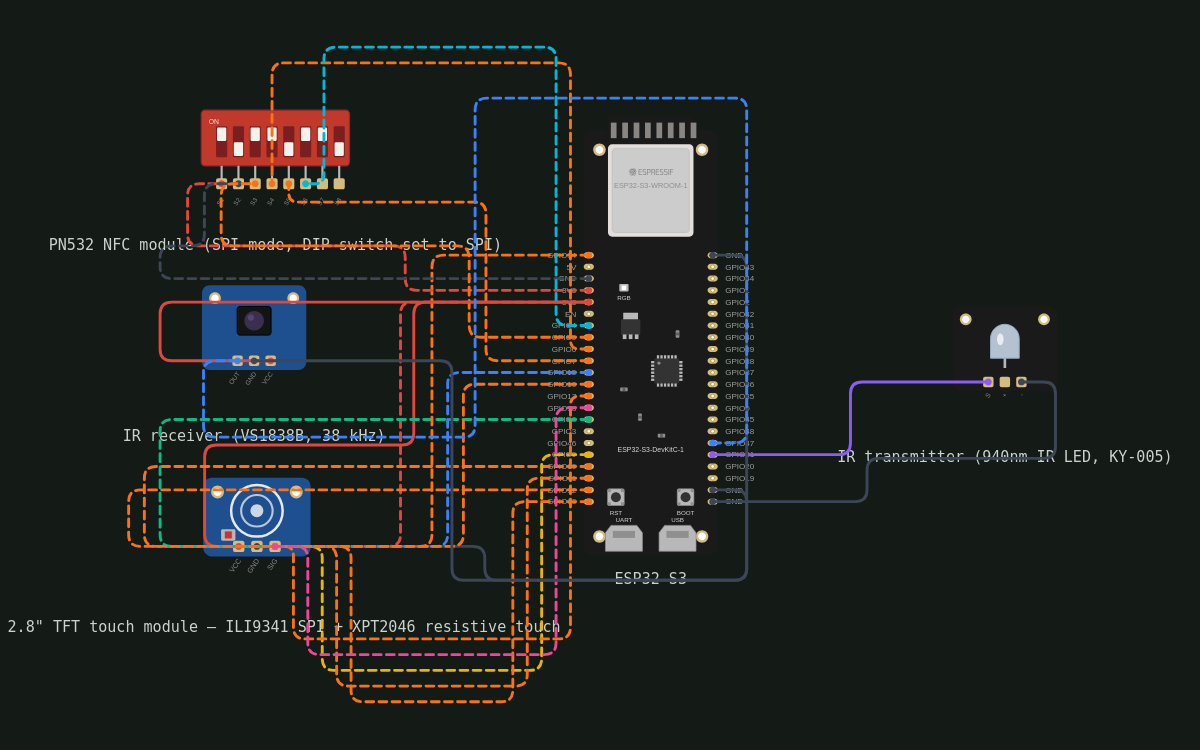
ok so i have an esp32 s3 devkit, i wanna connect it to an spi based touch tft display, and apart from that i want to connect it to pn532 nfc module and ir transmitter and receiver
What it does
- Display: KTRON 2.8" ILI9341 SPI TFT (240x320) + XPT2046 resistive touch, all at 3.3 V — LCD SPI on GPIO 9-13, touch SPI on GPIO 14-18
- PN532 NFC module in SPI mode: SCK 5, MISO 6, MOSI 7, SS 4, polled by the NFC screen
- IR transmit on GPIO 21 (38 kHz carrier), IR receive on GPIO 47 — separate pins so the device can learn and blast
- Touch TFT is the whole UI: a home screen listing my remotes, tap one to open its button grid
- Free-form builder — 'add remote' (name it), then add buttons (label + size) and learn each one
- Learn mode — point the original remote at the receiver, press a key, the code is captured and bound to the selected button; cancel or timeout if nothing is received
- Sending — tapping a learned button replays its stored IR code; unlearned buttons are visibly greyed out and do nothing
- Remotes and buttons persist in flash across power cycles; rename / delete a button or a whole remote on device
- NFC tool screen (PN532): hold a card/tag to the reader → show UID and memory data; write/clone tags where the tag allows
- Mains/USB powered — no battery, no sleep; device is always ready to blast
- Factory reset — long-press on screen clears all remotes/buttons (with a confirm dialog)
- On-board RGB LED (GPIO 38): dim blue at idle, flashing amber while waiting for a learn signal, green flash on each send; boot button (GPIO 0) left unused as hardware fallback
- No smart-home stack: standalone product, display framework only
Manual
Device Type
PlatyPulse — a standalone, touchscreen universal infrared remote. It replaces a pile of physical remotes: the user builds their own remotes on the device (name a remote, add buttons, learn each button's code by pointing the original remote at it), then taps the on-screen buttons to blast the stored code. A PN532 NFC module adds a separate tool screen for reading, writing and cloning NFC cards and tags. No network stack, no cloud, no app.
Hardware
chip: esp32s3 — board: ESP32-S3-DevKitC-1 — gpios: pin: GPIO8 — role: TFT DC · pin: GPIO9 — role: TFT RESET · pin: GPIO10 — role: TFT CS (SPI2) · pin: GPIO11 — role: TFT MOSI / shared display SPI data out · pin: GPIO12 — role: TFT SCK / shared display SPI clock · pin: GPIO13 — role: TFT MISO · pin: GPIO14 — role: Touch T_CLK (XPT2046, shares SCK line) · pin: GPIO15 — role: Touch T_CS · pin: GPIO16 — role: Touch T_DIN · pin: GPIO17 — role: Touch T_DOUT · pin: GPIO18 — role: Touch T_IRQ (pen-down interrupt) · pin: GPIO4 — role: PN532 SS/CS · pin: GPIO5 — role: PN532 SCK (SPI3) · pin: GPIO6 — role: PN532 MISO · pin: GPIO7 — role: PN532 MOSI · pin: GPIO21 — role: IR transmitter (RMT TX channel, 38 kHz carrier) · pin: GPIO47 — role: IR receiver data in (RMT RX channel) · pin: GPIO38 — role: on-board WS2812 status LED · pin: GPIO0 — role: on-board BOOT button — unused by the app, kept as hardware fallback — peripherals: name: KTRON 2.8" TFT LCD touch screen module — part: ILI9341 (240x320 SPI TFT) + XPT2046 resistive touch, 14-pin header — power: 3.3 V on both VCC and LED (user's choice; the module also accepts 5 V). Backlight LED is tied to 3V3 — always on. — wiring: VCC and LED to 3V3, GND to GND; display side on SPI2 (CS 10, RST 9, DC 8, MOSI 11, SCK 12, MISO 13, 40 MHz max); touch side on a second SPI device sharing SCK/MOSI/MISO (T_CS 15, T_CLK 14, T_DIN 16, T_DOUT 17, T_IRQ 18), clocked ~1-2 MHz · name: PN532 NFC module (Elechouse-style v3 or red SPI module) — part: PN532 — power: 3V3 — wiring: DIP switches set to SPI mode; SCK 5, MISO 6, MOSI 7, SS 4, plus VCC/GND. Own SPI3 host. RST/IRQ lines left unconnected. · name: IR transmitter — part: 940 nm IR LED (KY-005 module or bare LED with a series resistor) — power: GND, signal GPIO 21 — wiring: Drive with RMT carrier at 38 kHz, ~50% duty; on a KY-005 the on-board resistor is already present, a bare LED needs one in series. Aim the LED forward out of the enclosure. · name: IR receiver — part: VS1838B (or equivalent TSOP1838) — power: 3V3, GND — wiring: DATA to GPIO 47; idle high, demodulated 38 kHz carrier. Capture in RMT RX, decoding NEC/AEHA/Samsung/RC5/RC6/Sony plus raw timing fallback.
Inputs
kind: touch — label: Touchscreen taps, long-presses and drag on the resistive panel — hardware: XPT2046 on GPIO 14-18, 5-point calibration stored in NVS — behavior: Tap a remote on the home screen to open it; tap a button to send; long-press a remote or button for its menu (rename, delete, learn); long-press in a remote screen with no menu open opens the clear-all confirmation. · kind: sensor — label: IR receiver — learning source — hardware: VS1838B on GPIO 47 — behavior: While a learn dialog is open, the first valid frame captured is decoded and stored for the target button; nothing is captured at other times beyond a background check used to warn about ambient interference. · kind: sensor — label: NFC reader — cards and tags — hardware: PN532 in SPI mode on GPIO 4-7 — behavior: Only polled while the NFC screen is open (approx. every 200 ms). Recognised cards are announced with a short green flash and their UID/data shown.
Outputs
kind: display — label: KTRON 2.8" TFT — primary user interface — hardware: ILI9341, 240x320, 16-bit colour over SPI — behavior: Home screen: list of remotes, an 'add remote' tile and an 'NFC tool' tile. Remote screen: grid of buttons sized/labelled by the user; learned buttons normal, unlearned buttons greyed. Learn dialog: 'Point your remote and press the key…' with a swirling-amber indicator and a Cancel button; on capture shows the detected protocol and code. NFC screen: UID, tech/type, memory pages, and write/clone actions. Status line shows send confirmations. · kind: led — label: On-board RGB LED — hardware: WS2812 on GPIO 38 — behavior: Dim blue while idle/ready, flashing amber while waiting for a learn signal, brief green flash on every successful send (and on a captured code), red for a learn timeout or NFC read error. Very low brightness so it does not light the room. · kind: ir_led — label: IR transmitter — hardware: 940 nm LED on GPIO 21, RMT carrier — behavior: On tap, replays the stored timing of the button's code as a single press; holding a button repeats the code every ~120 ms after a 400 ms initial hold (useful for volume). Store-bound buttons that were recorded from a hold/repeat are replayed as a single press unless the captured code contained repeats.
Business Logic
powerOnBehavior: Plugs into USB (or a 5 V supply on the devkit); boots straight to the home screen with all stored remotes loaded from flash. No pairing, no onboarding, no network. LED goes dim blue. — automationRules: Add remote → enter a name → an empty remote screen opens in edit mode and suggests 6 default buttons (Power, Vol+, Vol-, Up, Down, Mute) that are all unlearned. · Learn → select a button → dialog waits up to 15 s for one IR frame → bind code to that button and rename the button to the captured protocol if it was unnamed. · Send → only possible on buttons with a stored code; unlearned buttons are inert and labelled 'not learned'. · NFC write/clone → only offered for writable tags; UID-changing 'magic' tags are flagged as cloneable, read-only tags show a lock. — dayToDayOperation: User taps the remote they want, then taps buttons. Everything is instant (local, no network round trip). New buttons or a new remote take about ten seconds to add: name it, point the old remote, press once. NFC usage is occasional and separate from the remote screens.
Factory Reset
trigger: Long-press anywhere on the home screen, or the 'Clear all remotes' item in the device menu, then confirm in the dialog. — effect: Deletes all remotes, buttons and learned codes from NVS, clears the touch calibration to force recalibration, and returns to an empty home screen. The boot button on GPIO 0 is also checked at boot as a hardware fallback: holding it down during power-up offers the same reset option.
Failure Modes
scenario: No IR code learned / button unlearned — behavior: Button is greyed and does nothing; long-press offers 'Learn this button'. · scenario: Learn timeout (nothing received in 15 s) — behavior: Dialog shows 'No signal — try again, aim at the receiver' and the LED flashes red; the previous code, if any, is unchanged. · scenario: IR receiver sees ambient noise (sunlight, fluorescent flicker) — behavior: Learn dialog warns 'Too much IR noise here' and refuses to bind a garbled capture. · scenario: PN532 not responding / module in wrong mode — behavior: The NFC screen shows 'NFC module not found — check the SPI switch'; every other screen keeps working normally. · scenario: Unreadable or unsupported NFC tag — behavior: NFC screen shows the UID if it was obtainable, otherwise 'tag not supported'; write/clone options are hidden. · scenario: Power blip / unplug — behavior: Remotes and codes are in NVS; device comes back to the home screen exactly as left. No state is lost mid-send. · scenario: Flash storage full — behavior: 'Storage full — delete a remote' message when adding; existing remotes still work.
Power Management
batteryPowered: false — sleepMode: None — the device stays awake and the backlight stays on while powered by USB; screen dims to 30% after 60 s idle and returns on touch to reduce burn-in.
Custom Behavior
IR learning stores each code as {protocol, address, command} when decodable plus the raw mark/space timing as a fallback, so exotic remotes still replay byte-for-byte. Remotes are ordered by last use on the home screen. There is no network stack at all in the firmware, by design.
Published 19 Oct 2026
Firmware and source licensed Apache-2.0; photos and text CC-BY-4.0.
The firmware includes open-source software — open-source licences and notices; some components may be used only with Espressif chips.
Built with ESP ZeroCode AI — describe a device, get production firmware.
Terms of Service · Privacy Policy