ESP ZeroCode AI · Community
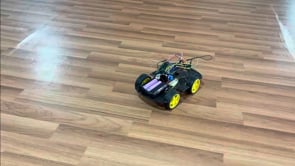
Phantom drifter
Phantom Drifter is a custom 4-wheel drive Wi-Fi RC car built for high-speed drifting, tight spins, and agile cornering. Controlled directly from your smartphone browser with no app or external router required, it gives you instant, responsive handling right out of the box. Dial in your preferred speed across 8 power levels, pull off smooth drifts or timed maneuvers, and drive with confidence thanks to built-in safety cutoffs that automatically stop the car if your connection drops.
What it does
- Four-wheel drive — two DC motors (left pair / right pair) behind an L298N dual H-bridge
- Speed step 1-8 (default 1) — sets the PWM duty for both motors; saved across reboots
- Drive commands — Forward / Reverse / Spin Left / Spin Right / Stop, held or timed by the page's duration box
- Tank steering — left and right motor channels driven separately: forward, reverse, spin left (left wheels back, right wheels forward) and spin right (mirrored)
- Page served over the car's own Wi-Fi network ZeroCode-<id> at http://192.168.4.1 — no app, no router, no internet needed
- On-board RGB LED status — colors show booting / page not connected / ready, and a driving indication while the motors run
- Deadman timeout — no heartbeat from the page for 1 s (or the tab closed / phone slept) and both motors stop
- Boot / reset — motors stay stopped after power-up, reboot or factory reset until a drive command arrives
- Motor direction is a per-channel sign set by the first test drive; both-forward is the default
- No obstacle sensor yet — four spare pins (GPIO 9, 10, 47, 48) are named in the spec for an HC-SR04 obstacle-stop later
- Power — 12 V pack on the L298N motor input; the L298N's 5 V output feeds the DevKitC-1's 5V pin
Manual
Device Type
A DIY four-wheel-drive RC car, driven from a phone browser. The ESP32-S3 DevKitC-1 is the whole brain: it makes its own Wi-Fi network, serves a small drive page, and turns the taps on that page into left/right motor commands on an L298N dual H-bridge. No app, no router, no cloud — power the car, join its network from a phone, open the page, drive.
Hardware
chip: esp32s3 — board: esp32-s3-devkitc-1 — gpios: GPIO5 (ENA): LEDC PWM, left motor speed — L298N ENA — GPIO6 (IN1): left motor direction A — L298N IN1 — GPIO7 (IN2): left motor direction B — L298N IN2 — GPIO15 (IN3): right motor direction A — L298N IN3 — GPIO16 (IN4): right motor direction B — L298N IN4 — GPIO17 (ENB): LEDC PWM, right motor speed — L298N ENB — GPIO38: the board's own WS2812 RGB LED (status, no extra wiring) — GPIO0: the board's own BOOT button (factory reset, no extra wiring) — GPIO9 / GPIO10 / GPIO47 / GPIO48: FREE — deliberately left unwired for a future HC-SR04 obstacle sensor (trigger + echo, echo through a divider) — peripherals: part: L298N dual H-bridge module — qty: 1 — wiring: 12V terminal ← 12 V battery pack +; GND terminal ← pack − and board GND (common ground, mandatory). ENA/IN1/IN2/IN3/IN4/ENB ← GPIO5/6/7/15/16/17. 5V terminal (its on-board regulator output) → board 5V pin and board GND. Both ENA and ENB jumpers REMOVED (the two EN pins are driven by PWM). Motor A output (OUT1/OUT2) → left motor; motor B output (OUT3/OUT4) → right motor. — notes: At 12 V the L298N's 5 V output can only supply the module's own logic plus a light load. The DevKitC-1 alone (no phone USB, only the motors off) is acceptable for a small pack; the car is intended for short runs. If the board browns out or reboots when the motors start, the fix is a separate 12 V→5 V buck converter to the board's 5V pin — a hardware change, not a firmware one. · part: DC gearmotor, left pair — qty: 1 — wiring: Two left wheels coupled to one motor (or two motors wired in parallel — parallel doubles the current, keep it inside 2 A). Motor terminals → L298N OUT1/OUT2. · part: DC gearmotor, right pair — qty: 1 — wiring: Two right wheels coupled to one motor (or two in parallel). Motor terminals → L298N OUT3/OUT4. · part: 12 V battery pack — qty: 1 — wiring: → L298N 12V terminal and GND. Not switchable by firmware: the pack's own switch is the master power.
Inputs
kind: web page — label: Drive pad — hardware: the car's own HTTP page (app_webui server, port 80) — behavior: Five commands — Forward, Reverse, Spin Left, Spin Right, Stop — behind a hold-to-drive pad. Press and hold drives for as long as the button is down; a tap drives for the number of seconds in the duration box (default 2 s, range 0.5–10 s in 0.5 s steps, remembered in the browser). Every press sends a command and every held state re-sends it as a heartbeat twice a second. Releasing sends Stop. · kind: web page — label: Speed step — hardware: a slider or number row on the page — behavior: 1 to 8, default 1, saved on the device in NVS; applies from the next command and applies immediately to a drive in progress (the duty changes under the running motors). · kind: button — label: BOOT button (board's own) — hardware: GPIO0, on the DevKitC-1 — behavior: Held for 5 s: factory reset (see factoryReset). The RGB LED goes full blue while held and returns to its normal indication if released early.
Outputs
kind: motor — label: Left drive — hardware: L298N channel A (ENA GPIO5 PWM, IN1 GPIO6, IN2 GPIO7) — behavior: Forward = IN1 high, IN2 low; Reverse = IN1 low, IN2 high; Stop = both low and ENA duty 0 (coast). · kind: motor — label: Right drive — hardware: L298N channel B (ENB GPIO17 PWM, IN3 GPIO15, IN4 GPIO16) — behavior: Same scheme, independent of the left channel. · kind: led — label: Status LED — hardware: the board's own WS2812 on GPIO38 (composed as the board_led_strip driver — the firmware never re-wires it) — behavior: Booting: short orange flash. No page connected (station joined but no heartbeat in the last 1 s): dim blue breathing. Ready and idle: steady green. Driving: solid white while any motor runs. Factory-reset hold: full blue. · kind: web page — label: Page status — hardware: the drive page itself — behavior: Shows the current speed step, the last command and the car's state (idle / driving) on the page's own status line, refreshed by the heartbeat round trip; a lost link flips it to 'no link' and disables the pad.
Connectivity
stack: webui — transport: Wi-Fi SoftAP — purpose: The car makes its own network 'ZeroCode-<id>' and serves the drive page at http://192.168.4.1. No internet, no router, no cloud, no app. At most 4 phones or computers can join at once; a joined phone has no internet while connected — that is expected and normal for this car.
Commissioning
method: softap — payload: none — the network name and password are generated on first boot — instructions: 1. Charge/fit the 12 V pack, switch the car on. The RGB LED flashes orange, then breathes blue. 2. On the phone, join the Wi-Fi network 'ZeroCode-<id>' (the id is derived from the board's hardware address, so the same car keeps the same name) with the password printed in the USB boot log on the first boot. 3. Open http://192.168.4.1 in the phone's browser. 4. Press and hold Forward — the LED turns white and the car drives. If the car goes the wrong way, that is the direction sign (see customBehavior), not a wiring fault to chase.
Business Logic
powerOnBehavior: On power-up or reboot: both motor channels are configured with ENA/ENB duty 0 and IN1–IN4 low before the Wi-Fi comes up, so the car cannot move on its own. The page becomes reachable within a few seconds of the network appearing; until a drive command arrives the motors stay stopped. — automationRules: Deadman: every drive command is valid for 1.0 s. The page re-sends the active command as a heartbeat every 500 ms; no command for 1.0 s (button released, phone slept, tab closed, Wi-Fi dropped) stops both motors. This is the only way a moving car stops on its own. · Stop is absolute: it clears the active command and the timed run, and holds both channels at zero. · A new command while one is active immediately replaces it (change of direction stops the motors for 50 ms first, so the H-bridge is never flipped straight from forward to reverse under load). · Speed step change while moving applies the new duty immediately to both channels. — dayToDayOperation: Power on → LED orange then blue → phone joins the car's network → page at 192.168.4.1 → holding a direction button drives, releasing stops → drag the speed slider for faster → switch off with the pack's switch. One phone at a time is typical; a second phone that opens the page takes over as the driver (last command wins) and the first phone's heartbeats simply stop moving the car.
Factory Reset
trigger: Hold the board's BOOT button for 5 s (LED full blue while held, back to normal if released early), or send `factory_reset` on the USB serial console. — effect: Erases saved settings — speed step and the motor direction signs — and reboots. Firmware is untouched. A new Wi-Fi password is made on the next boot and printed in the boot log; the network name and page address stay the same because they come from the hardware address.
Failure Modes
scenario: Phone loses Wi-Fi or leaves range while driving — behavior: Heartbeat stops, 1 s later both motors stop. The LED goes back to dim blue (no page connected). · scenario: Phone sleeps or the browser tab is closed mid-drive — behavior: Same 1 s deadman stop. · scenario: Second phone opens the page while the first is driving — behavior: Commands are accepted from anyone on the network (the page has no login) — last command wins. Both phones' heartbeats are independent; whichever is driving keeps the car moving. Documented, not prevented. · scenario: 12 V pack sags and the L298N's 5 V output cannot hold the board up when the motors start — behavior: The board browns out and reboots; motors are re-initialised low and the car stops rather than running away. Fix in hardware: separate buck converter to the 5V pin, or a fresh pack. · scenario: Car drives the wrong way for a direction, or a channel is mirrored — behavior: Set the per-channel direction sign: swap that channel's IN1/IN2 pair in the build's motor table (or swap the motor's two output wires). Both-forward is the default sign; it is expected to need one test drive. · scenario: Stuck firmware / settings wrong — behavior: BOOT held 5 s or `factory_reset` on the console — back to speed 1 and default signs.
Power Management
batteryPowered: true — sleepMode: none — the car always listens for the page while powered; the pack's switch is how it is turned off — wakeSources: pack switch (power) — notes: The DevKitC-1's on-board regulator and its RGB LED keep drawing current, so the car is not a low-power device: expect hours, not weeks, from a 12 V pack. Short runs and switching the pack off between runs are the intended use.
Custom Behavior
The drive page is the product's own, built behind `app_webui_register_handlers(server)` in components/app_logic: GET /drive returns a one-screen phone page (CSS buttons in a cross pad, a speed slider 1-8, a duration box), POST /api/drive takes {cmd, secs} (cmd one of stop/fwd/rev/left/right), POST /api/heartbeat re-arms the active command, POST /api/speed sets the speed step. The active command plus a 1 s deadline live in one mutex-protected struct, updated by the HTTP handlers and by a 500 ms app_driver_poll_every() poll that owns the timeout — because a listener runs on the writer's task and must not block there. Motors are the composed l298n motor-driver channel pair (both channels on one block), driven through the block's own params. Speed step is a product param (u8, 1-8); the per-channel direction signs are two product params (bool) set by the first test drive.
Published 24 Nov 2026 · version 2
Firmware and source licensed Apache-2.0; photos and text CC-BY-4.0.
The firmware includes open-source software — open-source licences and notices; some components may be used only with Espressif chips.
Built with ESP ZeroCode AI — describe a device, get production firmware.
Terms of Service · Privacy Policy