ESP ZeroCode AI · Community
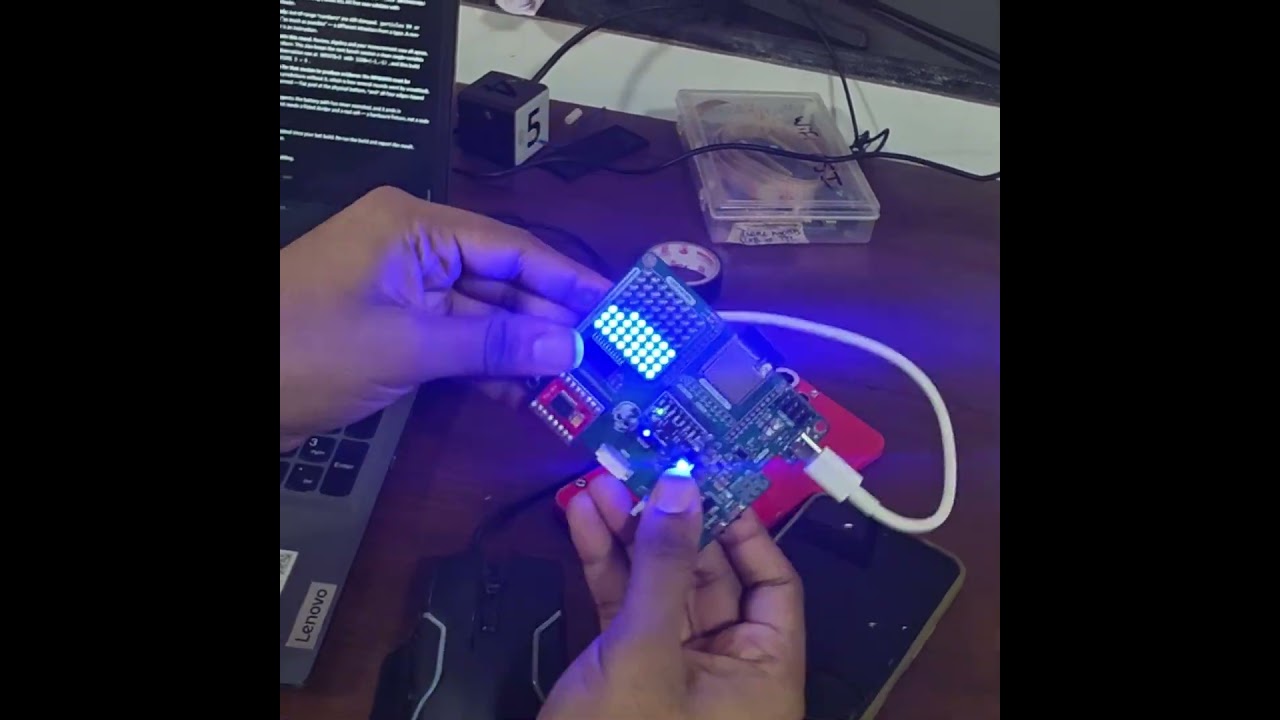
Particle Matrix
Particle Matrix is an interactive LED display project powered by the ESP32-S3 and driven by the MAX7219. Developed using Zero Code AI, it showcases dynamic particle animations, highlighting the capabilities of ESP32 hardware and AI-assisted development in bringing creative embedded projects to life.
What it does
- Liquid simulation — an 8x8 LED matrix shows a body of liquid about half filling the tank, with a visible surface line that tilts with gravity
- Tilt-driven gravity — MPU6050 accelerometer reading sets the simulation's gravity direction in real time
- Matrix output — MAX7219 drives the 8x8 grid (DIN GPIO16, CLK GPIO18, LOAD GPIO17)
- Shake to splash — sharp accelerometer spikes (a flick of the wrist) kick liquid into the air and it falls back
- Handheld, LiPo powered — runs on a single-cell LiPo charged over USB; no cable needed to play
- Idle dim/wake — after the device sits still and untouched the matrix dims and the simulation slows; picking it up wakes it
- Slide power switch in the battery line — on runs the simulation, off cuts power completely
- Battery gauge — cell voltage read on GPIO12 ADC through a 1:2 divider
- Fresh start on power-on — the tank always refills to its standard level, settled in the bottom of the grid; it never resumes an old state
Manual
Device Type
summary: A handheld, battery-powered desk/party toy: an 8x8 LED matrix showing a live liquid simulation that responds to how the device is held and moved. — problem: Nothing to solve — it is a tactile novelty. The appeal is that the object in your hand behaves like a sealed tank of liquid: tilt it and the liquid pours, shake it and it splashes, put it down and it settles. — formFactor: Pocket/cigarette-pack sized. ESP32-S3-DevKitC-1, a MAX7219 8x8 dot-matrix module facing out through a window in the case, an MPU6050 on the same board plane as the matrix, one LiPo cell and a USB charging board, and a slide switch on the side. Matrix orientation must match the IMU axes so 'down' on the display is 'down' in the hand.
Hardware
chip: esp32s3 — board: esp32-s3-devkitc-1 — gpios: gpio: 16 — role: MAX7219 DIN (MOSI equivalent) — net: signal · gpio: 18 — role: MAX7219 CLK — net: signal · gpio: 17 — role: MAX7219 LOAD / CS — net: signal · gpio: 14 — role: MPU6050 SDA — net: i2c · gpio: 21 — role: MPU6050 SCL — net: i2c · gpio: 12 — role: Battery voltage sense (ADC1 channel), fed by a 1:2 divider from the LiPo + terminal — net: analog — peripherals: part: MAX7219 8x8 LED matrix module — interface: bit-banged or SPI-host 3-wire write-only serial (DIN/CLK/LOAD) — wiring: VCC to 5V, GND to GND, DIN GPIO16, CLK GPIO18, LOAD GPIO17 — notes: Configure once at boot: decode mode off, scan limit 7, intensity from the current dim level, normal operation, display test off. A full 8x8 frame is 8 register writes; use auto-increment to push the whole frame in one LOAD pulse. Intensity is the dim/bright control — no PWM needed. · part: MPU6050 accelerometer/gyro — interface: I2C, 400 kHz, address 0x68 (AD0 low) — wiring: VCC to 3V3, GND to GND, SDA GPIO14, SCL GPIO21 — notes: Use the accelerometer only (gyro optional for extra inertia in the slosh). Wake the device from sleep, set ±2 g full scale and a 100 Hz internal sample rate with the DLPF on to reject the shake jitter. No INT pin is wired — GPIO23 does not exist on the ESP32-S3, and polling is sufficient. · part: Single-cell LiPo + USB charging board (e.g. TP4056-class) — interface: power only — wiring: Battery to charger BAT terminals; charger output to the DevKitC-1 5V pin and GND. The DevKit's onboard regulator supplies the 3V3 rail for the MPU6050. — notes: A slide switch sits in the battery positive line so off means physically disconnected. · part: Slide power switch — interface: in series with the battery — wiring: battery + -> switch -> charger board BAT+ / 5V feed — notes: Only power control on the device. There is no software power-off. · part: Battery sense divider — interface: analog — wiring: LiPo + -> 100k -> GPIO12 -> 100k -> GND (add a 100 nF from GPIO12 to GND) — notes: Halves 4.2 V to 2.1 V, inside the ESP32-S3 ADC's 3.3 V range. Calibrate the reading once against a multimeter. — unusedOnBoardHardware: WS2812 addressable LED on GPIO38 — not used; the matrix is the only output · BOOT button on GPIO0 — not used; power is controlled by the slide switch
Inputs
kind: imu — label: Tilt / orientation — hardware: MPU6050 accelerometer over I2C, polled at ~50 Hz — behavior: The gravity vector is low-pass filtered and quantised to one of eight compass directions (N, NE, E, SE, S, SW, W, NW) plus 'still'. That direction is the simulation's gravity. Small tilts slosh the surface; a large tilt (past ~35° from flat) makes the surface line vertical and the liquid pours down the low wall. An 8 px grid cannot show continuous angles, so the quantisation is explicit — the surface line stepping between eight angles is part of the look. · kind: imu — label: Shake / flick — hardware: MPU6050 accelerometer magnitude — behavior: When |accel| exceeds ~1.8 g, every particle gets an upward velocity impulse proportional to the excess (capped), plus a small random horizontal jitter. Liquid thrown off the top of the tank re-enters from the bottom so the fill level never drains away.
Outputs
kind: display — label: 8x8 LED matrix — hardware: MAX7219 module — behavior: The only output. Every cell is either lit (liquid) or dark (air); a settled pool of 24–40 particles reads as 'about half full'. Brightness (MAX7219 intensity 0–15) carries state: full brightness while playing, ramped down when idle, blinking for the low-battery warning. On power-on it runs a brief fill animation before settling.
Business Logic
powerOnBehavior: Slide switch to on → firmware boots, configures the MAX7219 and the MPU6050, reads and calibrates the battery voltage, then seeds a fresh half-full tank resting at the bottom of the grid with a short fill animation (~1 s). There is no stored state: every power-on is identical. No pairing, no network, no configuration. — automationRules: Tilt → gravity direction: low-pass the accelerometer, map to the nearest of eight directions, and feed it to the simulation as gravity. · Shake → impulse: |accel| > 1.8 g injects upward velocity into every particle. · Idle → dim: no motion and no acceleration change for 30 s drops matrix intensity and halves the particle update rate; the IMU keeps sampling slowly so motion is detected. · Motion → wake: any sustained acceleration above ~1.1 g restores full intensity and update rate within one frame. · Low battery → warn then sleep: battery below 3.4 V for 5 s blinks the matrix, then the device deep-sleeps with the display blank. — dayToDayOperation: Pick it up, flick the switch, and the tank fills and settles. Hold it flat and the liquid is still; tilt it and the surface line rotates and pours to the low side; tip it far and the liquid runs down the wall; shake it and it splashes and rains back down. Set it down and it settles and dims after half a minute. Move it and it comes straight back to full brightness. Charge over USB when the low-battery blink appears. — stateMachine: BOOT → SELF_TEST (display pattern, battery read) → FILL → PLAY · PLAY → IDLE (30 s still) → PLAY (motion) · PLAY/IDLE → LOW_BATTERY (V < 3.4 V for 5 s) → DEEP_SLEEP
Factory Reset
trigger: Slide the power switch off, wait two seconds, slide it back on. — effect: Complete reset. Nothing is persisted — no calibration table, no saved liquid state, no credentials — so a power cycle is indistinguishable from a factory reset. The device comes back with a fresh half-full tank.
Failure Modes
scenario: MPU6050 not responding at boot (wiring fault, wrong address) — behavior: Firmware retries a few times, then falls back to a fixed downward gravity and logs the fault to the console; the simulation still runs as a 'level tank' toy. It does not hang or blank the display. · scenario: MPU6050 drops off the I2C bus while running — behavior: I2C errors are swallowed, the last known gravity is held, and re-initialisation is retried every 2 s. The display keeps animating so the toy never appears dead. · scenario: MAX7219 missing or rewired — behavior: The firmware writes SPI frames regardless; the device boots normally and shows nothing. Note the matrix must be on 5 V — a 3.3 V feed gives dim or flickering output. · scenario: Battery low — behavior: Blink the matrix as a warning, then deep-sleep. Display is blanked first so the MAX7219 does not keep glowing on the way down. · scenario: Battery removed / charger unplugged with the switch on — behavior: Power simply drops — no brownout handling needed beyond an ESP-IDF brownout reset. State is not persisted, so nothing is corrupted. · scenario: Power blip while running — behavior: Boots on restoration with a fresh tank. Worst case is a sub-second visible flicker. · scenario: Device left running and untouched for hours — behavior: IDLE keeps the display dimmed and the particle update slow, so battery drain is dominated by the ESP32-S3 idle current; it stays in IDLE indefinitely rather than sleeping, so it never misses being picked up.
Power Management
batteryPowered: true — sleepMode: Two-stage. IDLE is an active low-power mode — matrix intensity dropped to its minimum setting and the simulation stepped at 10 Hz instead of 50 Hz while the IMU is polled at ~10 Hz for motion detection. DEEP_SLEEP is entered only on low battery (display blanked, wake on the IMU's motion interrupt is not available without the INT pin, so the device is effectively off until power-cycled). — wakeSources: Motion — any acceleration above ~1.1 g while in IDLE · Power-cycle — the only way out of DEEP_SLEEP, via the slide switch — notes: Reported runtime on a 1000 mAh cell is dominated by the matrix and the 3.3 V regulator, not the MCU. If runtime matters more than the liquid staying alive while idle, the IDLE state can be extended to a full light-sleep with the IMU configured for its own motion-detect interrupt.
Custom Behavior
simulationModel: Classic 8x8 falling-sand fluid. Particles occupy grid cells in a doubly-linked list for O(1) insert/remove. Each particle, in random order, tries to move in the gravity direction (straight down), then the two diagonals, then one sideways step to equalise the surface; move success removes it from its cell and inserts it into the target. A per-particle sideways velocity component (carried between frames and damped) is what makes the surface slosh and overhang instead of settling instantly — this is the whole difference between 'sand' and 'liquid'. The fill is about 30 of 64 cells; a settled pool plus a tilted surface line reads as roughly half full. — tiltQuantisation: Gravity is an 8-way compass, not a continuous vector, because an 8x8 grid has no sub-pixel resolution. The direction changes latch with ~5° of hysteresis so a board held near a boundary does not flicker between two directions. — matrixOrientation: The matrix's row/column mapping must be matched to the IMU's axes at build time; otherwise tilting left moves the liquid right. Calibrate by holding the device with the USB port away from you and confirming that the screen's 'down' matches real gravity.
Published 19 Oct 2026 · forked from fluid-bot
Firmware and source licensed Apache-2.0; photos and text CC-BY-4.0.
The firmware includes open-source software — open-source licences and notices; some components may be used only with Espressif chips.
Built with ESP ZeroCode AI — describe a device, get production firmware.
Terms of Service · Privacy Policy