ESP ZeroCode AI · Community
Network Traffic Visualizer
Build a standalone ESP32 "Wi-Fi Observatory": a compact, cyberpunk-style network terminal that passively observes nearby 2.4 GHz Wi-Fi activity and visualizes it on a small OLED. It never connects to any network and never transmits; it is intended only for places where I am authorized to observe. HARDWARE: ESP32 dev board, SSD1306 128x64 OLED on I2C (pins and address configurable), and two momentary buttons, MODE and SELECT, with internal pull-ups. If buttons are absent, auto-cycle the screens. No other sensors. OBSERVATION (ESP-IDF, C, FreeRTOS): Use Wi-Fi station mode, unconnected, and alternate two phases. 1) Sniff phase: promiscuous mode for management and data frames. Hop through channels 1-13 (configurable range) with a configurable dwell time (default 250 ms). Per channel, measure frames per second normalized by dwell time, management vs data split, average RSSI, and an approximate count of unique transmitters using a fixed-size hash table (never store or display MAC addresses). Parse the 802.11 frame-control field for type and subtype. The promiscuous callback must only copy a small metadata struct (channel, RSSI, type/subtype, length, hashed source) into a FreeRTOS queue; all processing happens in a separate task. If the queue is full, drop the sample and increment a drop counter. 2) Scan phase: every 30 s (configurable), run an active scan and keep up to 20 APs (SSID, hidden shown as "<hidden>", channel, RSSI, auth mode), sorted by RSSI. SCREENS (MODE button cycles them): A) RADAR: a rotating sweep line. Angle = channel, distance from center = signal strength, blip size = observed activity. Show a one-line legend: "not a position map". B) LIVE ACTIVITY: current channel, frames/s, management vs data split, average RSSI, a small bar chart of per-channel activity, and a "sampled" indicator. C) CHANNEL EXPLORER: nearby APs with channel and RSSI, plus a compact histogram of APs per channel. D) EVENT LOG: recent events with uptime timestamps. Tag each entry OBS (directly observed) or INF (inferred). Mark an AP "gone" only after it is missing from two consecutive scans. E) STATUS: free heap, queue drops, uptime, scan interval. CONTROLS: MODE short press = next screen; MODE long press = toggle auto-cycle. SELECT = pause/resume channel hopping and lock the current channel; on Channel Explorer, SELECT scrolls the AP list. SECURITY OBSERVATIONS: highlight a channel as "burst" when its frame rate exceeds about 3x its rolling average, and flag "mgmt spike" when deauthentication or disassociation frames exceed a configurable threshold per window. These are observations only; never label them attacks or claim to detect port scans or malicious IP traffic. DISPLAY RULES: use a 1-bit framebuffer drawn by a dedicated display task, at most 15 fps, redrawing only on change. The display task must never block or run inside the Wi-Fi callback. ERRORS AND RECOVERY: if OLED init fails, retry 3 times, then continue headless with serial logging and a blinking onboard LED. If Wi-Fi init fails, show an error screen, back off, and reboot after 10 s. If a scan fails, retry on the next cycle. Keep tasks watchdog-safe, use fixed buffers, and avoid heap allocation in the hot path. Expose intervals, dwell time, channel range and thresholds through menuconfig. Use only documented ESP-IDF APIs and add short comments explaining each design decision. If any requested feature cannot be generated, say so and list what I must write manually instead of guessing APIs.
What it does
- Passive observation only — never joins, associates, scans or transmits anything (no probe requests either); observe only where authorized
- Promiscuous sniffing of management and data frames while hopping both bands — 2.4 GHz channels 1–13 and the 5 GHz UNII channels — with a configurable dwell (default 250 ms) per channel
- Per-channel live metrics — frames/s normalized by dwell, management vs data split, average RSSI, approximate unique-transmitter count via fixed hash table (MAC addresses are never stored or displayed)
- Strictly passive radio — no active scan and no probe requests at all: the device only listens to frames already in the air, so it transmits nothing whatsoever
- RADAR screen — one circular sweep showing which channels are busy and where the strong signals sit, 2.4 GHz channels on the inner ring and 5 GHz on the outer ring so the two bands never read as the same channel; no legend line under it, the picture carries the meaning
- ACTIVITY screen — live traffic in everyday words with a real number behind each label: "Busy: 42 signals/sec", "Signal: strong" (or medium / weak, derived from the measured level), "Devices nearby: 7", plus which channel is being watched and a bar chart of which channels carry the most traffic
- STATUS screen — health in plain words: how long it has been watching, whether both bands are being watched, whether it is hearing any traffic at all, and one plain all-good / check-something line; the technical counters (free memory, dropped samples) go to the serial log only
- No buttons — three screens auto-advance in a fixed cycle (RADAR → STATUS → ACTIVITY), one screen every 8 s, wrapping forever
- Single-band-at-a-time radio — the C5 hears only one band at once, so observation alternates a 2.4 GHz sweep and a 5 GHz sweep, and every channel reading is tagged with its band
- The AP list, event log and channel explorer are gone from the screen — no screen lists networks at all, nothing technical is left on the panel for a non-technical person to interpret, and the event log survives only on the serial console
- Plain-language reading rule — numbers are kept but always carry an everyday-word label and a unit ("Busy: 42 signals/sec", "Devices nearby: 7"), never a bare figure, and nothing requires radio knowledge: no RSSI, dBm, mgmt/data, heap, queue or band jargon, no raw 802.11 terms, and no empty placeholder states
- Security observations — flag a channel as "burst" above ~3x its rolling average and "mgmt spike" when deauth/disassoc frames exceed a threshold per window; observations only, never labelled attacks. On screen these read as plain phrases a non-technical person understands, e.g. "unusually busy" and "lots of disconnects"
- The cycle never stops — the terminal is fully passive: no input hardware and no interaction, it just runs unattended
- OLED init failure — 3 retries, then continue headless with serial logging and a blinking status LED
- Wi-Fi init failure — error screen, back off and reboot after 10 s
- Watchdog-safe task layout — display task capped at 15 fps drawing a 1-bit framebuffer and redrawing only on change; samples cross the Wi-Fi callback in a small metadata struct on a FreeRTOS queue, fixed buffers, no heap in the hot path
- menuconfig-exposed timings and thresholds — dwell per channel, channel range per band, burst and spike thresholds
- Status indication on the devkit's onboard RGB LED (GPIO 27) — heartbeat while running, blinking error pattern when headless
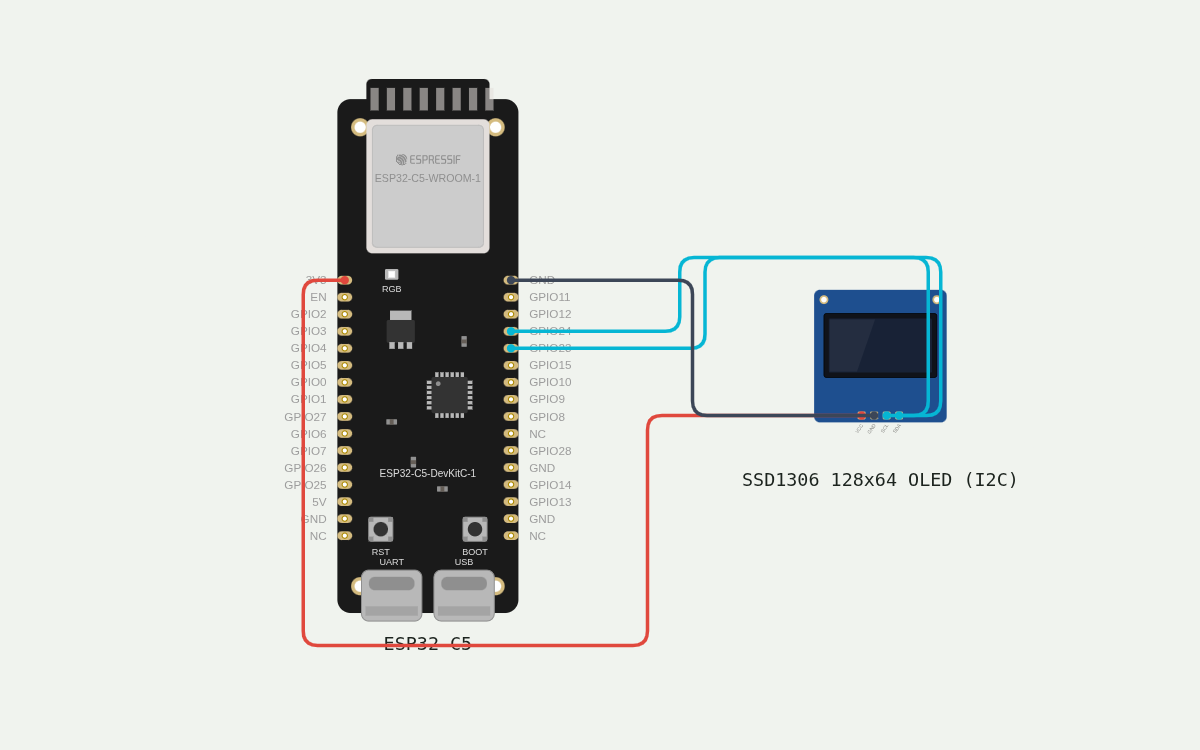
- SSD1306 128x64 OLED on I2C (address 0x3C) — the product's only display, data on GPIO 23 (J3 pin 5), clock on GPIO 24 (J3 pin 4), 3V3 and GND from the devkit; I2C on the C5 is GPIO-matrix routed so no dedicated pad is needed
- USB powered — runs continuously off a USB charger or host, no battery hardware fitted
- Battery-ready structure — observation, display and power policy are kept separate so a battery mode can be added later without redesign; STATUS shows how long the device has been running, which is the same yardstick a future battery reading would sit beside
- Alert badge rather than interruption — while a burst or mgmt spike is active a small banner is drawn on every screen and the cycle keeps running untouched, until the condition clears
- The onboard RGB LED doubles as an ambient cue — steady dim heartbeat while observing normally, warm tint while an alert badge is up, fast blink when running headless
Manual
Device Type
A standalone, passively receiving "Wi-Fi Observatory" — a small desk/shelf terminal that listens to ambient 802.11 traffic on 2.4 GHz and 5 GHz without ever joining, associating with, or transmitting on a network, and renders what it hears as a cyberpunk-styled radar readout on a 128x64 OLED, in three self-advancing screens. It solves the problem of making invisible RF activity legible at a glance for someone with no radio background: which channels are busy, how busy, how strong the signal is, roughly how many devices are transmitting nearby, and when traffic suddenly isn't normal — all stated in everyday words with a number and a unit behind each label. It is an observation instrument, not a security product: it reports only what it directly overheard, never labels anything an attack, and never claims to detect port scans or malicious IP traffic. Intended only for locations where the owner is authorized to observe.
Hardware
chip: esp32c5 — board: esp32-c5-devkitc-1 — boardNotes: ESP32-C5-DevKitC-1. Already on the board and used by the product: a WS2812 RGB LED on GPIO 27 (status/ambient cue) and a BOOT button on GPIO 28 (intentionally unused in normal operation — kept only as the factory-reset entry point). No external parts other than the OLED. GPIO 11/12 are the default UART0 console and GPIO 13/14 the USB pads — none of them are used for peripherals. — gpios: GPIO23: I2C SDA to the OLED (J3 pin 5; plain I/O, no strapping role) — GPIO24: I2C SCL to the OLED (J3 pin 4; plain I/O, no strapping role) — GPIO27: Onboard WS2812 RGB LED (board device) — GPIO28: Onboard BOOT button (board device) — held at power-on for factory reset, otherwise unused — 3V3: OLED supply — GND: OLED ground — peripherals: part: oled — detail: SSD1306 128x64 monochrome OLED, I2C address 0x3C, SDA GPIO23 / SCL GPIO24 on the J3 header, driven through the display framework on a 1-bit framebuffer. Standard I2C on the ESP32-C5 is routed through the GPIO matrix, so any GPIO pair works; GPIO23/24 were chosen because they are plain I/O with no strapping, console, USB or flash function. 4.7k pull-ups to 3V3 come from the OLED module — add them externally if the module lacks them. · part: rgb_led — detail: WS2812 on GPIO27, on-board — heartbeat / alert tint / headless error blink · part: boot_button — detail: On-board button on GPIO28 — factory-reset gesture only, no runtime role — power: USB 5 V only (devkit USB-C). No battery hardware, no charge controller, no voltage sensing. Current draw is dominated by the Wi-Fi radio; the OLED is dimmed automatically (see outputs) to keep the display from dominating.
Inputs
kind: none — label: No user input hardware — deliberately hands-off — hardware: None fitted. The BOOT button on GPIO28 has no runtime function. — behavior: The device has no interactive controls at all: no MODE/SELECT buttons, no touch, no scrolling. Screens advance on their own every 8 s in a fixed order. The only physical interaction is plugging in USB power. Do not invent a menu, a button handler, or a 'tap to change screen' interaction. · kind: radio — label: Ambient Wi-Fi traffic (the real input) — hardware: ESP32-C5 Wi-Fi radio in station mode, never connected, in receive-only promiscuous mode — behavior: Every observed 802.11 frame contributes a small metadata sample (channel, band, RSSI, frame type/subtype, length, hashed source). The device never associates, never scans and never probes: the only thing it ever does is listen to frames already in the air, so it puts nothing on the air itself. Because there is no scan, the device also cannot claim a complete picture of the room — it reports only what was overheard.
Outputs
kind: display — label: OLED — three auto-cycling screens — hardware: SSD1306 128x64, I2C 0x3C, 1-bit framebuffer — behavior: Cycle order RADAR → STATUS → ACTIVITY, one screen every 8 s, wrapping forever. Every screen carries the alert badge when a burst or mgmt spike is active. Redraw only on change, capped at 15 fps. Everything on the panel is written for a non-technical reader: everyday words, a unit on every number, no radio or firmware jargon, and never an empty placeholder state. RADAR = the circular sweep, 2.4 GHz inner ring and 5 GHz outer ring, angle = channel within its band, radius = signal strength, blip size = activity, no legend text beneath it. STATUS = how long it has been watching, whether both bands are being watched, whether it is hearing traffic at all, and one plain all-good / check-something line. ACTIVITY = the channel being watched, how busy it is in signals per second, signal strength worded strong/medium/weak, roughly how many devices are nearby, and a bar chart of which channels carry the most traffic. Numbers are kept, but every one of them sits behind an everyday label and a unit — 'Busy: 42 signals/sec', 'Signal: strong', 'Devices nearby: 7' — never a bare figure a reader has to interpret. Free memory, dropped samples and the OBS/INF event log are NOT on the panel — they go to the serial log. · kind: indicator — label: On-board RGB LED — ambient state cue — hardware: WS2812 on GPIO27 — behavior: Dim steady heartbeat pulse while observing normally; warm/amber tint for as long as an alert badge is up; fast blink (about 2 Hz) when the OLED failed to initialize and the device is running headless. A slow steady glow means it is listening but hearing nothing at all. · kind: log — label: Serial log — hardware: UART0 console at 115200 baud — behavior: Narrates boot, Wi-Fi/display init, every flag raised or cleared, the technical counters that are no longer on the panel (free memory, dropped samples), and doubles as the only human-readable output when the OLED is dead. Never logs MAC addresses.
Connectivity Notes
No networking stack in the product sense: the device never joins a network, never obtains an IP address, never talks to a cloud or a smart-home hub, and has no commissioning flow. The Wi-Fi driver is initialized in station mode and left unconnected because that is the only way to receive frames. An empty `connectivity` list is intentional — do not add Wi-Fi STA connection logic, provisioning, or an MQTT/HTTP client.
Commissioning
method: none — payload: none — instructions: There is nothing to set up. Plug the devkit into USB power; it boots straight into observation. No credentials, no phone app, no pairing. Behavioral knobs (dwell per channel, channel range per band, burst and spike thresholds) are set at build time through menuconfig, not at runtime.
Business Logic
powerOnBehavior: Boot: init NVS and the display (3 attempts); if the display comes up, show a 1.5 s title card with just the product name and 'watching quietly'. Initialize the Wi-Fi driver in station mode, never connect, enable promiscuous filtering for management and data frames, then enter the observation loop and the screen cycle. — observationLoop: A single observation task owns the radio and does nothing else with it: it runs repeated sweeps and never leaves receive mode. For the 2.4 GHz band set WIFI_BAND_MODE_2G_ONLY, then walk channels 1–13 with a dwell per channel (default 250 ms), tuning with esp_wifi_set_channel; then switch to WIFI_BAND_MODE_5G_ONLY and walk the configured 5 GHz UNII channel list; then repeat, forever. Promiscuous mode stays enabled across the whole loop and there is no scan phase, no probe request and no associated state — the radio only ever listens. — noScanRationale: The product no longer runs active scans. The AP list was already off the panel, so the scan existed only to feed a single count that the sniffing metrics can answer honestly from what is actually heard (unique transmitters per channel). Dropping it removes the only part of the firmware that ever misbehaved on hardware, makes every sweep cycle shorter and more even, and makes the receive-only claim literally true: with no scan, the device puts nothing on the air, not even probe requests. Nothing in the UI may imply the device goes looking for networks — it only reports what it heard. — metricsAggregation: The promiscuous callback only copies a fixed-size metadata struct (channel id, band, RSSI, type/subtype from the frame-control field, length, hashed source) into a FreeRTOS queue; a full queue drops the sample and increments a counter that goes to the serial log only. A separate aggregation task drains the queue and maintains, per channel: frame count, mgmt vs data split, RSSI sum/count, and unique-transmitter approximation via a fixed-size hash table of hashed sources. Frames/s is computed by normalizing the count by the actual dwell time observed for that channel. A rolling average per channel feeds burst detection (current rate > ~3x the rolling average). MAC addresses are hashed on arrival and never stored, printed or displayed. — scanLogic: None — there is no active scan in this product. The AP table, its SSID/hidden/channel/auth fields, the 20-entry cap, the sort-by-RSSI ordering, the 'missing from two consecutive scans' gone rule and the scan interval setting are all removed, and with them the whole class of timeout, band-switch and DFS-passive-dwell failure that used to live there. Do not reintroduce a scan to populate a count: the 'devices nearby' number on ACTIVITY comes from the transmitters actually heard during sweeps. — flagRules: Burst: a channel whose measured frames/s exceeds about 3x its own rolling average. Mgmt spike: deauthentication or disassociation frames on a channel exceeding a configurable count per window (default: 10 frames in 10 s). Both raise the alert badge on every screen, tint the LED warm, are written to the serial log tagged as observations, and clear automatically when the condition stops holding. On the panel the wording is everyday language — 'unusually busy here' and 'lots of disconnects here' — never 'burst' or 'mgmt spike', and never attack, threat, danger, intrusion, port scan or malicious anywhere in the UI. — statusHonesty: STATUS reports only what the device actually knows: how long it has been watching, whether both bands are being swept, and whether it is hearing any traffic at all ('hearing traffic' versus 'hearing nothing' is a real, measured distinction, not a guess). It must never present an instrument failure as a fact about the room, and it never claims a network count it did not measure. — eventLog: A 20-entry event ring exists in RAM as a serial-only log and is not a screen. Every entry is something directly observed (a flag raised or cleared, boot, a band unavailable) — with no scan there is nothing left to infer, so the old OBS/INF distinction collapses to plain observations. Nothing is written to flash; the ring is empty after every reboot. — displayCycle: A display task advances the screen every 8 s on its own, forever, through RADAR → STATUS → ACTIVITY. The 8 s dwell is what guarantees a passive, hands-off device still reveals every screen. — dayToDayOperation: Plug it in and leave it. The radar sweeps, the LED breathes, and the three screens rotate on their own through what the radio currently hears, in words anyone can read. If something unusual is happening, a badge appears on every screen and the LED goes warm until it stops. To stop observing, unplug it.
Factory Reset
trigger: Hold the on-board BOOT button (GPIO28) while plugging in USB power, for about 3 s. — effect: Erases the NVS partition (Wi-Fi driver calibration/cache data and any stored state), then reboots. All runtime metrics, the per-channel table and the event ring are in RAM and are already cleared by the reboot — the device comes back with factory defaults. If the display works, it shows a short 'RESET' notice before restarting. There is no other state to lose: no credentials, no configuration, no stored history.
Failure Modes
scenario: OLED does not answer on I2C (unplugged, wrong address, dead module) — behavior: Retry initialization 3 times; on final failure continue running headless. Observation, metrics and the log keep working; the LED blinks fast and everything is written to the serial log so the device is still usable from a console. No reboot loop, and no attempt to interact is expected from the user. · scenario: Wi-Fi driver initialization fails — behavior: Show an error screen if the display is alive (text names the failure and the 10 s reboot), log it, back off, and reboot after 10 s. Repeated failure yields a slow, steady reboot cycle rather than a hang. · scenario: Band switch to 5 GHz is refused or unavailable — behavior: Log it, mark the 5 GHz sweep unavailable, and keep observing 2.4 GHz only. STATUS and RADAR indicate that 5 GHz is not currently being swept, so a missing outer arc never reads as a quiet 5 GHz spectrum. · scenario: Nothing at all is being heard (quiet room, or the radio is not receiving) — behavior: Say so plainly rather than freezing: STATUS shows 'hearing nothing', the ACTIVITY numbers go to zero with their labels intact, and the LED settles to a slow steady glow. This is a real reading, not an error, and the device must not invent traffic, hold a stale number, or present it as a fault. · scenario: Promiscuous queue overruns (very busy RF environment) — behavior: Drop the sample, increment the queue-drop counter and log it to serial only — it is no longer shown on the panel. Metrics stay honest (they are normalized against the samples actually processed) and nothing blocks the Wi-Fi callback. · scenario: Power blip or cable knocked out — behavior: Everything is in RAM, so the device comes back cold: new uptime, empty event ring, fresh per-channel metrics, first sweep starts immediately. This is expected and needs no recovery action. · scenario: Task stalls / watchdog — behavior: Radio, aggregation and display are separate tasks with bounded work per iteration; each subscribes to the task watchdog and yields or delays in its loop, so a display or aggregation hiccup cannot wedge the radio callback, and a genuinely wedged task reboots the device. With the scan gone there is no long blocking call left in the radio task, so every iteration is short by construction.
Power Management
batteryPowered: false — sleepMode: None. The device is designed to run continuously off USB, with continuous reception and a continuous display cycle. Light sleep is deliberately not used because it suspends the receiver. — wakeSources: Power applied. Nothing else. — futureNote: Battery operation is anticipated but not built: the observation engine, the aggregation and the display cycle are kept independent of power policy, and both duty cycles (dwell per channel, screen interval) are single constants in menuconfig, so a later battery mode can stretch them and gate the display without restructuring the firmware. No battery hardware, charge status, or voltage sensing exists in this version, and nothing on screen may claim a battery level.
Custom Behavior
legalAndEthicalFraming: The product is strictly receive-only: it never associates, never scans, never sends probe requests, never transmits user data, and never stores MAC addresses — unique transmitters are counted through a fixed-size hash table and the hash is not reversible. Because there is no scan, the 'it transmits nothing' claim is literally true with no exception to explain. The panel carries no 'not a position map' caption; instead the RADAR simply never draws anything spatial — no bearing, no distance in metres, no map — so nothing on screen can be mistaken for a location. The spec assumes use only in locations where the owner is authorized to observe. — singleBandRadio: The ESP32-C5 listens to one band at a time. Any UI showing 'all bands at once' would be a lie, so the RADAR draws two independent rings (2.4 GHz inside, 5 GHz outside) and the sweep alternates bands at sweep granularity rather than per channel. — honestyOfMeasurements: Frames/s is always normalized by the real dwell achieved on that channel, so a channel visited briefly is not reported as quiet. Signal strength is shown as strong/medium/weak words derived from the measured dBm, never as a raw dBm number a non-technical reader cannot interpret. The 'devices nearby' figure is an approximation from hashed transmitters heard during sweeps, and the label must stay honest about being approximate ('about 7 devices') rather than implying an exact census — and since nothing is scanned, the device reports only what it overheard, never a claim about every network in range. — cyberpunkPresentation: Visual identity is monochrome, high-contrast and scanline-flavoured — the radar sweep, brackets and tick marks carry the character, not blocks of text. Presentation must never sacrifice readability: every value is in everyday words with its unit, legible at arm's length on a 128x64 panel, and a reader with no radio or IT background can tell what each screen is saying without asking.
Published 22 Oct 2026
Firmware and source licensed Apache-2.0; photos and text CC-BY-4.0.
The firmware includes open-source software — open-source licences and notices; some components may be used only with Espressif chips.
Built with ESP ZeroCode AI — describe a device, get production firmware.
Terms of Service · Privacy Policy