ESP ZeroCode AI · Community
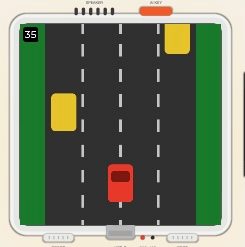
Mosaico Car Racer
Make my Mosaico to be used for a 2D car racing game with accelerometer to be used to move the car left or right. Make it as interesting as possible.
What it does
- A 2D car racing game that runs on the device's own screen
- An endless road the car dodges oncoming traffic on, with the speed rising as you go
- Steer the car left and right by tilting the device, held upright facing you — the accelerometer is the only steering control
- One crash ends the run
- The device buzzes when you crash
- The game makes sound: an engine note while driving, a crash noise and a jingle when the run ends
- Tap the screen to start a run and tap again to pause
- The game should be as interesting as possible, beyond what the description names
- Gold coins appear on the road; driving over one scores bonus points and plays a short high beep
- The best score is kept and shown on the title and game-over screens, and survives a power cut
- Straight ahead is taken from how the device is held at the start of each run, so you can play sitting or lying down
Manual
What it is
A handheld arcade game on the ESP-Mosaico. The car drives up an endless road drawn on the 480x480 square touchscreen, oncoming traffic comes down at it, and the player dodges by tilting the device left and right. Speed and score rise the longer a run lasts; the first crash ends it. The whole game is on the device — no phone, no network, no external parts. It exists so that a bare ESP-Mosaico becomes a self-contained racing toy you steer the way you steer a real wheel: by tilting.
Hardware
chip: esp32s31 — board: id: esp-mosaico — name: ESP-Mosaico — chosen_by: user — note: The person chose this board. Everything the game needs is already on it, so the product has zero external wiring. — onboard_devices_used: device: display_lcd — part: CO5300 — pins: 9,35,36,42,44,50,51 (QSPI, board-owned) — role: the game screen, 480x480 · device: lcd_touch — part: CST9217 — pins: 6 (INT), I2C0 SDA 3 / SCL 56 — role: tap to start and pause; every touch is handled by the game's own full-screen handler · device: imu_sensor — part: BMI270 — pins: INT 2, I2C0 address 0x69 (SDA 3 / SCL 56, board-owned bus) — role: accelerometer — the only steering input · device: vibration_motor — pins: 8, active-high — role: buzz on a crash · device: audio_dac — part: ES8311 codec + amplifier — pins: 37,40,45,49,52,54 (board-owned I2S/I2C) — role: engine note, crash noise, score jingle, coin beep — onboard_devices_not_used: camera · magnetometers (BMM150 x2) · ai_button (GPIO7) · boot_button (GPIO61) · battery_monitor (BQ27220) · audio_adc / microphone — accelerometer_requirement: Steering needs the lateral gravity component at 50 Hz or faster. The catalog's BMI270 block publishes only a coarse motion flag and an orientation enum at its own poll interval, which is not enough to steer a game, so product code reads the BMI270 acceleration itself at 50 Hz — through the Bosch bmi270 driver the board already pulls, because the part produces no data until its initialization blob is uploaded, and that blob lives in the driver. It must take the I2C bus the board already owns on port 0 (SDA 3, SCL 56) with i2c_master_get_bus_handle rather than creating a second bus, and it must be the only handle for address 0x69 — do not also instantiate the catalog BMI270 block on the same bus. — accelerometer_axis_assumption: SETTLED ON THE BOARD, NOT AN ASSUMPTION: with the device upright and the USB-C port at the bottom, the BMI270's +X reads as screen LEFT, so a roll that brings the right edge down must steer LEFT and a roll that brings the left edge down steers right. The firmware therefore uses IMU_SIGN = -1 on the accelerometer's X axis. Steering is correct only if a left-edge-down roll moves the car right. — player_start: the player's car starts at the road centre (x = 240) at the start of every run, after every calibration — firmware writer's choice. — held_orientation: how_held: upright, screen facing the player, like a phone — chosen_by: user — up_side: USB-C port at the bottom so the picture is the right way up — my choice (the person did not say which way up). — steering_axis: With the device upright and facing the player, gravity lies mostly down the screen. Rolling the device left or right moves gravity along the screen's horizontal axis, and that component is the steering input, in milli-g. Its sign is inverted on this board: +X reads as screen left, so a right-edge-down roll steers left.
Screen layout
panel: 480x480 square, used in portrait with the USB-C port at the bottom — my choice. — road: 360 px wide, centred (60 px verge on each side), scrolling upwards. Road markings scroll with it so speed is visible. — lanes: 4 lanes of 90 px — my choice. — player_car: 60 x 90 px, centred vertically at y = 380 px, kept inside the road (never overlaps the verge) — my choice. — obstacle_car: 60 x 90 px, spawned at the top of a lane, moving down the screen toward the player — my choice. — coin: a 32 px gold disc in the middle of a lane — my choice. — colors: dark grey road (#303030), lighter dashed centre markings (#C0C0C0), green verges (#1E7A2E), player car red (#E03A2F), traffic cars in blue (#2F6FE0) and yellow (#E0C22F) picked at random, coins gold (#F5C518), score text white on black — my choice.
Steering
input: lateral gravity in milli-g from the BMI270, sampled every 20 ms (50 Hz) — my choice. — neutral: At the start of every run the game averages the reading for 500 ms while the player holds still, and takes that as straight ahead; a run cannot start until those 500 ms are done ('Hold still'). This is my choice, and it is what lets the game be played sitting or lying down. — dead_zone: ±30 mg either side of neutral does nothing — my choice, it stops the car trembling at rest. — full_lock: ±300 mg of lateral gravity (about 17 degrees of roll) reaches the edge of the road — my choice. — response: The steering value is smoothed with a 60 ms time constant so the car moves with the device rather than jittering — my choice. — car_speed: the car crosses the road at up to 320 px/s sideways; the lateral gravity is mapped linearly from the dead zone to full lock, and clamped beyond it — my choice. — loss_of_sensor: if the BMI270 stops answering, no run can start and the screen says 'SENSOR ERROR — CHECK THE DEVICE'; the game retries the sensor every 2 s and returns to the title screen when it answers again — my choice.
Game rules
start: the title screen shows the best score and 'TAP TO START'; a tap begins the 500 ms 'Hold still' calibration, then the run — chosen by the person (tap to start). A tap made while the steering sensor has not come up yet (inside the 3 s boot grace) is held, not lost: the run starts by itself the moment the sensor answers, but only within 5 s of the tap, after which it is dropped — firmware writer's choice for the 5 s bound. — pause: a tap during a run pauses it: everything freezes (traffic and coin timing included, so the first spawn after a resume may be immediate), the engine note stops, and 'PAUSED - TAP TO RESUME' is shown; another tap resumes — chosen by the person (tap to pause). — scoring: 1 point per 10 px of road scrolled; a coin is worth 5 points — my choice. — speed: road scroll starts at 140 px/s, rises by 10 px/s for every 200 points, and stops rising at 420 px/s — my choice. — traffic: the first traffic car appears 1.2 s after the run starts, then every 0.9 s, the gap shrinking to 0.45 s as the road reaches its top speed; a car is placed in a random lane, and never in a lane that already has a car within 120 px of the top of the screen, so at least two lanes are always free — my choice. — traffic_speed: traffic closes on the player at the road speed plus 60 px/s of its own — my choice. — coins: one coin appears every 1.5 to 3 s (random) in a lane with no traffic near the top; it scrolls down with the road and is missed if the player is not in its lane — my choice. — collision: the run ends the moment the player car's rectangle overlaps a traffic car's rectangle (pixel overlap of the 60x90 boxes) — my choice. — game_over: on a crash the road stops, the motor buzzes for 150 ms, three low tones play, the screen flashes red once, and the game-over screen shows 'SCORE <n>' and 'BEST <n>' with 'TAP TO PLAY AGAIN'; a tap starts a new run — my choice. — best_score: the best score is written to NVS at the end of every run and read at boot; it survives a power cut mid-run (the interrupted run is lost) and is cleared by a factory reset — my choice.
Sound
engine: while a run is in progress and not paused, a continuous tone plays whose pitch rises with the road speed, from 180 Hz at the start speed to 520 Hz at the top speed; it is silent on the title, pause and game-over screens. The game drives the tone itself with its own note sequencer rather than through the sound framework's play call, which blocks until a note ends and so could not be cut off by a coin beep or a crash; the sound framework is composed but idles — firmware writer's choice — the pitches and level are my choice. — crash: three low notes (220, 165, 110 Hz, 120 ms each) on a crash, followed without a gap by the game-over jingle as one seven-note sequence so nothing is cut off between them — firmware writer's choice; the notes are my choice. — coin: one short 1320 Hz beep, 60 ms, on collecting a coin — my choice. — score_jingle: four rising notes (523, 659, 784, 1047 Hz, 120 ms each) played once on the game-over screen after the crash sound — my choice. — level: volume fixed at 60% of the codec's output; the sound framework plays these tones one note at a time and cuts off a note still playing when the next starts, so the engine tone resumes after each beep — my choice. — unavailable: if the speaker codec does not open, the game runs silently (the failure is logged) and everything else, buzz included, keeps working.
Buzz
crash: the vibration motor buzzes for 150 ms on a crash — the person asked for a buzz on a crash; the length is my choice. — other: no other buzzes — my choice.
Connectivity
None. The device joins no network and has no phone app, no cloud and no internet; the selected frameworks are the display framework (LVGL UI) and the sound framework (beeps and tone melodies), neither of which brings a network. Everything the game needs is on the device.
Day to day
power_on: the ESP-Mosaico is switched on (its own power button), boots in about 2 s and shows the title screen with the best score and 'TAP TO START'. The screen stays on the whole time the device is powered — the display framework does not dim or sleep it — my choice. — while_playing: every run is identical in rules: tap to start, hold still for half a second, then steer by tilt, tap once to pause and once to resume. — nothing_else: the game never needs a phone, a network, an account or a button other than the screen.
First run
Plug the ESP-Mosaico into a computer with a USB-C cable and flash the product from its page in Chrome, Edge or Firefox 151+ — there are no tools to install and no per-device value to type in. · Unplug and switch the device on: the title screen appears with a best score of 0. · Tap the screen to play. Nothing has to be set up, paired or configured.
Factory reset
the built-in console command `factory_reset` (over the USB serial console) erases every saved setting, including the best score, and reboots. No button combo or power-cycle reset is configured, so a factory reset needs a computer on a USB cable — my choice; a long-press reset on the AI button can be added if the person wants one.
Failure modes
accelerometer_not_answering: on the title and game-over screens, never offer a run: the screen says 'SENSOR ERROR - CHECK THE DEVICE' and the game retries every 2 s, going back to the title screen when the sensor answers. The first 3 s after boot carry no error screen, because the driver's initialization upload takes about a second and a false error at power-up would be wrong — firmware writer's choice. A sensor that stops answering DURING a run does not end the run: the game keeps the last reading so the player's score is not abandoned (firmware writer's choice, so a run can be finished on a dead sensor until the player crashes or pauses). — touch_not_answering: the display still shows the game, but nothing can be started or paused; the game logs its own view of it — an error at start-up if no touch panel was registered, or one warning if no touch has arrived 15 s after the title screen (firmware writer's choice) — and waits. Tilt is not a fallback for tapping. — speaker_not_opening: the game plays silently; the buzz and the game itself are unaffected. — vibration_motor_missing: the game plays with no buzz; nothing else changes. — power_cut_mid_run: the device restarts on the title screen; the interrupted run is lost and the stored best score is unchanged. A run that was cut short does not update the best score unless it had already ended. — no_network: not applicable — the game never uses one.
Power
the ESP-Mosaico runs from USB-C or its own 3.7 V Li-ion cell; the game adds no power management and does nothing when the battery is low. On the internal cell, expect a short playtime: the panel and speaker draw far more than the cell's 65 mAh holds, so the device is normally played plugged in — my choice, and worth knowing before relying on the battery.
After flashing the person must
Nothing: the game is complete at first boot. Only a factory reset needs a computer on the USB cable, to type `factory_reset` in the serial console.
On screen text
Labels are drawn with the ASCII hyphen ('PAUSED - TAP TO RESUME', 'SENSOR ERROR - CHECK THE DEVICE'): the built-in fonts carry no em dash, which would render as nothing — firmware writer's choice.
Beyond the framework
The display framework draws device cards for catalog device types. This product draws a game of its own — a scrolling road, cars, coins, a score — with LVGL objects on the display the framework creates, and handles every screen touch itself through app_display_on_touch(). That game code is custom firmware beyond what any catalog framework provides.
Unknown
How the BMI270 is mounted on the board has been settled by the person on the real device: it is mounted so that +X reads as screen left, and the firmware's IMU_SIGN is -1 to match. Nothing here is unknown about steering. · Whether the speaker is actually audible at codec volume 60 through the board's amplifier — the emulator can only show the codec opening, not play a tone. · The speed ramp past 200 points and the 420 px/s cap: no test run stayed alive that long, so the rise with score was never exercised (the 140 px/s start speed was measured). · Whether the first minute of play is too hard: in testing the fastest run reached 135 points in 9.4 s before traffic hit. A person with the screen in their hands reacts faster than a test harness can, but the early traffic density may want softening.
Published 26 Nov 2026
Firmware and source licensed Apache-2.0; photos and text CC-BY-4.0.
The firmware includes open-source software — open-source licences and notices; some components may be used only with Espressif chips.
Built with ESP ZeroCode AI — describe a device, get production firmware.
Terms of Service · Privacy Policy