ESP ZeroCode AI · Community
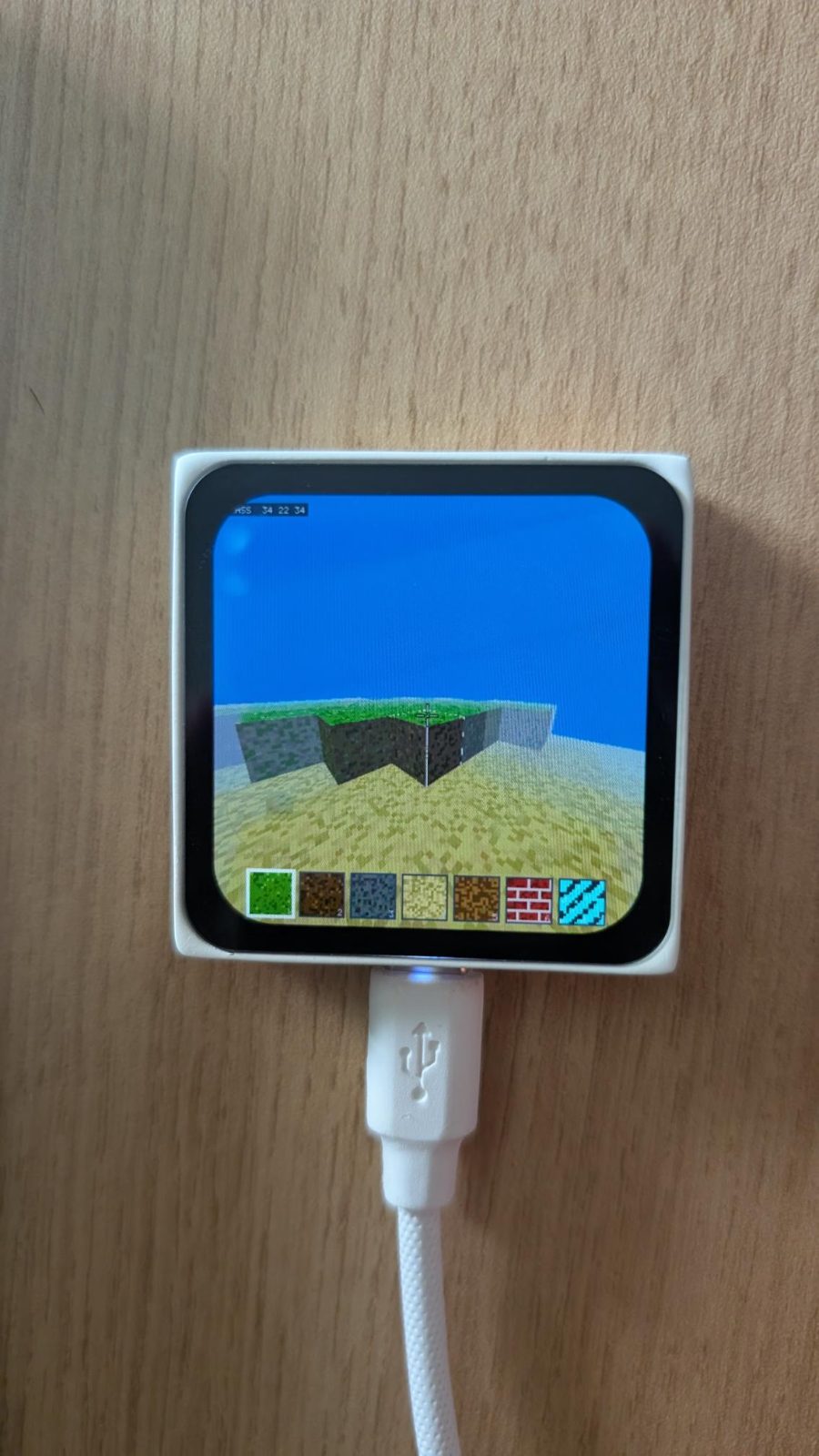
Minecraft
I want to create a Minecraft type game on ESP Mosaico. Everything runs on the board itself. Visually, it should be very crisp. I want basic features from minecraft. The world should look exactly the same. We can use the additional buttons and sensors to simplify the control. It needs to be very user friendly.
V2: Bugs fixed from the first version. Day-Night Cycle, All Blocks work, Jump and Climb works, Much smoother than before. Auto-Save and then Resume Works (the world is saved on the device).— @chiragDownload the firmware Fork it in the studio
What it does
- Standalone handheld voxel game — world, renderer and controls all run on the ESP-Mosaico board itself; no phone, PC, Wi-Fi or account
- Minecraft-style voxel world rendered on the board's own 2.16-inch 480x480 QSPI AMOLED (CO5300) — chunky voxels, 16x16 pixel-art textures per block face, bright sky, crisp saturated colours, targeted at a smooth 30 fps
- Creative pocket world — about 64x64 blocks across and 48 blocks tall, free building, endless block supply; no mobs, no health, no hunger, no crafting
- Core Minecraft gameplay — walk, jump, look around, break blocks, place blocks, from a first-person view
- Touch-first controls — virtual joystick in the bottom-left of the screen to walk, horizontal swipe on the world to turn, TAP to place the selected block, LONG HOLD (with an on-screen progress bar) to break the block you are aiming at, on-screen hotbar to pick the block, and an on-screen JUMP button above the joystick (the AI button also jumps)
- AI button = jump; BOOT button opens the menu / block palette; both are usable at the same time as the touchscreen
- Own identity, Minecraft's rendering feel — our own game name (Blockworld), our own hand-built terrain and block set with a signature glowing crystal ore; not a copy of Minecraft's name, textures or world data
- Sound effects through the on-board speaker — footsteps, block break and place pops, a chunky menu click, and one gentle ambient loop; volume toggle in the menu
- Haptics — a short vibrate tick on every block break and place, a stronger buzz when the selected block changes, a double-buzz on save; toggle in the menu
- First-run help — a single 'how to play' card on the very first launch, dismissed with one tap and never shown again (re-readable from the menu)
- Day/night cycle — the sky, sun and ambient light slowly shift; the world keeps its warm sunset and cool moonlit palettes on the AMOLED
- Automatic save into the on-board flash — saved every 60 s, before auto-sleep, and manually from the menu; the world is reloaded on every power-on (stored in NVS on the 16 MB NOR in this build; see the storage deviation note under businessLogic)
- Menu (BOOT button) — Continue, Save, New world, how-to-play card, sound on/off, haptics on/off, Reset world (two-step confirm)
- Battery-aware power management — the small on-board battery gives roughly 20-30 minutes of play; the battery gauge warns below 15%, the display dims, and the game autosaves and shuts down cleanly when empty. Runs indefinitely on USB-C.
- No extra hardware — the AMOLED, its capacitive touch panel, the ES8311 codec, speaker, vibration motor, both buttons, the BMI270 IMU, the magnetometers and the NAND flash are all part of the ESP-Mosaico board, so the diagram stays board-only
Manual
Device Type
summary: Blockworld — a handheld, self-contained creative voxel building game. — problem: Minecraft-style building normally needs a phone, PC or console plus a network account. Blockworld puts the whole thing on a pocket board: press POWER and you are building in a world within a few seconds. — form: One ESP-Mosaico board (CoreBoard + BaseBoard), held in two hands in portrait or landscape, played on its own 2.16in square AMOLED, powered by battery or USB-C. No companion app, no pairing, no network of any kind.
Hardware
chip: esp32s31 — board: esp-mosaico — board_notes: ESP32-S31 (dual-core RISC-V, up to 320 MHz) with 16 MB in-package PSRAM, 16 MB SPI NOR flash and a 128 MB SPI NAND flash. The display, touch, audio, buttons, motor, IMU, magnetometers and NAND are all soldered on the board and reached through Espressif's ESP-Mosaico BSP — none of them are wired to the GPIOs in this diagram. — gpios: pin: GPIO3 — role: I2C clock (SCL) on the board revision this firmware is built for — see the status-LED deviation note under 'outputs'. (An earlier board revision carried the on-board orange status LED here.) · pin: GPIO7 — role: on-board AI / Function button, active-low — jump · pin: GPIO61 — role: on-board BOOT button, active-low — open the menu (also the ROM download button) · pin: GPIO8 — role: on-board vibration motor, active-high via MOSFET — haptics · pin: GPIO6 — role: touch controller interrupt (CST9220) · pin: GPIO9 / 35 / 36 / 51 — role: QSPI data lines to the CO5300 AMOLED · pin: GPIO44 / 50 / 42 / 43 — role: AMOLED clock, chip-select, reset and tear-effect sync · pin: GPIO37 / 40 / 45 / 49 / 52 / 54 — role: I2S to the ES8311 codec, and amplifier enable · pin: GPIO56 / GPIO3 — role: shared I2C bus sda/scl (touch, codec, IMU, fuel gauge) — the pins the compiled board table uses · pin: GPIO20 / 21 / 22 / 23 / 24 / 25 (not modelled in this build) — role: SPI NAND flash — not modelled by the board definition for this build, so the world save lives in NVS on the 16 MB NOR instead (see the storage deviation note under 'businessLogic') · pin: GPIO57 / 60 — role: power switch request and 3.3 V rail control — peripherals: 2.16in 480x480 QSPI AMOLED display, CO5300 driver — the game view (true blacks, so the sky and caves look crisp) · Capacitive touch panel (CST9220-series, I2C 0x5A) — on-screen joystick, swipes, taps, hotbar · ES8311 audio codec + NS4150B 3 W class-D amplifier + on-board speaker — game sound · On-board microphone (LMA2718B331) via the ES8311 ADC — present but unused in this design · Vibration motor on GPIO8 — haptics · BMI270 6-axis IMU (I2C 0x69) — optional tilt look · Dual BMM150 magnetometers (I2C 0x11, 0x12) — compass heading, unused unless tilt look is enabled · 128 MB SPI NAND flash — present on the board but NOT modelled by this build's board definition, so the world save uses NVS on the 16 MB NOR instead (see the storage deviation note under businessLogic) · 16 MB SPI NOR flash — firmware, program data, code, and (in this build) the world save and assets, which live in NVS and in the app image rather than on the NAND · BQ27220 fuel gauge (I2C 0x55) — battery state of charge · 3.7 V / 65 mAh Li-ion battery + TP4057 charger + SAM8108 power switch — portable play · USB-C 2.0 High-Speed port — power/charging, flashing and console logs only, not part of gameplay
Inputs
kind: touch — label: Virtual joystick (walk) — hardware: CST9220 capacitive touch panel over the AMOLED — behavior: A joystick ring sits in the bottom-left of the screen. Touching anywhere in that corner anchors the joystick there and dragging walks the player relative to where they are facing; releasing stops the player. The ring is always faintly visible, and brightens while used. · kind: touch — label: Swipe (look / turn) — hardware: CST9220 capacitive touch panel — behavior: Dragging horizontally anywhere outside the joystick, hotbar and buttons turns the camera left and right; dragging vertically pitches the view up and down within limits. Sensitivity is fixed and tuned so a 3 cm drag is about a 90 degree turn. Lifting the finger leaves the view where it is placed. · kind: touch — label: Tap (PLACE block) — hardware: CST9220 capacitive touch panel — behavior: A quick tap in the middle of the screen PLACES the selected block against the face the crosshair is on, on the near side of the target block, with a soft thunk and a small puff. Placement is refused if it would intersect the player's own body. Empty ground or out-of-range is a no-op with no haptic. · kind: touch — label: Hotbar (pick block to place) — hardware: CST9220 capacitive touch panel — behavior: A row of seven block icons sits along the bottom edge, each showing the block's pixel-art texture. Tapping one selects it, highlights it and gives a short haptic tick. The selected block is highlighted with a white frame like the game it is inspired by. · kind: touch — label: Long-press (BREAK block) — hardware: CST9220 capacitive touch panel — behavior: Pressing and holding on the world for about half a second BREAKS the block the crosshair is aimed at, using the Minecraft-style reach limit (about five blocks) and a short break animation with particles. An on-screen progress bar fills while the hold is counted, so the destructive action reads as deliberate; it fires once per touch, not repeatedly. · kind: touch — label: On-screen jump button — hardware: CST9220 capacitive touch panel — behavior: A faint ring sits directly above the joystick, in the same thumb column, and fires a jump when pressed (not on release). It is tested as a circle, so a drag starting beside it becomes a look swipe instead. It lights while held and shares the jump path with the AI button. · kind: button — label: AI / Function button — jump (secondary) — hardware: On-board function button on GPIO7, active-low — behavior: Tapping jumps the player about 1.5 blocks, and holding it while walking hops repeatedly. Works at the same time as touch, so jumping and steering with the joystick is comfortable. · kind: button — label: BOOT button — menu — hardware: On-board BOOT button on GPIO61, active-low — behavior: A short press opens the in-game menu, which pauses the world. Pressing it again, tapping Continue, or tapping outside the panel closes the menu and resumes. Holding it for two seconds from the menu closes everything back to the title screen. It is also the ROM download button, which only matters while flashing. · kind: sensor — label: BMI270 IMU — optional tilt look — hardware: On-board 6-axis IMU on the shared I2C bus — behavior: Off by default. When switched on in the menu, leaning the board left/right or forward/back tilts the camera pitch and yaw smoothly, layered on top of swipe look. Useful for peeking over a wall while both thumbs are busy. · kind: sensor — label: Fuel gauge — hardware: BQ27220 fuel gauge (I2C 0x55) — behavior: Read a few times a second; drives the low-battery warning and the clean shutdown. Not a player-facing control.
Outputs
kind: display — label: AMOLED game view — hardware: 2.16in 480x480 QSPI AMOLED, CO5300 driver — behavior: First-person tilted-down view of the voxel world at a target 30 fps, plus a fixed heads-up layer: crosshair in the centre, joystick ring bottom-left with the JUMP button above it, hotbar along the bottom, and a small block-name label above the hotbar that fades after a selection. A status line appears near the centre on a save, a load and a warning. The sun/moon and sky colour shift through the day/night cycle. Menu and title screens are drawn in the same pixel-art style. · kind: haptic — label: Vibration motor — hardware: On-board motor on GPIO8, active-high — behavior: ~30 ms tick on every block broken or placed; ~80 ms buzz when the hotbar selection changes; a double buzz when a save completes; a longer 200 ms buzz when the battery shutdown warning appears. Immediately disabled from the menu when haptics are turned off. · kind: speaker — label: Game sound — hardware: ES8311 codec + NS4150B amplifier + on-board speaker — behavior: Short synthesised samples held in flash: footstep thud per block walked, break and place pops, jump whoosh, menu click, a rising chime on save, and one looping gentle ambient track. Master volume on/off from the menu; the amplifier is enabled only while sound is on, otherwise the PA control is held off to save power. · kind: led — label: Status LED — hardware: On-board orange LED on GPIO3, active-low — NOT DRIVABLE ON THIS BOARD REVISION. The board configuration this firmware compiles puts the shared I2C bus on sda 56 / scl 3 and declares no status_led device, so GPIO3 is the I2C clock line (touch panel, ES8311 codec, BMI270 IMU, fuel gauge) and driving it as an output would corrupt the whole control and audio path. An earlier esp_mosaico board revision did carry the LED here; the shipped revision does not. — behavior: Solid while the title screen loads, a slow double-pulse when a world save or load finishes, and off during normal play so it does not distract. Also used as a help signal if the saved world cannot be read. Because there is no usable LED on this revision, every one of these is delivered ON THE PANEL, where the player is already looking: the title and loading screens draw their own state, a finished save/load posts a 'SAVED (...)' status line with the save chime and a double buzz, an unreadable world reports 'No world found - starting fresh', and the low-battery warning is the pulsing red battery icon. Each is the same signal the LED would have carried, in the panel's own language of text, chime and haptics.
Connectivity note
None. This is deliberately a standalone, offline product: no Wi-Fi, no Bluetooth, no Thread/Zigbee, no Matter or RainMaker stack. The radio is never started, which keeps boot time short and the battery budget entirely for rendering.
Business Logic
powerOnBehavior: Press POWER (single press toggles power via the on-board SAM8108). Firmware boots straight into Blockworld: the status feedback comes up on the panel (solid title state; there is no usable status LED on this board revision), the title screen appears within a couple of seconds showing the game name and the tappable options 'Continue' and 'New world'. 'Continue' loads the world from the save behind a loading sky; 'New world' generates fresh terrain, overwriting the previous world after a confirm. There is no pairing, setup or connection step of any kind. — automationRules: Day/night cycle — real time advances while playing; one full cycle is about 10 minutes of play. Sky, sun position and ambient light interpolate continuously between four keyed palettes (dawn, day, sunset, night). · Autosave — every 60 seconds, and always before auto-sleep, before New world, and before a low-battery shutdown. The save is a flash write, marked complete only after it verifies, so a power blip cannot leave a half-written world. STORAGE DEVIATION: the specification names the 128 MB SPI NAND, but this build stores the world in NVS on the 16 MB NOR flash. The board definition does not model the SPI NAND at all (its GPIOs are listed as not modelled), no NAND driver or filesystem is in this build, and NVS is the one persistence path proven on this hardware; NVS's journalled nvs_set_blob()/nvs_commit() gives the same guarantee the requirement is about. Every other property is unchanged: 60 s cadence, before sleep, before New world, and the save is marked complete only after a CRC-verified read-back. · Idle handling — if there is no touch, no button press and no motion for 90 seconds, the display dims to 30%. After a further 90 seconds it autosaves and puts the board into deep sleep. · Ambient life — drifting clouds across the sky and a subtle animated water surface on the top-most water blocks, both cheap effects that make the world feel alive at 30 fps. · World bounds — the player and block placement are clipped to the 64x64x48 volume; walking into the edge shows a faint boundary shimmer instead of an invisible wall. — dayToDayOperation: Pick the board up and press POWER — you are in your world within a few seconds. Walk with the left thumb, look by dragging anywhere in the middle of the screen, TAP to place a block, HOLD to break one, tap a hotbar slot to change block, and press the AI button to jump. BOOT opens the menu, which is also where sound and haptics are toggled and where the how-to-play card can be re-read. The game autosaves as you build, so simply pressing POWER off (or letting it go to sleep) is a safe way to stop. Plugging in USB-C charges the battery and lets you keep playing while it charges.
Factory Reset
trigger: Two ways. (1) On the title screen, press and hold the AI button for 10 seconds, then confirm on screen — a long, deliberate hold, so an accidental press cannot wipe a world. (2) From the in-game menu choose 'Reset world' and confirm twice. The BOOT button is deliberately not used at power-up for this, because holding it at boot enters ROM download mode. — effect: The saved world is discarded (in NVS on the NOR flash in this build — see the storage deviation note) and the texture/asset region is left untouched. The board restarts into the title screen with a fresh, ungenerated world; the next 'New world' or 'Continue' generates terrain from the hand-built seed. The how-to-play card is shown again, since the device is effectively new.
Failure Modes
scenario: Saved world is missing or fails its checksum — behavior: The game does not hang. It reports 'No world found — starting fresh' on the panel (this board revision has no usable status LED), generates a new world and continues. The corrupt save is overwritten on the next save. · scenario: A save is interrupted by a power blip or battery death — behavior: The save is only marked valid after verification, so the previous good save is still intact and loads normally. Worst case the player loses the last minute of building. · scenario: Firmware hangs or the screen freezes — behavior: Single-press POWER to switch the device off, then press it again to power on — the board's power switch is hardware, so this always works. The world resumes from the last autosave. There is no watchdog-reset loop risk that a user has to reason about. · scenario: Battery drains (small 65 mAh cell) — behavior: Below 15% a small battery icon appears and pulses in red; below 7% the display dims, a 200 ms buzz and a spoken-style chime warn the player, the game autosaves and the board shuts down cleanly. Fuel gauge readings also keep the on-screen icon honest, so the player is never surprised mid-build. · scenario: Battery is left completely flat, or the player only has USB power — behavior: The device runs normally and indefinitely on USB-C while charging; the battery icon changes to a charging icon. If the battery is flat and no USB is attached, POWER does nothing until USB is connected. · scenario: Touch panel stops responding mid-game — behavior: Because the two physical buttons stay live, the player can always press BOOT to reach the menu, save and power off cleanly; a stuck thumb on the panel never blocks the menu. · scenario: Very large builds slow the frame rate — behavior: The renderer degrades gracefully rather than stuttering: it first drops the draw distance, then the sky/particle effects, before frame rate. The joystick and buttons stay responsive throughout, so the game never becomes hard to control.
Power Management
batteryPowered: true — battery: 3.7 V / 65 mAh Li-ion on board, charged over USB-C at ~65 mA. Expect roughly 20-30 minutes of continuous play from full, depending on brightness; longer if the player uses the sleep-on-idle behaviour. — sleepMode: After 90 s idle the display dims to 30%; after a further 90 s the game autosaves and the board enters deep sleep with the display, amplifier and motor off. During gameplay the render loop is capped at 30 fps and the display refresh is driven from the tear-effect signal so the panel is never pushed faster than it is drawn. — wakeSources: AI button press, a touch on the panel, or the POWER button (hardware power on/off). On wake the last world is restored from the save and the game resumes exactly where it was left.
Custom Behavior
renderer: A hand-written software voxel renderer, because there is no GPU: a per-block-face textured rasteriser with a z-buffer, back-face and frustum culling, and a chunk mesh cache that is rebuilt only for the 16x16x16 chunks a block change actually touched. Textures are 16x16 pixel-art atlases packed in flash, sampled with nearest-neighbour filtering for the crisp look, and blocks are drawn with per-face shading (top brightest, sides mid, front face darkest) so cubes read clearly on a small screen. The frame buffer is assembled in PSRAM. — renderBudget: Design target 30 fps at a draw distance of 12 blocks from a 480x480 viewport, with the world data (64x64x48 blocks) resident in PSRAM. The render distance is the first thing the game trades away to protect frame rate. — assets: Block textures (a compact set: grass, dirt, stone, sand, water, wood, leaves, a rose-red brick, the glowing crystal ore, and glass) and the sound samples are BUILT INTO the firmware image rather than read from a separate flash asset region — the board definition does not model the NAND, and the whole 12-tile 16x16 atlas is 6 KB of generated pixel art plus a few KB of synthesised PCM, which is cheaper in flash than a filesystem to read it from. Nothing is generated or downloaded at runtime. — audio: Sound is played through the ES8311 codec and the on-board amplifier from pre-rendered short PCM clips in flash. The mic path is wired on the board but deliberately out of scope for this product. — privacy: Nothing leaves the device. There is no network interface in the build, no telemetry, no accounts and no analytics; the only stored data is the world save and the first-run flag in NVS on the NOR flash (see the storage deviation note under businessLogic.automationRules).
Published 2026-09-28 · version 2
Built with ESP ZeroCode AI — describe a device, get production firmware.
Terms of Service · Privacy Policy