ESP ZeroCode AI · Community
hispark
我想开发一个屏幕显示文字的案例,显示hispark 文字,横向滚动
just test— zestDownload the firmware Open-source licences Fork it in the studio
What it does
- The screen shows the word "hispark".
- The text scrolls sideways across the screen, right to left, repeating continuously.
- Green text on a blue background.
- The animation is the whole product: no other screen, no buttons to press, no network.
Manual
What It Is
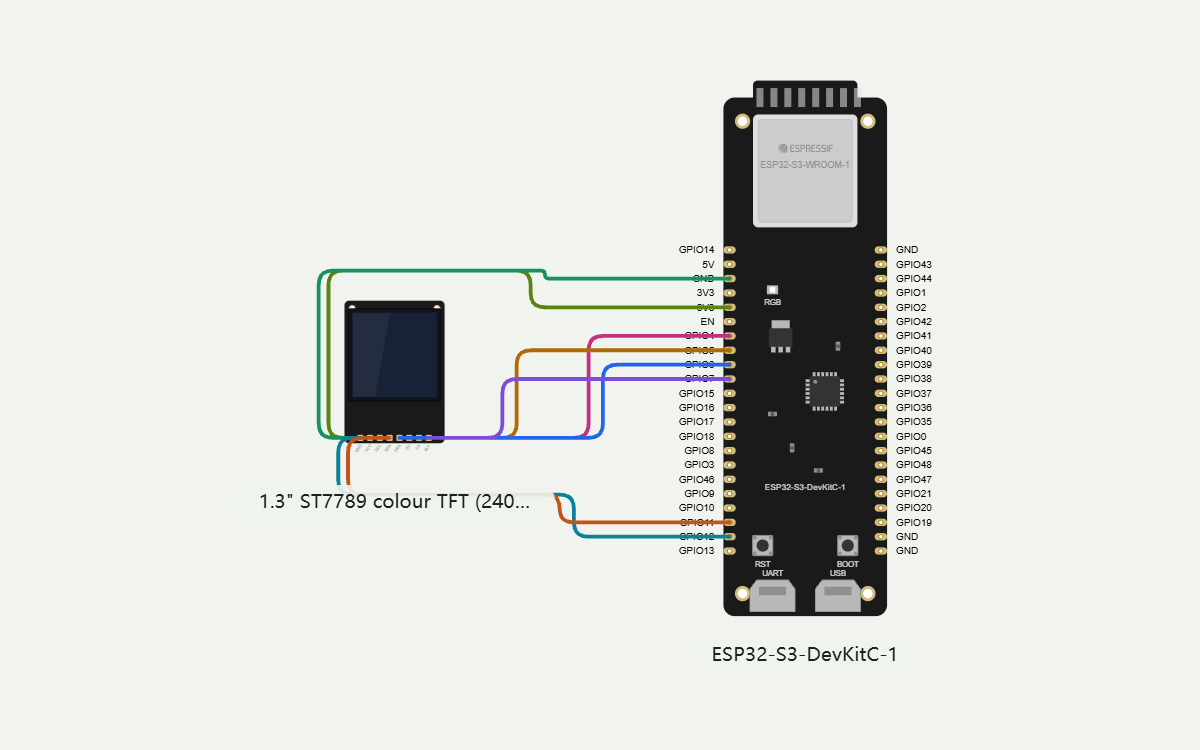
A single-purpose display: an ESP32-S3-DevKitC-1 drives a wired 1.3" 240x240 ST7789 colour TFT, which shows the word "hispark" scrolling right to left like a news ticker, in green on blue. It has no inputs, no network, no settings to make and nothing to save.
Hardware
chip: ESP32-S3 (ESP32-S3-DevKitC-1, N8R8 module, USB micro-USB). — framework: display (LVGL, no network). — parts: name: 1.3" colour TFT, ST7789, 240x240, 8-pin SPI module — driver: catalog block drivers/display_st7789_spi on SPI host 1 (SPI2), 40 MHz, 240x240, no x/y gap, backlight active high, kept on. — pinsAgreed: The person chose the module and left the pins to the expert; the eight pins above are the expert's pick and the person agreed to them. — supply: 3.3 V from the board's 3V3 pin. The module is a 3.3 V part; do not feed it 5 V. — notUsed: The board's addressable LED (GPIO38) and boot button (GPIO0) exist but this product does not use them — the LED stays off, the button does nothing.
Display Behaviour
text: hispark — font: montserrat_48, green 0x00FF00 — background: solid blue 0x0033CC, full screen — animation: A full-screen label scrolls right to left at about 105 px/s: one pass takes about 4 s from the word fully off the right edge to fully off the left edge, then the next pass starts immediately. Implemented as an LVGL label animated by a periodic timer; only the label moves, the background stays still. — backlight: On as soon as the panel has initialised (a few milliseconds after boot) and never turned off; nothing dims or sleeps. With a panel that fails to initialise the backlight never comes on, so the screen is dark — firmware writer's choice, consistent with the failure mode below. — fontWidth: On the panel the word renders about 177 px wide and 46 px tall in montserrat_48 (measured), which makes a pass about 4 s at the chosen speed. — boot: The animation starts as soon as the panel is initialised and runs forever.
Inputs Outputs
No inputs: no touch layer on the module, no button used, no sensor. Output: the panel only.
Connectivity
None. The display framework brings no Wi-Fi, no Bluetooth product feature, no cloud and no phone app. The screen cannot be changed remotely in this version.
Onboarding
Nothing to set up on the device: no Wi-Fi, no account, no code to enter. The firmware is put on the board from the product page in Chrome, Edge or Firefox 151+ on a computer over the board's USB cable. The ESP32-S3 also has a virtual device, so the same build can be run there to see it work without hardware.
Day To Day
Powered over USB, the board boots and the word scrolls. Unplug and replug: it boots and scrolls again, from the start of a pass. There is nothing to operate.
Factory Reset
Nothing product-specific is stored, so a factory reset changes nothing visible. The serial console's built-in factory_reset command still erases the firmware's settings store and reboots; no reset button sequence is added (the person did not ask for one).
Serial Console
Present over USB with the built-in help/reboot/mem/factory_reset plus uptime, chip, version, log and heap commands, and the diagnostics the display framework's composition brings: a task watchdog (10 s, panics on starvation), a boot counter in NVS ('Boot #N') and a boot-reason line. None of these touch the screen, the panel pins or the animation — firmware writer's choice from the catalog defaults.
Power
USB powered (board's micro-USB, or 5 V on the 5V pin). Not battery operated; the board's regulator and LED keep drawing current in sleep, and this product does not sleep anyway.
Failure Modes
panelNotAnswering: If the panel does not initialise (a loose or wrong wire), the firmware logs 'ST7789 panel: <step> failed (<err>) — no display; fix the wiring and reboot' on the serial console and keeps running; the screen stays dark. It does not retry — after fixing the wiring, reboot (console `reboot` or unplug/replug). The ticker waits up to 20 s (polling every 50 ms) for a display to exist and then logs 'no display after 20 s' and stops — firmware writer's choice. — powerCut: Nothing is saved, so a power cut loses nothing; the animation restarts at boot. — wrongColours: If the picture is inverted or red and blue are swapped, that is a module setting (invert / bgr) in the panel block's configuration, changed in the build, not a wiring change.
What The Owner Must Do
Wire the module as listed (3V3, GND, and the six signals to GPIO12/11/4/5/6/7). · Flash it from the product page over USB from a computer, or run it on the virtual device. · Look at the panel: if the colours are inverted or red/blue swapped, report it — the panel's invert/bgr setting is then flipped in the build.
Unknown
The actual module's invert and bgr settings cannot be known before it is powered on the person's own wiring; the firmware starts with invert on, bgr off (the catalog default for ST7789 240x240 modules). · The panel-not-answering path could not be exercised: nothing on the virtual device can break the SPI link, so a loose-wire panel is untested until it is tried on real hardware. · The panel bring-up is made non-fatal by an edit to a code file the firmware engine regenerates; if the tree is ever regenerated from template.yaml, that edit is lost and a failing panel would abort the boot instead of logging and continuing. It must be re-applied then.
Virtual Device
The ESP32-S3 virtual device does bring the panel up and shows the picture: tested there, the word scrolled at 104 px/s on a blue 0x0033CC background in green 0x00FF00, centred, with nothing else on the screen, the on-board LED off and the boot button inert.
Published 28 Nov 2026
Firmware and source licensed Apache-2.0; photos and text CC-BY-4.0.
The firmware includes open-source software — open-source licences and notices; some components may be used only with Espressif chips.
Built with ESP ZeroCode AI — describe a device, get production firmware.
Terms of Service · Privacy Policy · Cookie Policy