ESP ZeroCode AI · Community
Gravity Balls (Testing)
I want to build a game where there are 24 multi-colored balls which are simulated inside a 3d box on the esp_mosaico screeen. The balls should react to tilting of the device in all the axis as per gravity
What it does
- Screen-edge arena — the box is bounded by the edges of the screen, with no door and no openings, so a ball can never fall out or leave the view
- 3D ball arena — multi-coloured shaded balls live in a simulated 3D box rendered in real time on the ESP-Mosaico's LCD
- Full 3-axis tilt — gravity follows tilt on all three axes including the one pointing out of the screen: tilt the top edge toward you and the balls roll toward you, tilt it away and they roll to the back wall
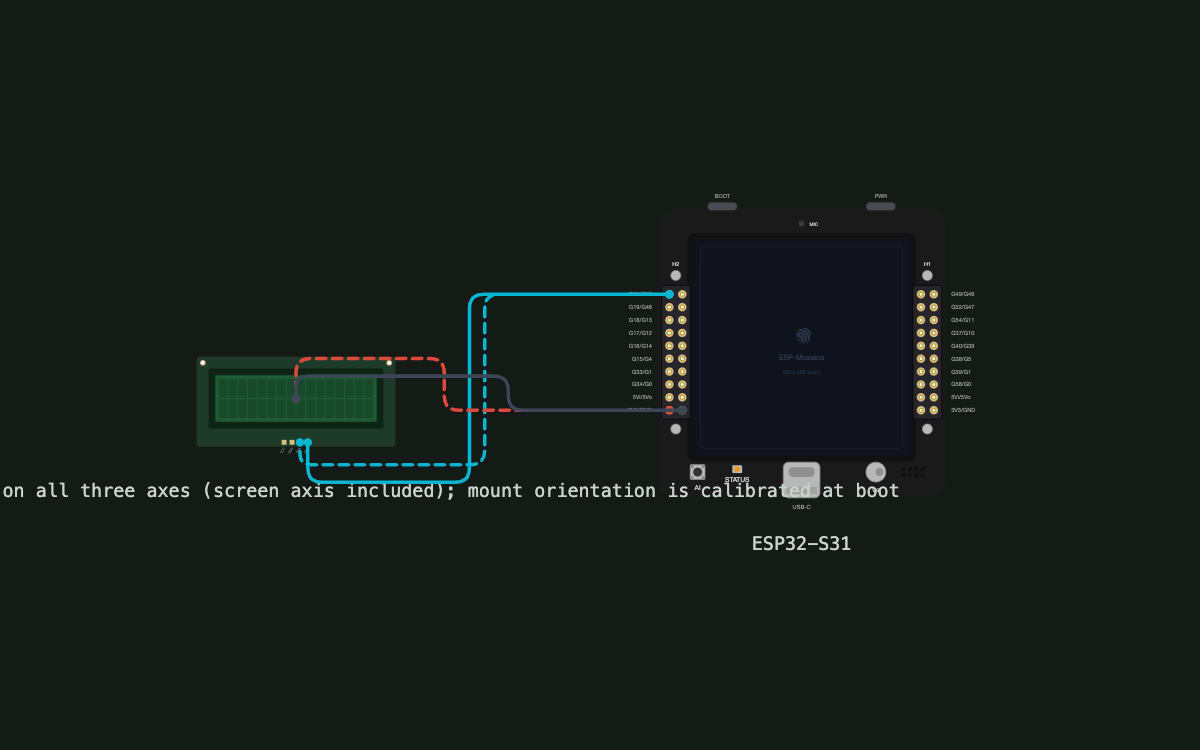
- Tilt sensing — external 3-axis accelerometer on the board's I2C bus (the ESP-Mosaico has no accelerometer on board)
- Jump on tap — touching the arena kicks the balls near your finger upward, so a pile can be stirred up or flicked apart
- Jump feedback — each jump plays a soft whoosh through the onboard speaker with a quick buzz from the vibration motor
- Settings menu — a gear button in the top-right corner of the screen opens a settings panel over the arena
- Ball count setting — chooses how many balls are in play, in multiples of 2; ball size stays fixed, so the count is what changes how full the box looks (default: 12)
- Gravity setting — steps through off, light, normal, strong and heavy; off is the zero-gravity mode, and the default is strong so the balls feel heavy from the first power-on
- Zero-gravity mode — the bottom rung of the gravity setting switches gravity off entirely, and the balls then drift and ricochet forever on perfectly elastic collisions with each other and the walls
- Sandbox, not a game — no goal, no score and no rounds; nothing to win and nothing to fail
- Touch controls — the screen is the only control: tap the arena to jump, tap the gear to open settings
- Settings remembered — ball count, gravity and mode are saved and restored on the next power-on
- Visible depth — the box is drawn in true perspective, so a ball rolling toward you grows as it approaches and shrinks as it recedes; the front-to-back axis is something you can see, not something you infer
- Real-ball pace — the balls behave like real balls in a container: crisp bounces, a quick settle once they come to rest, and a tilt response that keeps up with the hand so a shake sends the whole pile flying
Manual
Device Type
Gravity Balls is a handheld gravity sandbox built on the ESP-Mosaico devkit. It is a screen-filling arena of multi-coloured balls that obey gravity taken from how the device is held: tilt it in any direction, including tipping the top edge toward you or away, and the balls roll that way, bounce off the walls and settle. It is deliberately not a game — no goal, no exit, no score, no rounds — so it is closer to a fidget toy. A settings menu in the top-right corner lets the player choose how many balls are in play, how strong gravity is, or switch to a zero-gravity mode where the balls keep bouncing forever. The arena is bounded by the screen edges with no openings, so no ball can ever be lost off the screen. The balls are tuned to move like real balls in a container: fast, crisp and quick to settle. The only hardware beyond the devkit itself is one external accelerometer on the board's I2C bus.
Hardware
chip: esp32s31 — board: esp-mosaico — gpios: GPIO0: I2C master SDA (board's existing bus) for the external accelerometer — GPIO1: I2C master SCL (board's existing bus) for the external accelerometer — peripherals: part: 3-axis accelerometer (I2C) — role: tilt / gravity vector input, all three axes — interface: I2C, on the board's existing I2C master bus (SDA GPIO0 / SCL GPIO1) alongside the touch panel — note: The ESP-Mosaico has no accelerometer on board, so tilt sensing requires this one external part. It taps the bus the board already brings out (GPIO0/GPIO1), so no new pins are consumed and no wires are re-routed. GPIO5 was rejected as a candidate because it is a reserved flash/system pin on this chip. A 3-axis part is essential: a tilt-only or 2-axis sensor could not report the axis perpendicular to the screen, which is what makes the balls roll toward and away from the player. — onboardUsed: CO5300 LCD — the arena and the settings panel · CST9217 capacitive touch — jump taps and the settings menu · ES8311 codec + speaker — jump whoosh and settings ticks · Vibration motor on GPIO8 — haptic confirmation on jump · Status LED on GPIO3 — boot indication and sensor-fault blink — onboardUnused: AI button (GPIO7) · Boot button (GPIO61) — storage: Ball count, gravity and mode are stored in the chip's internal NVS flash, so no external memory part is needed and the settings survive a power cycle. — power: USB powered by the devkit; no battery, no sleep modes.
Inputs
kind: accelerometer — label: Device tilt — hardware: external 3-axis accelerometer on the board's I2C bus (SDA GPIO0 / SCL GPIO1) — behavior: Read continuously at a high rate (target ~100 Hz) with only light low-pass filtering, so the gravity vector keeps up with the hand instead of trailing it. All three axes are used, and this is the point of the feature: the axis perpendicular to the screen is a full participant, not a discarded value. Tip the device's top edge toward you and the balls roll toward you and pile against the front wall, growing as they come; tip it away and they roll to the back wall; lay it flat and they drop to the bottom of the box. The sensor's axes are mapped onto the screen's axes at calibration, so the part can be stuck on in any physical orientation and the mapping still lines up. Only implausible readings are clamped — the clamp is a guard against a corrupt sample throwing the arena, and it deliberately does not flatten the screen-perpendicular axis. The gravity setting scales this vector; in zero-gravity mode the tilt is ignored entirely. · kind: touch — label: Screen taps — hardware: onboard CST9217 capacitive touch panel over the LCD — behavior: The only player control. A tap on the arena kicks upward the balls near the finger: each ball within a small radius of the touch point gets an upward impulse that falls off with distance, so a tap stirs whichever part of the pile it lands on while balls elsewhere keep rolling. A tap on empty floor, away from any ball, does nothing but a ripple. A tap on the gear button in the top-right corner opens the settings panel over the arena. While the panel is open, taps drive the panel's own controls and do not jump the balls; tapping outside the panel or on its close button dismisses it and returns to the arena.
Outputs
kind: display — label: Ball arena — hardware: onboard CO5300 LCD — behavior: The whole screen is the arena, drawn in true perspective rather than a flat projection, so a ball moving toward the player visibly grows and one moving away shrinks. That size change is what makes the front-to-back axis readable — without it, motion along the screen-perpendicular axis would be invisible and the balls would look stuck. The box projects to fill the screen corner to corner: the near frame sits flush against the screen edges and the far wall is a smaller rectangle inset within it, so no ball can leave the visible area at any depth. Balls are drawn as shaded spheres in their own colours from a fixed palette, and shading plus perspective together keep a settled pile reading as three-dimensional. Because the near wall is the one the player looks through, it is invisible for drawing only — a ball resting against it is still drawn in full and never hidden behind the screen edge. · kind: display — label: Settings panel — hardware: onboard CO5300 LCD, drawn over the arena — behavior: A compact panel anchored under the gear button in the top-right corner. It holds two controls. The ball-count stepper moves in steps of 2. The gravity control steps through a single ladder of strengths: off, light, normal, strong and heavy. The off rung is the zero-gravity mode, so there is no separate toggle for it — turning gravity off is just the bottom of the same control. The panel also carries a 'reset to defaults' entry. Each control shows its current value and applies immediately, so the effect is visible on the balls behind the panel as it is changed. · kind: speaker — label: Whoosh and ticks — hardware: onboard ES8311 codec and speaker — behavior: A soft whoosh accompanies a jump, and a small tick confirms a settings change. Audio never blocks the render loop. · kind: haptics — label: Buzz on jump — hardware: onboard vibration motor on GPIO8 — behavior: A brief motor pulse fires with the jump whoosh, so the jump is felt as well as heard and seen. No continuous vibration. · kind: led — label: Status LED — hardware: onboard status LED on GPIO3 — behavior: Briefly indicates boot, then stays off during use so it does not distract from the arena. It blinks slowly if the accelerometer is not detected.
Business Logic
powerOnBehavior: On power-up the firmware initialises the LCD, touch panel, codec and the I2C accelerometer, maps the sensor's axes onto the screen's axes, loads the stored settings from flash, and comes straight up into the arena with those settings already applied — there is no title screen or start prompt to get past. If the accelerometer does not answer on the I2C bus, the arena still runs: gravity falls back to a fixed downward direction, a small warning appears next to the gear button, and the status LED blinks slowly, so the toy is still usable (and the settings menu still works) rather than being bricked by one missing part. — automationRules: The walls are the screen edges. There is no opening anywhere in the boundary, and any ball that reaches an edge bounces back inside, so balls can never be lost off the screen. · Gravity is the full tilt-derived 3D vector, applied on all three axes. The screen-perpendicular component drives the balls toward or away from the player; it is never dropped, zeroed or squashed in the name of stability. · The physics runs at a high internal rate and is advanced through a fixed-timestep accumulator with multiple substeps per frame, so the ball speeds are not capped by the frame rate and fast balls cannot step past a wall between two samples. Collision with the walls is resolved against the swept path of each ball, not just its end position. · Ball speed, bounce and settling are tuned to the feel of real balls in a container: restitution is high enough that bounces are crisp rather than mushy, rolling drag is low so the balls keep their momentum, and a small amount of friction brings a pile to rest quickly instead of letting it shiver. The effect is that a tilt sends the whole pile moving at once and it settles within a moment or two of the device stopping. · Tilt filtering is deliberately light so the response is immediate; the trade-off is a little more hand-tremor energy in the arena, which the ball-to-ball collisions absorb before it is visible. · A tap kicks upward only the balls within a small radius of the touch point, with the impulse fading with distance; balls outside that radius are unaffected, and a tap on bare floor does nothing but a ripple. · Ball count is chosen in steps of 2 (default 12, ceiling 24). Ball radius is fixed, so the count is the only thing that changes how full the box looks. When the count is raised, new balls are spawned at free positions that do not overlap the existing balls, so changing the setting never wedges two balls inside each other. · Gravity is a ladder of strengths applied as a multiplier on the tilt-derived vector: off, light, normal, strong, heavy. The off rung is the zero-gravity mode; there is no separate toggle. The default is strong, so the toy feels heavy and lively the first time it is switched on; the ladder reaches heavier still for players who want the balls to feel like lead. · In zero-gravity mode, collisions between balls and with the walls are perfectly elastic — no energy is lost and restitution is 1.0 — so the balls keep moving indefinitely. A tiny speed floor and periodic renormalisation keep floating-point drift from either freezing the motion or letting total energy creep upward. · In normal gravity modes collisions are slightly damped, so a pile of balls comes to rest instead of shivering forever. · Settings are written to flash when they change, and the arena continues running behind the settings panel so the player sees the result immediately. — dayToDayOperation: Pick the device up and tilt it. Tip the top edge toward you and the balls roll toward you, swelling in size as they come and piling against the front of the box; tip it away and the whole pile slides back and shrinks into the distance; lay it flat and the balls drop to the bottom. The motion is quick and weighty, like a jar of marbles — a flick of the wrist sends everything across the arena and it settles a moment after you stop. Tap a ball or the pile under your finger and the balls near your fingertip hop, so you can stir one corner of the pile without disturbing the rest. If the pile gets boring or there are too many balls to see the floor, tap the gear in the top-right corner, step the ball count up or down, change how strong gravity is, or switch gravity off entirely and watch the balls carom around the arena, never stopping and never leaving the screen. Close the panel and the new settings stay until they are changed again, even across a power cycle.
Factory Reset
trigger: The settings panel carries a 'reset to defaults' entry, which restores the default ball count, gravity and mode. A device that is unresponsive for any other reason is recovered by unplugging and replugging USB, or by holding the onboard boot button while power is applied to enter the ROM bootloader for a reflash. — effect: Ball count, gravity and mode return to their factory defaults — 12 balls and strong gravity. Because those values live in flash, a power cycle alone does not clear them; the way back is the reset entry in the settings panel.
Failure Modes
scenario: Accelerometer not detected on the I2C bus (miswired or dead part) — behavior: Gravity falls back to a fixed downward direction, a warning shows beside the gear button and the status LED blinks slowly. The arena, the jump, the settings menu and zero-gravity mode all still work; only the screen-perpendicular axis is lost, so the balls can still be rolled around the screen but cannot be sent toward or away from the player. · scenario: Accelerometer reading noisy or briefly lost mid-use — behavior: The last good gravity vector is held and the arena keeps running with the previous gravity direction, so a momentary bus hiccup does not throw the balls across the screen. · scenario: A ball moves fast enough to cross a wall between two simulation steps — behavior: This is the specific risk created by high ball speeds in a small arena. It is handled by advancing the physics in substeps and testing each ball's swept path against the walls rather than only its end position, plus a maximum-speed clamp well above the speeds the settings can produce. A ball therefore cannot tunnel out of the arena, which would otherwise look exactly like the ball falling out of the box. · scenario: Very high ball speeds make the pile jitter rather than settle — behavior: Bounce restitution and rolling drag are tuned so energy leaves the system at a plausible rate — balls stop within a moment or two of the device coming to rest. If the arena is still too lively at the heaviest gravity setting, the settle damping scales with the gravity setting rather than being fixed. · scenario: Frame rate drops when many balls are in play at high speed — behavior: The simulation is stepped on a fixed time base with the physics capped per frame, so a slow frame advances motion in bigger steps rather than the toy running at half speed. Sphere shading detail degrades before the motion does. · scenario: Settings change mid-flight — behavior: Ball count changes spawn only at free positions, so raising the count never overlaps a new ball with a moving one; lowering the count removes balls from the simulation immediately without disturbing the others. A gravity change takes effect on the next physics step and does not teleport anything. · scenario: Power blip or unplug — behavior: The arena restarts with the stored settings applied; nothing in play is lost because nothing about the running simulation is stored. · scenario: Touch panel unresponsive — behavior: Jumps and the settings menu are unavailable, but tilt still works, so the balls can still be rolled around. Recovery is a power cycle.
Custom Behavior
The simulation is tuned for this toy rather than being a generic engine, and three of its choices are load-bearing. First, the gravity vector is the complete three-axis tilt vector: the component perpendicular to the screen drives the balls toward and away from the player and is never clamped away, which is what makes the arena feel like a real box rather than a flat tray. Second, the projection is true perspective, so motion on that perpendicular axis is visible as a change in ball size; a flat projection would make the same physics look like nothing was happening. Third, the physics is substepped with swept-path wall collisions and a speed clamp, because balls tuned to move like real balls are fast enough to step through a wall in a single frame — and a ball escaping the arena would look identical to the bug the player is trying to report. Axis mapping is calibrated at boot so the accelerometer can be mounted in any orientation without changing the arena's sense of up, and tilt filtering is kept light so the response tracks the hand rather than lagging behind it.
Published 1 Oct 2026
Built with ESP ZeroCode AI — describe a device, get production firmware.
Terms of Service · Privacy Policy