ESP ZeroCode AI · Community
Garage Light
Matter enabled light with on/off, brightness, and color functionality on ESP32-C6
What it does
- Matter light device — on/off, brightness and color exposed to the smart home (Wi-Fi + Thread)
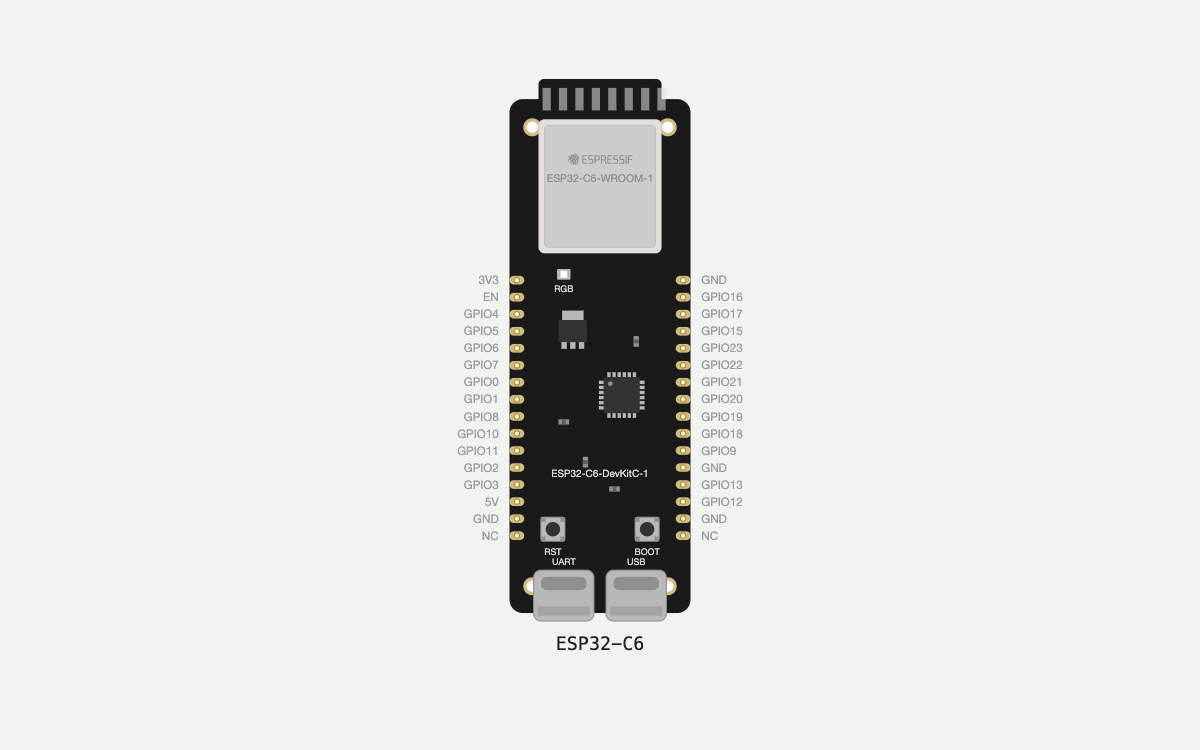
- Light output is the devkit's own onboard WS2812 RGB LED (GPIO 8) — no external parts or wiring
- Onboarding with QR code and manual pairing code
- Factory reset & re-commission — long-press the onboard BOOT button (~6s, GPIO 9)
- Local on/off — short press of the BOOT button (GPIO 9) toggles the light, no app needed
- Status feedback on the same LED — slow blue breathe while uncommissioned/pairing, green flash on successful join, white pulse while identifying (Matter Identify)
- Smooth fade on every brightness/color change instead of a hard jump
- After a power cut the light restores its last state (on/off, brightness, color) from flash
Manual
Device Type
A Matter-enabled smart light built on the ESP32-C6-DevKitC-1. It exposes standard Matter light functionality — on/off, brightness (Level Control) and color — to any Matter ecosystem (Apple Home, Google Home, Alexa, SmartThings) over Wi-Fi or Thread. It is a bench/demo build: the light output is the devkit's own single onboard WS2812 RGB pixel, so no external hardware, wiring or mains connection is involved. The problem it solves is having a fully standards-compliant, controllable light with zero external parts, ideal for validating the Matter light data model, commissioning flow and control latency.
Hardware
chip: esp32c6 — board: esp32-c6-devkitc-1 — gpios: gpio: 8 — role: onboard WS2812 RGB LED data line (light output + status indication) · gpio: 9 — role: onboard BOOT button (local on/off toggle + factory reset) — peripherals: name: Onboard addressable RGB LED (WS2812) — type: led_strip — pins: GPIO8 (data, driven via RMT) — notes: Single pixel. Serves as both the light output and the device status indicator. · name: Onboard BOOT button — type: button — pins: GPIO9 — notes: Already on the devkit. GPIO9 is also the C6 boot strapping pin — the button is held low at power-up to enter ROM download mode, so the runtime factory-reset gesture must be a press while already running, not a press held through reset. · name: Onboard USB-C — type: power+console — notes: Powers the board and carries the serial console used for flashing and reading the commissioning codes. — notIncluded: No external LED strip, no relay, no dimmer, no mains switching. Nothing is wired beyond the devkit itself.
Inputs
kind: button — label: BOOT button (GPIO9) — short press — hardware: onboard BOOT button on GPIO9, active low — behavior: Toggles the light on/off locally. On -> off stores the on-level so it can be restored; off -> on returns to the remembered brightness and color. The change is reflected to the Matter controller and to all subscribed ecosystems as a state change. · kind: button — label: BOOT button (GPIO9) — long press (~6s) — hardware: onboard BOOT button on GPIO9, active low — behavior: Factory reset: while held, the LED pulses amber to acknowledge; on completion the fixture wipes its Matter fabrics and network credentials, reboots, and comes back up uncommissioned (blue breathing). The light resumes as a fresh, unpair-able-to-anyone device. · kind: matter-command — label: Smart home commands (on/off, level, color) — hardware: Matter over Wi-Fi or Thread, via the commissioned fabric — behavior: App, voice assistant, scene or automation sets on/off, brightness (0-100% or 0-254 raw level), hue/saturation, or color temperature. Applied with a short fade rather than a jump.
Outputs
kind: rgb_led — label: Light output (onboard WS2812, GPIO8) — hardware: single addressable RGB pixel — behavior: Off = dark. On = the commissioned color at the requested brightness. All colors are produced by mixing the single RGB pixel; color temperature is emulated by mixing warm and cool approximations, so the reported temperature is a close approximation rather than a true multi-channel white. · kind: indicator — label: Status indication (same WS2812 pixel) — hardware: single addressable RGB pixel, shared with the light output — behavior: Uncommissioned: slow blue breathe. Commissioning in progress: faster blue blink. Join success: brief green flash, then handed back to the light state. Identification (Matter Identify) or long-press acknowledgment: white/amber pulse. Status indications temporarily take over the pixel and the previous light state is restored when they finish.
Connectivity
stack: matter — transport: wifi — purpose: Primary commissioning and control path; the device joins the home Wi-Fi network during commissioning. · stack: matter — transport: thread — purpose: Optional path using the C6's 802.15.4 radio, for Thread-border-router homes. The device is a Thread end device/SED when commissioned this way.
Commissioning
method: matter_qr_code_and_manual_pairing_code — payload: The firmware derives the standard Matter onboarding payload (Vendor ID, Product ID, discriminator, setup passcode) and prints both the QR code payload string and the 11-digit manual pairing code to the serial console at first boot, and shows them again whenever the device is uncommissioned. — instructions: 1) Flash the firmware and open a serial monitor at 115200 baud. 2) Put the light within range and note the QR payload / manual pairing code printed at boot — the LED breathes blue to show it is ready. 3) In the Matter app (Apple Home, Google Home, Alexa, SmartThings) choose 'Add device' and scan the QR code, or enter the manual pairing code. 4) Pick Wi-Fi or Thread as the transport when prompted. 5) On success the LED flashes green and the light appears in the app; it can then be assigned to a room/name and controlled like any other bulb.
Business Logic
powerOnBehavior: Restore last state. On every power-up the device loads on/off, brightness and color from non-volatile storage and applies them (with a fade-in from dark so there is no harsh flash). If no stored state exists (fresh device or after a factory reset) the light comes up off, leaving the LED free to show commissioning status. The restored state is also pushed into the Matter attributes so the controller shows the correct values. — automationRules: No local schedules, timers, or on-device automation. All automation is delegated to the Matter ecosystem (scenes, schedules, voice, motion triggers sent from the hub). — dayToDayOperation: The light lives on the Matter fabric. Day to day the user controls it from an app, voice, or an automation; commands land within a couple of hundred milliseconds and fade in/out smoothly. The physical BOOT button gives a no-phone way to toggle the light. State changes made on either side are kept in sync: a local button press is reflected in the app, and an app command lights the pixel. The state is persisted so power cuts are invisible to the user.
Factory Reset
trigger: Hold the onboard BOOT button for about 6 seconds while the device is running (the LED pulses amber to confirm the gesture is registered). — effect: Deletes all Matter fabrics and stored network credentials, clears the stored light state, and reboots the device into the uncommissioned state: the LED breathes blue, the commissioning codes are printed to the serial console again, and the device is ready to be onboarded by any controller as if new. Releasing the button early cancels the gesture with no effect.
Failure Modes
scenario: Wi-Fi/network drops while commissioned — behavior: The light keeps its current on/off, brightness and color and keeps responding to the BOOT button locally. Matter attribute changes are retained; the firmware retries the connection in the background with backoff. No user-visible flicker or reset of light state. · scenario: Hub / cloud unreachable (remote commands fail) — behavior: Local control (button and any local state) continues to work. Remote commands simply time out at the controller; the light does not go dark. When the hub returns, the light re-subscribes and reports its current state. · scenario: Power blip / full power loss — behavior: Device reboots and restores the last persisted state, fading up from dark. Because it is mains/USB powered there is no battery to protect; a brown-out reset during a write is tolerated by writing the persisted state atomically and ignoring a corrupt record, falling back to defaults. · scenario: Not yet commissioned / commissioning fails or times out — behavior: The LED keeps breathing blue indefinitely so the state is obvious, and the commissioning codes remain readable on the serial console. A failed join attempt can be retried without a reset; a bad credential is discarded. · scenario: BOOT button held through power-up — behavior: The ESP32-C6 enters ROM download mode (the button's strapping role) instead of running the firmware; the board is recovered by releasing the button and power-cycling. Documented so it is not mistaken for a fault. · scenario: Two controllers fight over the light — behavior: Standard Matter behavior — the last command wins and the resulting state is reported back to all subscribed fabrics, so every app converges on the same on/off, level and color.
Power Management
batteryPowered: false — notes: USB-C powered from the devkit. No battery, sleep or wake-source behavior is implemented; the radio stays available for Matter subscriptions. A future battery variant would need the light state to survive deep sleep and the button to act as a wake source.
Custom Behavior
name: Shared LED: light output vs. status — detail: There is only one pixel on the devkit, so the light and the status indicator share it. Status patterns (blue breathing, green flash, white/amber pulse, Identify) are layered above the light state: they take the pixel for their duration and then hand it back to the last light state exactly as it was. This is why commissioning status is still visible even though the device's nominal job is to be a light. · name: Single-pixel color temperature emulation — detail: An RGB pixel has no dedicated white channel, so ColorTemperature is emulated by mixing measured warm and cool RGB approximations. Brightness is applied as a global scale so that dimming does not shift the perceived hue.
Published 10 Sep 2026
Built with ESP ZeroCode AI — describe a device, get production firmware.
Terms of Service · Privacy Policy