ESP ZeroCode AI · Community
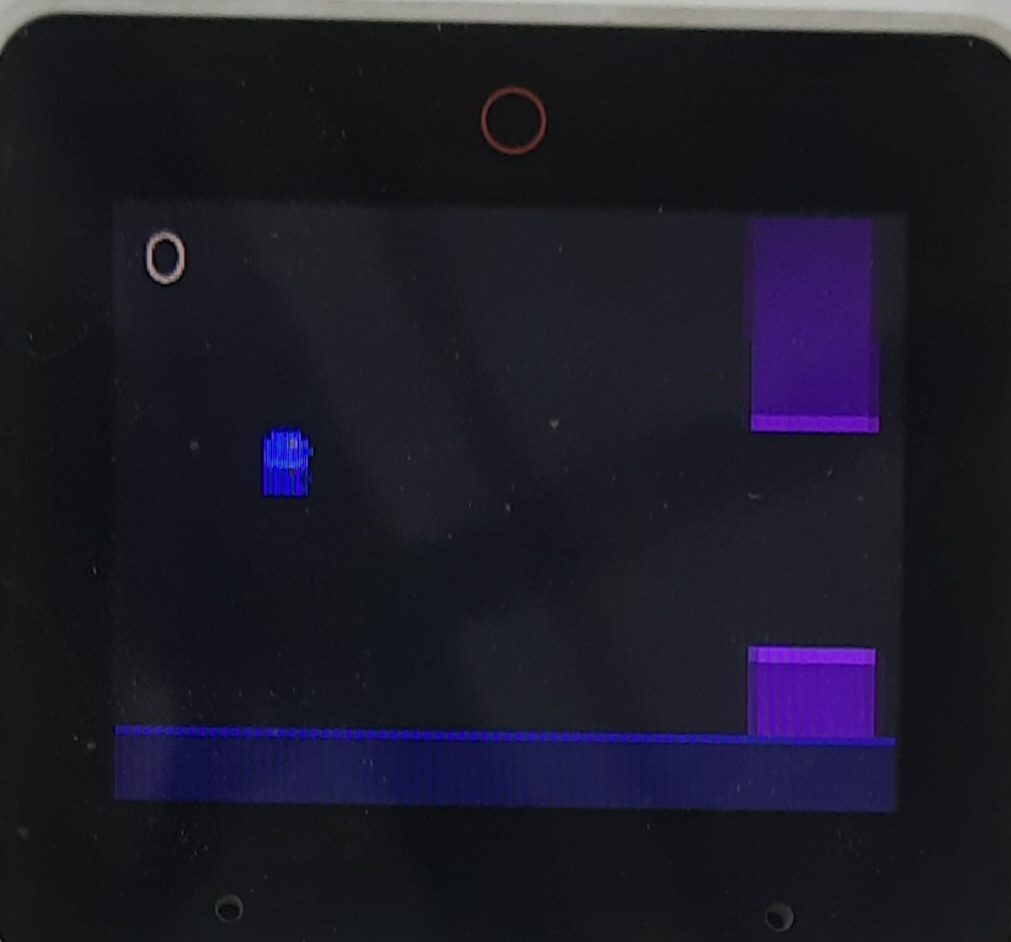
Flappy Bird
ESP32 S3 box dock V1.0 display; M5 button module make a flappy bird game, game ends when bird hits a wall, on every button click the bird flies up, without button click Build a Flappy Bird game for my ESP32 board. HARDWARE - Board: ESP32 (change if different) - Display: 128x64 SSD1306 OLED over I2C (SDA = GPIO 21, SCL = GPIO 22) - Input: one push button on GPIO 4 (active LOW, internal pull-up, debounced) - Optional: passive buzzer on GPIO 5 for sound effects GAME RULES 1. A small bird sits at a fixed X position near the left side of the screen. 2. Gravity constantly pulls the bird down, and its speed increases the longer it falls. 3. Pressing the button makes the bird "flap": it gets a quick upward velocity boost. 4. Pairs of vertical pipes scroll from right to left at a constant speed. 5. Each pipe pair has a gap. The gap's vertical position is random, but the gap size is fixed. 6. The player scores +1 each time the bird passes a pipe pair. 7. The game ends if the bird hits a pipe, the ground, or the top of the screen. GAME STATES - START screen: shows "FLAPPY BIRD" and "Press button to start". - PLAYING: the game loop runs at about 30-60 FPS using non-blocking timing (millis), not delay(). - GAME OVER screen: shows the score and the high score. Pressing the button restarts the game. DETAILS - Draw the bird as a small sprite or a filled circle. - Draw pipes as filled rectangles. - Show the live score in the top corner during play. - Save the high score in non-volatile memory (Preferences/NVS) so it survives power-off. - Increase the difficulty slowly (e.g. pipes get slightly faster every 5 points). - Use constants at the top for gravity, flap strength, pipe speed, gap size, and pin numbers so they are easy to tune. OUTPUT - Give me the complete code, the libraries to install , the wiring table, and short upload instructions.
What it does
- Game display — the board's own 2.4" 320x240 colour LCD in landscape (panel on the board's internal bus, GPIO4-7/48; do not touch those pads)
- Flap input — M5 Unit Button, signal on GPIO 21, active LOW with internal pull-up, debounced on press edge
- Sound effects — flap blip, score ding and crash tone through the board's own ES8311 codec + speaker; the board's top mute button silences them
- Start screen — "FLAPPY BIRD" and "press button to start"
- Playing — gravity constantly pulls the bird down (fall speed increasing), each press gives one upward flap impulse
- Pipes — pairs scroll right to left at a constant speed, fixed gap size, random gap height
- Scoring — +1 per pipe pair passed, live score shown in the top corner during play
- Difficulty ramp — pipes get slightly faster every 5 points
- Game over — ends on pipe, ground or ceiling hit; shows the score and the high score; a press restarts
- High score saved in flash (NVS) so it survives power-off; shows as "NEW BEST" when beaten
- Non-blocking game loop at a steady ~60 FPS (no delay() stalls, one frame per tick)
- Tunable constants at the top of the code — gravity, flap strength, pipe speed, gap size, spacing and pin numbers
- Tap the touchscreen or press the board's BOOT button (GPIO 0) to flap as well — playable with no external part attached
- Runs fully offline — no Wi-Fi, account or phone app; plug in USB-C and play
- High score is permanent — it never resets on its own and there is no in-game way to clear it (erase by re-flashing the board)
Manual
Device Type
A self-contained single-player arcade game built on an ESP32-S3-BOX devkit. It turns the devkit into a pocket Flappy Bird machine: the board's own colour LCD is the screen, its speaker makes the sound, and one external button is the flap control. Nothing is networked — no Wi-Fi, no account, no phone app. Power it over USB-C and it plays.
Hardware
chip: esp32s3 — board: esp32-s3-box (ESP32-S3-BOX with DOCK), referenced from the board registry so the firmware uses the devices already soldered on — gpios: gpio21: flap button signal — external M5 Unit Button, input with internal pull-up (active LOW). Free on both the BOX and the BOX-3, confirmed free on the user's DOCK V1.0 — gpio0: BOOT button (on-board, already wired) — second flap input — gpio3: LCD touch interrupt (on-board) — third flap input, tap anywhere — gpio4_5_6_7_48: LCD panel (on-board) — do not assign — gpio45: LCD backlight PWM (on-board) — do not assign — gpio2_15_16_17_46_47: ES8311/ES7210 audio codec (on-board) — do not assign — gpio1: mute button (on-board) — hardware audio mute, no firmware work needed — gpio8_18: I2C bus for the on-board peripherals — do not assign — peripherals: part: M5 Unit Button — role: flap control — wiring: IN -> GPIO21, VCC -> 3V3, GND -> GND (3 wires: it is a HY2.0-4P unit with its own buffered output and LED, not a bare switch — the unit's own supply pin must be connected) · part: 2.4" 320x240 colour LCD with capacitive touch — role: game screen + second flap input — wiring: already on the board · part: ES8311 audio codec + speaker — role: sound effects — wiring: already on the board
Inputs
kind: button — label: Flap (M5 Unit Button) — hardware: GPIO 21, active LOW, internal pull-up, ~30 ms debounce — behavior: One press = exactly one flap impulse. On the start screen it starts the game; while playing it flaps; on the game over screen it restarts. Holding the button does not auto-repeat — one press, one flap. · kind: button — label: BOOT button (on-board) — hardware: GPIO 0 — behavior: Identical to the flap button, so the game is fully playable with no external part attached. · kind: touch — label: Touchscreen tap — hardware: on-board capacitive touch panel — behavior: A tap anywhere on the screen acts as one flap / start / restart, so the game can be played from the screen alone.
Outputs
kind: display — label: Game screen — hardware: on-board 320x240 colour LCD, landscape orientation — behavior: START: title "FLAPPY BIRD", a hint to press to start, and the best score. PLAYING: the bird at a fixed X near the left, pipes scrolling right-to-left, live score in the top corner, and a simple sky/ground so the motion is readable. GAME OVER: "GAME OVER", this run's score, the high score (with "NEW BEST" if it was just beaten) and a press-to-restart hint. · kind: speaker — label: Sound effects — hardware: on-board ES8311 codec + speaker — behavior: Short synthesised tones, no audio files needed: a short rising blip on flap, a bright two-note ding when scoring, and a low descending tone on the crash. The board's hardware mute button silences the game; sound never delays the game loop.
Business Logic
powerOnBehavior: Boots straight to the start screen within about a second (no splash screen, no setup). The saved high score is loaded from NVS and shown on the start screen immediately. — automationRules: None — no schedules, no network, no smart-home stack. — dayToDayOperation: The game runs one non-blocking frame loop pinned to ~60 FPS; every frame advances physics, moves the pipes, redraws the scene and polls the inputs. Gravity keeps pulling the bird down and its fall speed builds while falling; a flap press sets an upward velocity that gravity then eats. Pipe pairs spawn at a fixed horizontal spacing with a fixed gap height at a random vertical position, and scroll left. Passing a pair scores a point; every 5 points the pipe speed steps up slightly, so runs get harder. A collision with a pipe, the ground or the ceiling ends the run immediately. Both the physics and the difficulty ramp are expressed as named constants at the top of the source so they can be tuned by editing one number. — savingAndQuitting: There is no save-and-quit: a run is over the moment the bird hits something. Leaving the game means cutting power, which is safe — a new best score is written to NVS the moment it is beaten, and only a new best is written, so flash wear is negligible.
Factory Reset
trigger: None. The game exposes no settings, no credentials and no user-writable state other than the high score. — effect: Not applicable — power-cycling always returns the device to the start screen with its saved high score intact. There is deliberately no in-game way to clear the high score; the only way to erase it is to re-flash the board.
Failure Modes
scenario: The external M5 Unit Button is unplugged or miswired — behavior: The game keeps running: the BOOT button and the touchscreen still flap. A loose plug mid-run does not crash the firmware. · scenario: The touch panel does not respond — behavior: The external button and BOOT button remain fully functional; nothing else changes. · scenario: The audio codec or speaker fails to initialise — behavior: The game plays silently and stays fully playable; audio failure is logged and never blocks the frame loop. · scenario: Power is cut mid-run — behavior: The run is lost, the high score survives in flash, and the device boots straight back to the start screen. · scenario: No Wi-Fi / no network at all — behavior: Nothing changes — the product has no network dependency by design. · scenario: The flap button is stuck held down — behavior: The firmware triggers on the press edge only, so the bird gets one flap rather than repeated flaps, and the player can still restart by releasing and pressing again.
Power Management
batteryPowered: false — note: USB-C powered from the DOCK. No sleep states: the screen is the product, so the game simply runs while power is applied.
Custom Behavior
tuningConstants: A single block of named constants at the top of the game source controls: gravity (px/frame^2), flap impulse (px/frame), maximum fall speed, pipe width, gap height, initial pipe speed, speed increase per difficulty step, points per difficulty step, and pipe spacing. — startingValues: Frame target 60 FPS; bird X fixed at ~60 px; gravity ~0.35 px/frame^2; flap impulse ~5 px/frame upward; fall speed capped at ~6 px/frame; pipe width ~52 px; gap height ~80 px; pipe speed ~1.8 px/frame rising by ~0.15 px/frame every 5 points; pipe spacing ~150 px. All are starting points to be tuned on the bench. — storage: The high score is a single integer in NVS so it survives power-off. It is permanent by design: never cleared by the device, never cleared by the player, and only ever overwritten by a higher score. — displayOrientation: The 320x240 panel is drawn in landscape, which supersedes the coarser 128x64 rendering the original brief assumed — sprites and pipes are drawn at the panel's real resolution.
Published 15 Oct 2026 · version 2
Firmware and source licensed Apache-2.0; photos and text CC-BY-4.0.
The firmware includes open-source software — open-source licences and notices; some components may be used only with Espressif chips.
Built with ESP ZeroCode AI — describe a device, get production firmware.
Terms of Service · Privacy Policy