ESP ZeroCode AI · Community
ESPArcade
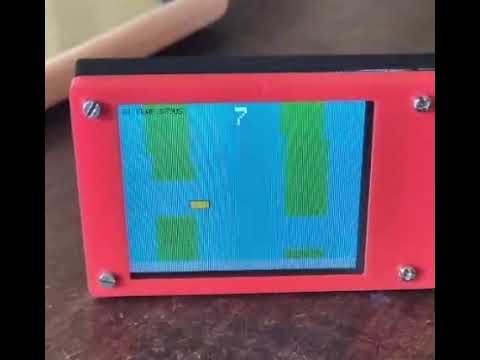
An esp32 s3 based flappy bird game which runs on a 2.8 inch TFT touch display. Consists of 2 modes i.e manual and automatic , packed in a custom case in the form of a desk accessory.
What it does
- 2.8" ILI9341 TFT game screen (320x240 landscape) on SPI — SCLK 12, MOSI 11, MISO 13, CS 10, DC 9, RST 14, backlight PWM on GPIO 21
- Touch anywhere on the screen to flap — the whole panel is one button; only pen-down matters, tap position is ignored
- No calibration screen — pen-down is detected from the XPT2046's T_IRQ line (GPIO 16) plus a pressure read, so the panel works out of the box and no coordinate mapping is stored
- Endless obstacle play — pipes scroll in from the right, passing a pair scores a point, touching a pipe or the ground ends the run
- Live score on screen plus a high score that survives power cycles (stored in NVS flash)
- Difficulty ramp — pipe gap tightens and scroll speed rises as the score climbs
- Single game, no menu — boots straight to the ready screen, tap to fly, tap to retry after game over
- On-board boot button (GPIO 0) also flaps — a hardware fallback if the touch panel misreads
- On-board RGB LED — blue = ready, green = playing, red = game over
- Silent device — no buzzer or speaker; all feedback is visual on the TFT plus the RGB LED
- High-score reset — hold the boot button 6 s on the ready screen to clear the saved best score
- USB powered, display always on — no sleep states, no battery management in this version
Manual
Device Type
summary: ESPArcade — a palm-sized, single-game arcade device. It reproduces the classic one-button Flappy Bird loop on a 2.8 inch TFT with a resistive touch panel: tap the screen and the bird flaps, gravity and scrolling pipes do the rest. It exists to be a finished, self-contained little arcade machine — power it from any USB source and it is instantly playable, with the best score remembered across power cycles. — formFactor: ESP32-S3-DevKitC-1 with a classic 2.8 inch ILI9341 TFT + XPT2046 touch module wired on top. Landscape orientation, screen filling the device face, no enclosure assumed in this version. — scope: Deliberately narrow: one game, no menu, no network, no audio. Everything the device needs is on the board plus the one display module.
Hardware
chip: esp32s3 — board: esp32-s3-devkitc-1 — gpios: pin: GPIO12 — role: LCD SPI SCLK (+ XPT2046 T_CLK) — net: spi · pin: GPIO11 — role: LCD SPI MOSI (+ XPT2046 T_DIN) — net: spi · pin: GPIO13 — role: LCD SPI MISO (+ XPT2046 T_DO) — net: spi · pin: GPIO10 — role: LCD chip select — net: spi · pin: GPIO9 — role: LCD data/command — net: signal · pin: GPIO14 — role: LCD reset — net: signal · pin: GPIO21 — role: LCD backlight (LED pin) — driven high at init, PWM-capable if a dim/brightness effect is wanted — net: pwm · pin: GPIO15 — role: XPT2046 touch chip select — net: spi · pin: GPIO16 — role: XPT2046 touch IRQ (pen-down) — the device's entire touch input — net: signal · pin: GPIO0 — role: On-board BOOT button — secondary flap input, also the high-score reset gesture — net: signal · pin: GPIO38 — role: On-board addressable RGB LED — state indicator — net: signal — peripherals: part: 2.8" ILI9341 TFT LCD (240x320), SPI — notes: Run in landscape (320x240). Shares one SPI bus with the touch controller: display and touch each have their own CS, so every transfer must be a transaction that asserts exactly one CS. Module VCC 3V3, backlight through the LED pin, driven high during init so the screen is lit before the first frame. · part: XPT2046 resistive touch controller — notes: Used purely as a contact sensor, not as a pointing device. Pen-down comes from T_IRQ (GPIO 16) going low, confirmed by a pressure (Z-axis) read over SPI; no X/Y coordinates are sampled, mapped or stored, which is why the panel needs no calibration and why a fresh panel or a remounted module works on the first try. A pressure reading is used rather than the IRQ alone so a stuck-low IRQ line cannot pin the bird to the ceiling. — power: 5 V from the devkit's USB connector; the module is fed from the board's 3V3 rail. Total draw is dominated by the backlight, well within a USB port.
Inputs
kind: touch-screen — label: Tap anywhere on the screen — hardware: XPT2046 resistive panel over SPI (T_CS 15, T_IRQ 16) — behavior: Any pen-down during play flaps the bird — the tap location is irrelevant, the whole screen is one big button. In the ready state a tap starts a run; on the game-over screen a tap (after a short lockout, ~600 ms, so the crash tap does not instantly restart) begins a new run. Only the transition to pen-down counts: holding a finger down does not produce repeated flaps. · kind: button — label: On-board BOOT button — hardware: GPIO0, on-board, active-low — behavior: Acts as a second flap button — same press semantics as a tap, for players who prefer a physical button, and as a fallback if the panel is damaged or unplugged. On the ready screen only, a 6 s hold clears the saved high score. The button is never used during boot — holding it through a reset puts the chip into ROM download mode.
Outputs
kind: display — label: 2.8" TFT game screen — hardware: ILI9341 in landscape, 320x240 — behavior: Draws every state at roughly 30-40 fps by rendering the moving elements (bird, pipes, score) rather than repainting the full frame. States: (1) Ready — title, the bird hovering at the left, high score, and a 'TAP TO FLY' prompt; (2) Playing — scrolling pipe pairs, the bird with a slight rotation that follows its vertical velocity, current score drawn large in the upper-middle; (3) Game Over — 'GAME OVER' banner, the run's score, the high score, and a 'NEW BEST!' marker when the run beat it, plus 'TAP TO RETRY'. A brief white flash on crash sells the impact. · kind: led — label: On-board RGB LED state indicator — hardware: WS2812 addressable LED on GPIO38 — behavior: Blue = ready/idle, green = a run is in progress, red = game over. Readable at a glance across a room so bystanders can see whose turn is going badly. One of the three colours is always lit.
Commissioning
method: None — the device is playable on first power-up — payload: Nothing. No credentials, no network, no calibration step, no stored offsets. — instructions: Power it over USB and tap. There is no onboarding flow: the resistive panel is used as a single contact sensor rather than a coordinate device, so it needs no calibration and there is nothing for the user to set up. This is a deliberate product decision — a calibration gate in front of a one-button game would be pure friction for no accuracy gain, since a tap anywhere on the screen does the same thing.
Business Logic
powerOnBehavior: Display and backlight come up, the panel is initialised, and the ready screen appears with the title, the stored high score and the tap prompt. RGB LED blue. No button needs to be touched and no setup screen ever appears — the device is playable within about a second of power being applied. — automationRules: Gravity: the bird accelerates downward every frame; a flap sets its upward velocity to a fixed impulse, so tap cadence — not tap strength or location — is the whole skill. Velocity is capped so the bird never tunnels through a pipe in one frame. · Scoring: a point is credited once, when the bird's X passes the right edge of a pipe pair. Collision uses a slightly inset hitbox (a few pixels smaller than the drawn bird) so near-misses feel fair rather than punishing. · Difficulty: up to ~20 points the pipe gap and scroll speed stay at their starting values; beyond that the gap shrinks and the speed rises with score, clamped at a maximum so the game stays hard rather than impossible. · Pipe spawning: a new pair appears on a randomised gap position (kept clear of the ceiling and floor) at a fixed horizontal spacing, so the rhythm is consistent even as speed changes. · High score: written to NVS only when a run ends and only if it beat the stored value — not on every point, to spare the flash. · The high-score reset gesture is only armed on the ready screen, so a long press during play never derails a run. — dayToDayOperation: Plug in USB. The screen lights, the ready screen appears with the best score. Tap to start; tap to flap through the pipes; a mistimed tap ends the run and the game-over screen shows the score and the best. Tap again to go straight back into a new run. Power-cycling returns to the same ready screen with the high score intact. There is no maintenance step — no recalibration, no pairing, no app.
Factory Reset
trigger: Hold the on-board BOOT button for 6 seconds while the ready screen is showing. — effect: Clears the stored high score from NVS and shows a short confirmation, returning to a fresh ready screen. Since there is no configuration, no credentials and no calibration to lose, this is the entire reset — a corrupt or unwanted state cannot survive it. Recovery from a genuinely stuck device is the standard hardware route: hold BOOT, tap RESET, and the chip comes up in ROM download mode for reflashing.
Failure Modes
scenario: Touch panel unplugged or dead (bad wiring, failed controller) — behavior: The screen still draws normally and the ready screen stays visible; the BOOT button still flaps, so the device remains fully playable with the physical button. No hang or reboot loop. · scenario: Touch misreads / ghost taps from a worn or pressure-heavy resistive panel — behavior: A pen-down only counts when the IRQ line is low AND a pressure read confirms real contact, and a minimum interval between accepted flaps is enforced — so a noisy panel or a stuck IRQ cannot machine-gun flaps. · scenario: T_IRQ line stuck low (short or damaged trace) — behavior: The pressure confirmation keeps it from being read as a permanent touch; the game stays playable on the BOOT button and the screen never locks up. · scenario: NVS read fails or the stored high score is corrupt — behavior: Falls back to a high score of 0 and continues; the device never blocks boot on storage problems. · scenario: Power blip or unplugged mid-run — behavior: No state is written except the high score, so nothing is corrupted; on power-up the device returns to the ready screen. A run in progress is simply lost. · scenario: Backlight wired but never driven high (blank-looking screen) — behavior: Firmware drives the backlight pin high during display init, before the first frame, so the first thing the user sees is lit content rather than a dark screen that looks dead.
Power Management
batteryPowered: false — sleepMode: none — USB powered, display always on — note: A battery version is anticipated later. This firmware is intentionally kept simple: no deep sleep, no display blanking, no battery management. Adding a battery later means adding sleep/idle handling and a low-battery indication, not restructuring the game loop.
Custom Behavior
gameLoop: Fixed-timestep update (physics and collision at a constant rate) decoupled from render, so gravity and pipe speed stay identical regardless of frame time. The scrolling background and pipes are drawn as tiles/sprites into the panel rather than a full-screen blit per frame, keeping the SPI bus within budget. — tapSemantics: One physical flap per pen-down edge. The touch controller's IRQ line drives pen-down detection so the panel is not polled at full rate; the post-crash lockout (~600 ms) is deliberately long enough to swallow the tap that killed the bird and short enough not to feel like a stall. — noCalibrationByDesign: Because the game reads contact, not position, the resistive panel's natural lack of calibration never surfaces to the user. Coordinates would only become necessary if a future version added on-screen buttons or a game-select menu — at that point a stored coordinate mapping would be added, along with a calibration step to produce it. — noNetworkPromise: The device has no Wi-Fi, cloud or smart-home behaviour of any kind — a deliberate product decision, not an omission. It works identically with no network present.
Published 14 Nov 2026 · version 2
Firmware and source licensed Apache-2.0; photos and text CC-BY-4.0.
The firmware includes open-source software — open-source licences and notices; some components may be used only with Espressif chips.
Built with ESP ZeroCode AI — describe a device, get production firmware.
Terms of Service · Privacy Policy