ESP ZeroCode AI · Community
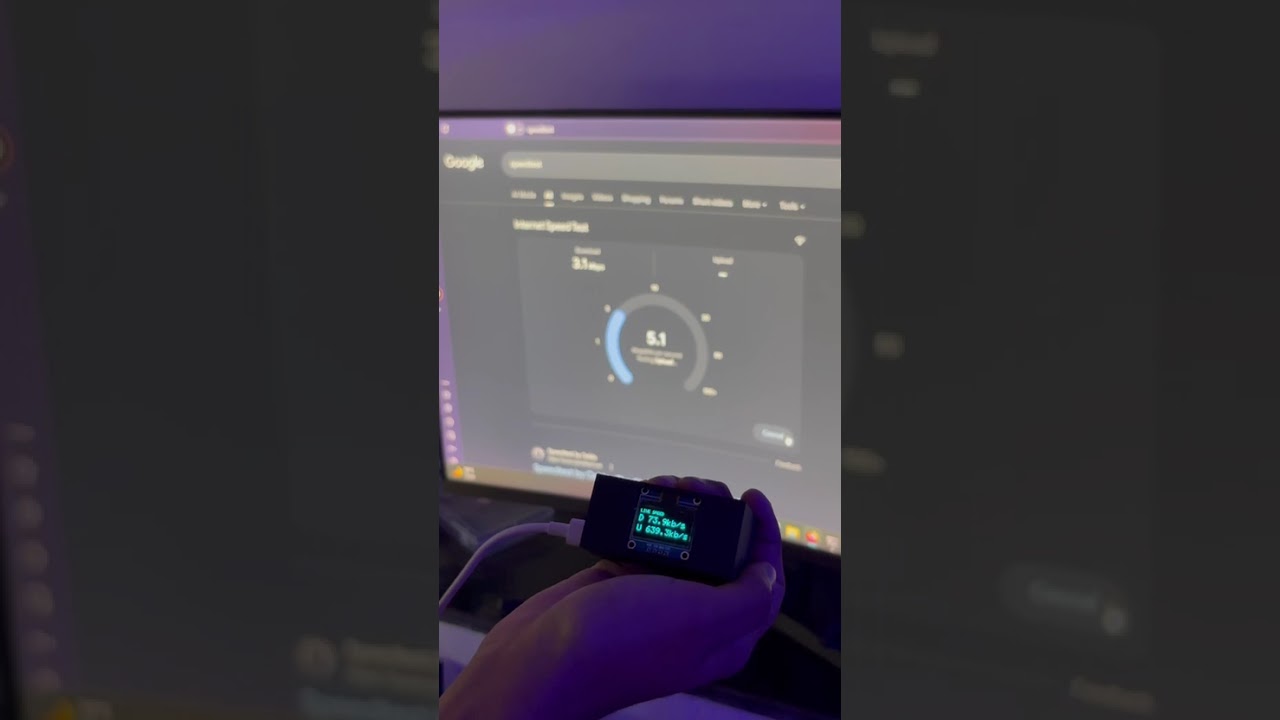
ESP32S3 Wifi dongle
USB Wi-Fi dongle built on the ESP32S3 — plugs into a laptop as an ethernet card, bridges to 2.4 GHz Wi-Fi, with an OLED showing network, speed and uptime
What it does
- USB Wi-Fi dongle — the board enumerates as a USB CDC-NCM network card and forwards raw Ethernet frames in both directions (transparent layer-2 bridge, no NAT, no DHCP server). Host: Windows 11, Linux and macOS 13+ work with their built-in drivers; Windows 10 would need one
- Joins a 2.4 GHz Wi-Fi network as a station and reconnects automatically after a drop; Wi-Fi power save is disabled for throughput
- The USB network link comes up only after Wi-Fi connects, and goes down again whenever Wi-Fi drops, so the host never routes traffic into a dead link
- Setup — the Wi-Fi network name and password are compiled into the firmware at build time (defaults "ssid" / "password"); changing networks means rebuilding and reflashing
- OLED status display — 128x64 SSD1306 on I2C at address 0x3C, SDA GPIO8 / SCL GPIO9, probed at boot
- Display page 1 — network name and password (shown in plain text by choice, with a build option to hide it behind "(hidden)"), long values scroll as a marquee, with a large Connecting / Connected line at the bottom
- Display page 2 — live download and upload throughput in Mb/s, switching to kb/s below 1 Mb/s, refreshed each second
- Display page 3 — uptime as HH:MM:SS (or days/hours/minutes past a day) and total downloaded / uploaded since boot
- Pages rotate every 5 seconds while connected and stay on the connection page before Wi-Fi joins; screen redraws 4 times per second
- If Wi-Fi has not joined after about 30 seconds, the OLED switches from "Connecting" to a clear "No Wi-Fi — check SSID/password" message while the device keeps retrying in the background
- A missing or unresponsive display only logs a warning — the bridge keeps working without it
Manual
Device Type
A USB Wi-Fi dongle: an ESP32-S3 that appears to a laptop as a plug-in ethernet card and bridges its traffic to a 2.4 GHz Wi-Fi network at layer 2. It solves 'this machine needs Wi-Fi' without a driver hunt — a built-in USB network adapter, plus a small OLED that tells you, at a glance, which network it is on, how fast it is going and how much it has moved. It is a purely local device: no cloud account, no app, no pairing, nothing to log into.
Hardware
chip: esp32s3 — board: ESP32-S3-DevKitC-1 — gpios: GPIO8 — OLED SDA (I2C) · GPIO9 — OLED SCL (I2C) · OLED VCC — 3V3, OLED GND — GND · GPIO19 / GPIO20 — NOT AVAILABLE: they are the native USB D-/D+ pair the dongle function rides on. Never assign a peripheral to them. · GPIO38 — on-board WS2812 LED, unused by this product · GPIO0 — on-board BOOT button, unused by this product during normal operation (it is the ROM download-mode button for recovery) — peripherals: part: SSD1306 128x64 monochrome OLED, I2C address 0x3C — wiring: SDA GPIO8, SCL GPIO9, VCC 3V3, GND — notes: Addressed and probed before use. 4-pin modules pull-ups are usually on the module; the devkit's I2C driver uses the new i2c_master API and the esp_lcd panel driver for the SSD1306. — buildConfiguration: Kconfig menu with: Wi-Fi SSID (default "ssid"), Wi-Fi password (default "password"), display enabled (default yes), I2C SDA (default 8, validated against GPIO19/20), I2C SCL (default 9), I2C address (default 0x3C), show-password (default yes; when off the display prints "(hidden)"). — usbMode: USB CDC-NCM (not RNDIS, not ECM). Native USB port carries the dongle function; the UART port is the one used for flashing.
Inputs
kind: network — label: Traffic from the host laptop — hardware: USB CDC-NCM receive path — behavior: Every ethernet frame the host sends is handed straight to the Wi-Fi driver for transmission, but only while Wi-Fi is connected; frames arriving while disconnected are dropped. Nothing is inspected, rewritten or filtered — this is a transparent layer-2 bridge. · kind: physical — label: No buttons, no sensors — hardware: The devkit's BOOT button exists but is not used by this product — behavior: There is nothing to press during normal use. Plug it in and it does its job.
Outputs
kind: display — label: SSD1306 128x64 OLED — three rotating status pages — hardware: I2C at 0x3C, redrawn 4 times per second; 5x7 font with integer scaling, 1-bit framebuffer, text clipped at the screen edges — behavior: Page 1 CONNECTION: "SSID:" and the network name, "PASS:" and the password (plain text, or "(hidden)" when the show-password option is off); values longer than 21 columns scroll as a marquee; a large "Connecting" or "Connected" line along the bottom. Page 2 LIVE SPEED: "LIVE SPEED" heading, then a large "D x.xMb/s" and "U x.xMb/s", each computed once per second from the change in the byte counters — shown in kb/s below 1 Mb/s. Page 3 UPTIME: a large HH:MM:SS clock (switching to "Dd HHhMMm" after a day), then large "D <total>" and "U <total>" bytes since boot as B / KB / MB (1 decimal) or GB (2 decimals). Pages rotate every 5 seconds, and only once Wi-Fi is connected — before that it stays on page 1. If Wi-Fi has not connected within about 30 seconds the status line becomes "No Wi-Fi — check SSID/password" while retries continue. · kind: network — label: USB link state reported to the host — hardware: CDC-NCM link-state callback — behavior: The link is reported UP only while the Wi-Fi station is actually connected, and DOWN the moment it drops. The laptop therefore shows a connected adapter exactly when there is real connectivity behind it, and never a silent dead link.
Connectivity
stack: Wi-Fi — transport: 2.4 GHz station (STA) — purpose: The uplink the dongle bridges to. Joins at boot with compiled-in credentials and reconnects automatically forever. Wi-Fi power save is turned off for throughput. · stack: USB CDC-NCM — transport: Native USB (full speed) — purpose: Presents the dongle to the host as an ethernet card and carries raw ethernet frames both ways. The station's own MAC address is used as the NCM MAC. No IP stack runs on the device: no DHCP server, no NAT, no netif.
Commissioning
method: build-time configuration — there is no runtime onboarding — payload: Wi-Fi SSID and password (plus optional display and I2C settings), set before building. They are the Kconfig options CONFIG_APP_WIFI_SSID and CONFIG_APP_WIFI_PASSWORD, in the "USB Wi-Fi Dongle" menu, defaults "ssid" and "password". — instructions: 1. Set the network name and password, either with idf.py menuconfig (USB Wi-Fi Dongle menu, "Wi-Fi network name (SSID)" and "Wi-Fi password") or by adding CONFIG_APP_WIFI_SSID="MyNetwork" and CONFIG_APP_WIFI_PASSWORD="MyPassword" to sdkconfig.defaults. Leave the I2C defaults unless the OLED is wired differently. 2. Limits are enforced at BUILD time, not by silent truncation: the SSID is at most 32 characters and the password at most 63, and an over-long value stops the build with a message naming the option. An empty password means an open network; anything else requires WPA2-PSK, so the dongle will not silently join an open twin of the SSID. 3. Build for esp32s3. 4. Flash through the board's UART port, not the native USB port — the native port is the dongle itself and is already owned by the USB stack. 5. Unplug and move the cable to the native USB port. 6. Windows 11, Linux and macOS 13+ recognise the ethernet card with their built-in NCM driver; the laptop gets its address from the real router over the bridge. To change networks, repeat the whole cycle with new credentials — there is no runtime way to set them, and the console deliberately cannot: its only product command is a read-only 'bridge' status command that prints the SSID and masks the password. The password is compiled into the image (readable in the binary and shown on OLED page 1, which is why the show-password option exists).
Business Logic
powerOnBehavior: Probe the OLED at 0x3C; if it answers, start the display task showing page 1 with "Connecting". Start the USB device stack with the network link reported DOWN. Join the configured Wi-Fi network. On success: register the receive callback, disable Wi-Fi power save, flip the link state to UP so the host's card comes alive, and begin page rotation. On failure: keep retrying, and after about 30 seconds turn the status line into a clear "No Wi-Fi — check SSID/password". — automationRules: Link state follows Wi-Fi state exactly: up on join, down on loss, with no manual step and no latch. · Pages only rotate while connected; before the first connection the screen stays put. · Display trouble never stops the bridge: if the panel is absent the firmware logs a warning and carries on bridging. — dayToDayOperation: Plug it in and use the network. The laptop sees an ordinary wired connection with an address from the router; traffic flows at a few Mb/s (the ceiling of USB full speed and 2.4 GHz Wi-Fi). The OLED cycles connection details, live speed and uptime every five seconds. The speed page's figures are per-second rates; the totals on the uptime page accumulate since power-on. Unplugging and replugging restarts the device and zeroes the totals.
Factory Reset
trigger: None — there is no stored state to reset — effect: Credentials live in the firmware image, and nothing is written at runtime, so there is nothing to wipe. Recovery from a bad or unwanted state is always a reflash: hold BOOT while plugging into the UART port to enter ROM download mode, then flash again. The USB byte counters and uptime reset on every unplug.
Failure Modes
scenario: Wrong SSID or password, or the router is off — behavior: Retries in the background indefinitely. USB link stays DOWN so the laptop shows no network (rather than a dead one). After about 30 seconds the OLED status line reads "No Wi-Fi — check SSID/password" with the configured network name still on screen, so the mistake is visible. · scenario: Wi-Fi drops while the host is using it — behavior: The receive callback is unregistered, link state goes DOWN, the host tears the connection down cleanly, and the OLED returns to the connection page. Reconnection is automatic and the link comes back up on its own. · scenario: Router reachable but no internet — behavior: Indistinguishable from success at layer 2 — the device joins and the link goes up. The laptop's own diagnostics report the lack of internet; the dongle does not pretend otherwise. · scenario: No OLED connected, or it does not answer at 0x3C — behavior: One warning in the log and nothing else. All bridging, reconnection and link-state behaviour is unaffected. · scenario: Host sends traffic while Wi-Fi is down — behavior: Frames are dropped rather than queued; transmission is attempted only while connected. When the network comes back, the upper layers retry on their own. · scenario: USB send stalls (busy host, hub, slow scheduling) — behavior: The frame is sent with a 100 ms timeout and dropped on failure, and its Wi-Fi buffer is released either way — a stalled host cannot slowly starve the device of memory. · scenario: Power blip or unplug — behavior: Full restart: reconnect, link re-negotiated, uptime and byte totals start again from zero.
Power Management
batteryPowered: false — sleepMode: None. The device is bus-powered and must bridge continuously; it never sleeps.
Custom Behavior
Deliberately a transparent layer-2 bridge, not a router: no NAT, no DHCP server and no IP stack in the device, which is why the host takes an address from the real router and appears on the LAN as an ordinary machine. The consequence is that the network this joins must have a working DHCP server. Two other hard limits sit in the hardware: the radio is 2.4 GHz only (no 5 GHz), and USB full speed caps throughput at a few Mb/s. The device is local-only by design — no cloud, no telemetry, no remote control.
Published 12 Nov 2026
Firmware and source licensed Apache-2.0; photos and text CC-BY-4.0.
The firmware includes open-source software — open-source licences and notices; some components may be used only with Espressif chips.
Built with ESP ZeroCode AI — describe a device, get production firmware.
Terms of Service · Privacy Policy