ESP ZeroCode AI · Community
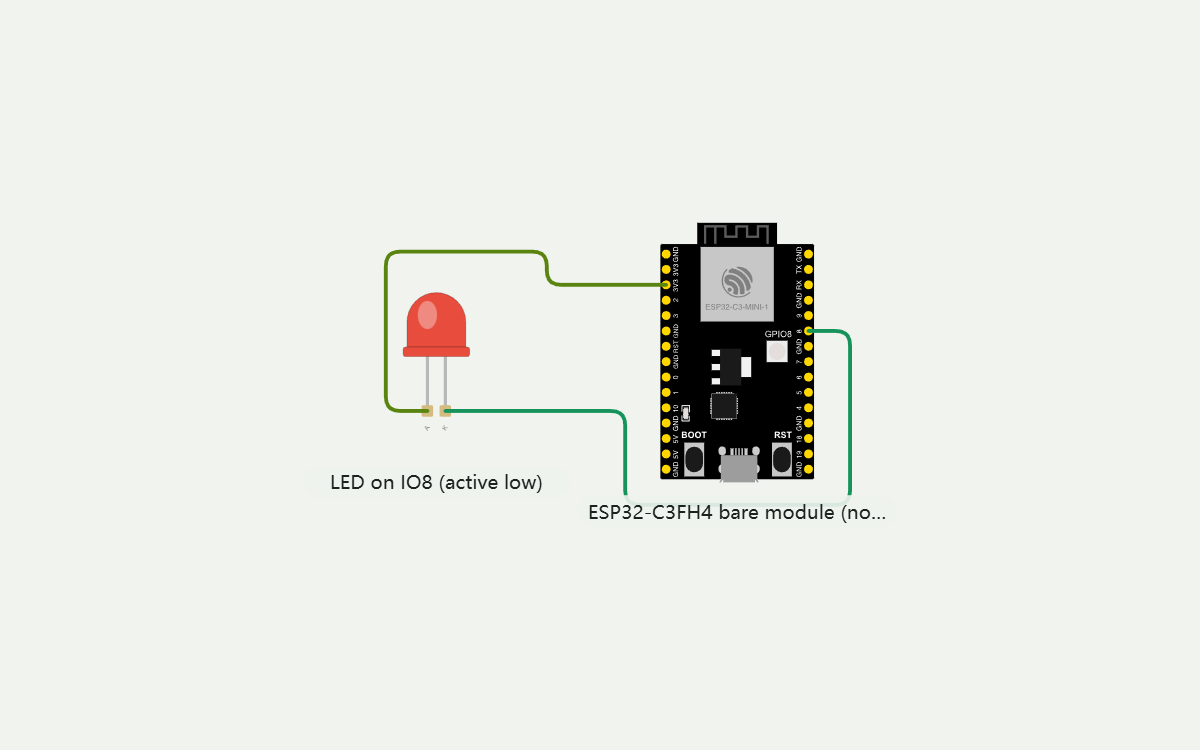
esp32c3fh4io8led
现在有块esp32c3fh4芯片的开发板,io8连接一个led灯,低电平点亮,需要做一个呼吸灯的功能
What it does
- An LED on IO8 breathes: it fades up and down again and again
- The web page has an on/off switch: on = breathing, off = dark
- The web page has a slider from 2 to 10 s setting how long one breath takes
- With no usable Wi-Fi it blinks the LED slowly to say the Wi-Fi has to be set up
- The phone joins the device's own network and opens a page there to type the home Wi-Fi name and password
- While it connects to the home Wi-Fi the LED fast-blinks
- Once connected the LED stays solid for 3 s, then goes dark
- Once it is on the home Wi-Fi, the light is controlled from the phone over that network
Manual
What it is
A small ESP32-C3FH4 board whose single LED on IO8 glows with a breathing effect (gradual fade up and down), switched on and off and speed-set from a phone browser. The phone reaches the page over the home Wi-Fi once the device has been given that network's name and password; the first setup is done from the phone on the device's own small network.
Hardware
chip: ESP32-C3 (ESP32-C3FH4, 4 MB embedded flash); Wi-Fi 2.4 GHz only — board: esp32c3_module — bare module, no devkit board; the board model is not to be confirmed further, the module is what there is — parts: id: led1 — part: LED (single colour, the person's own) — wiring: A (anode) via the person's own series resistor to board 3V3; K (cathode) to board GPIO8 — driven: Active low: GPIO8 low = lit, GPIO8 high = dark. Dimming by LEDC PWM on GPIO8, PWM frequency above hearing and above visible flicker (my choice). GPIO8 is an ESP32-C3 strapping pad read only while GPIO9 selects download mode; free for this at run time. — usb: USB socket wired to the module's native USB pads GPIO18/19; used for flashing, the serial console and power.
Led states
precedence: slow blink > fast blink > 3 s solid > breathing / dark. Only one at a time. — slow_blink: 1 s on, 1 s off: no home network saved, or the saved one cannot be reached (router off, password changed, out of range). — fast_blink: 0.2 s on, 0.2 s off: trying to join the saved home network. — solid_3s: lit continuously for 3 s: the join just succeeded. — breathing: PWM fade dark → full → dark over the set period (2–10 s, default 4 s), endlessly: joined, and the switch is on. Shape and PWM are the firmware writer's choice: a raised cosine (half the period up, half down) at 5 kHz, peak at full brightness, updated 50 times a second. — dark: off: the switch is off, or the very first setup just finished.
Page
control_page: The device's own web page, refreshing by itself: one on/off switch labelled "Breathing light" (on = breathing, off = dark) and one speed slider labelled "Breath time (s)" in seconds per breath, 2–10 s, default 4 s. No login. (Labels are the firmware writer's choice.) — setup_page: A product-owned page at /wifi where the home network name and password are typed and saved on the device (password must be at least 8 characters, the writer's choice); the main page redirects there while no network has been set up. Reaching it means joining the device's own ZeroCode-<id> network, whose password is printed in the boot log. — rows: Switch and slider are the only controls: two product rows (a toggle and a 2–10 s slider) on the page; no other device type is composed (firmware writer's choice).
Name in firmware
The product name esp32c3fh4_wifi_led is what the owner sees: it is the page title and heading and the serial console prompt. The internal build name stays zerocode_ai_firmware and shows only on the `firmware:` line of the console `version` command (the firmware writer's choice: that line is the build's identity, not the product's).
Connectivity
plan: The page is reachable on the home Wi-Fi network, no broker, no account, no Home Assistant. Because the Web UI framework alone serves only on the device's own access point and the catalog's plain Wi-Fi station block is refused beside it, the home-network join is custom firmware written for this product (the person accepted this). — page_address: On the home network: http://zerocode-<last 4 hex of the board MAC>.local (mDNS); the home-network IP is printed in the boot log and by the console command wifi-status, for routers that block mDNS. — own_network: The device's own ZeroCode-<id> access point stays up beside the home network as a fallback, so http://192.168.4.1 works even when the home network is down (my choice). It carries the same pages. — network_kind: 2.4 GHz WPA2 home networks; WPA3-only enterprise and captive-portal guest networks do not work. — no_login: No login anywhere: anyone who can reach the device can switch the light and change the speed.
First setup
step1: Flash over USB from the product page on a computer (Chrome, Edge or Firefox 151+). — step2: On boot with nothing saved the LED slow-blinks (1 s on / 1 s off). Join the device's own network ZeroCode-<id> with the password printed in the boot log. — step3: Open the page; it redirects to /wifi. Type the home Wi-Fi name and password and save. — step4: The LED fast-blinks (0.2 s on / 0.2 s off) while it joins. On success it is solid for 3 s, then dark. — step5: Switch the light on from the phone; it breathes. From then on it is reached on the home network.
Day to day
boot: With saved details: fast-blink while joining, 3 s solid, then breathing if the switch is on, dark if it is off (state kept across the power cut). — reconnect: Any later reconnect (router reboot, brief outage) gives the 3 s solid and then goes back to breathing if the switch is on; the switch is only forced to off after the very first setup. — control: Phone on the home network: on/off and the 2–10 s speed slider, saved on the device.
Failure modes
no_network: Slow blink, retry in the background — first retry after 2 s, doubling to a cap of 5 minutes (the product's wait; the writer settled the start and the doubling) — never giving up; the page stays reachable on the device's own network to re-enter the details. — wrong_password: Same slow blink; the details are re-entered from /wifi on the device's own network. — unknown_setting_kept: A failed or interrupted Wi-Fi attempt never loses the last saved details or the light settings, except through a factory reset. — crash: The device reboots itself and comes back with its saved settings (my choice).
Factory reset
how: The serial console command factory_reset over the USB cable: erases the Wi-Fi details, the switch state and the speed, then reboots into first setup (slow blink, own network, /wifi page). — no_button: There is no reset button or gesture on this product.
Power
supply: Powered over the USB socket; no battery. A power cut keeps every saved setting.
Owner must supply
The LED and its series resistor on GPIO8, wired as in the diagram (already in place). · A USB socket wired to the module's GPIO18/19 for flashing, console and power. · A computer with Chrome, Edge or Firefox 151+ and a USB cable to flash the first time. · A phone on the home Wi-Fi to control it, and the home Wi-Fi name and password typed once on the setup page. · A 2.4 GHz WPA2 home network (the chip has no 5 GHz).
Published 28 Nov 2026
Firmware and source licensed Apache-2.0; photos and text CC-BY-4.0.
The firmware includes open-source software — open-source licences and notices; some components may be used only with Espressif chips.
Built with ESP ZeroCode AI — describe a device, get production firmware.
Terms of Service · Privacy Policy · Cookie Policy