ESP ZeroCode AI · Community
ESP JUMP
一台小小的掌上游戏机,用带屏幕和按钮的开发板做成:跳一跳游戏
What it does
- 一台掌上游戏机,玩谷歌恐龙跳一跳游戏:恐龙一直向前跑,跳过仙人掌
- 按侧面那颗 AI 键跳一下,点屏幕也能跳一下
- 障碍物只有仙人掌,没有飞龙,所以不需要蹲下
- 平时用板载的 65mAh 锂电池玩,插上 USB 时一边充电一边玩
- 屏幕上显示当前分数,最高分在关机后仍然保留
- 跳的时候一声轻“哔”,每 100 分响一声,撞到仙人掌一个下坠音
- 撞到仙人掌时震动马达抖一下
- 右上角显示电量百分比,快没电时提示一下再正常关机保住最高分
- 开机直接跑起来,撞了以后按 AI 键或点屏幕立刻重来
Manual
Overview
A pocket-sized handheld game console running a Chrome-dinosaur endless runner. The dinosaur always runs to the right; the player jumps over cacti. One button (the side AI button) and a tap on the 480x480 touch screen both make it jump. Score grows with distance, the best score survives a power-off, sound comes from the on-board speaker and the vibration motor pulses on a crash. Battery powered with USB-C charging.
Hardware
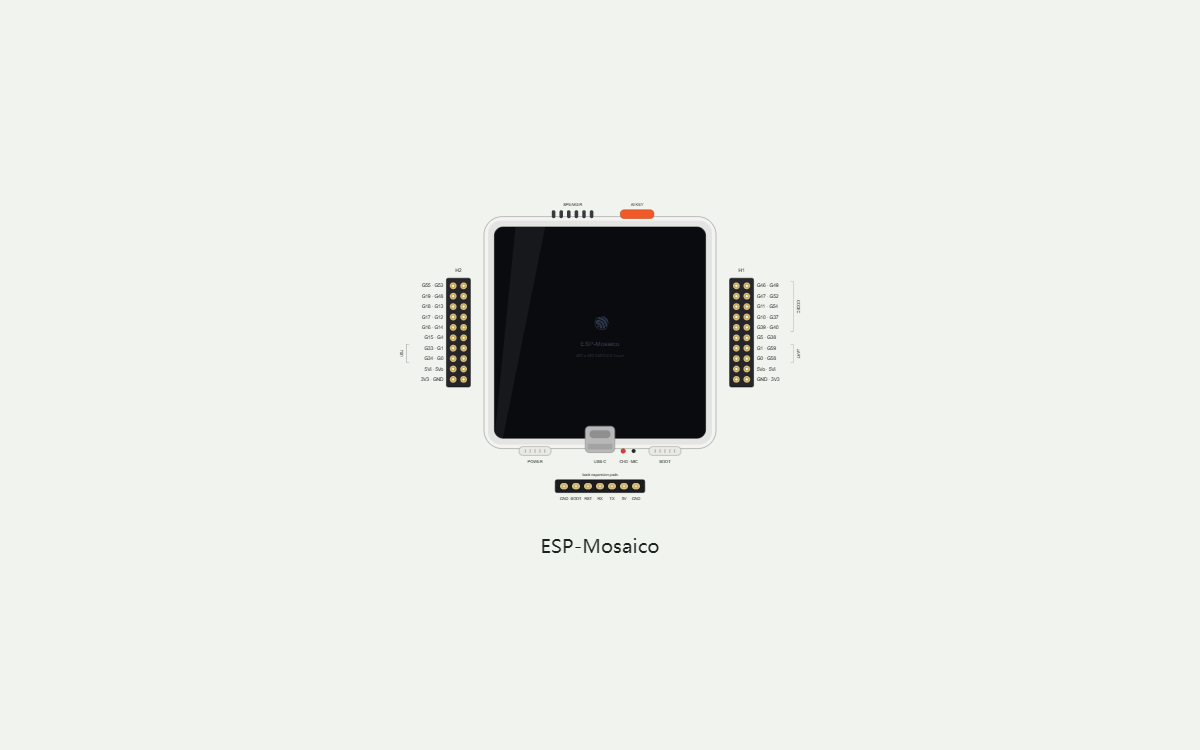
board: id: esp-mosaico — name: ESP-Mosaico — chip: esp32s31 — note: Board confirmed by the person; every part below is already on the board, so there is no external wiring. — parts: part: CO5300 480x480 QSPI LCD — board_device: display_lcd — role: game screen (square playfield), backlight on at boot · part: CST9217 capacitive touch — board_device: lcd_touch — role: tap = jump; every touch wakes/acts immediately · part: AI button — board_device: ai_button — pin: GPIO7 — role: jump (active level per board definition, pressed = low) · part: boot button — board_device: boot_button — pin: GPIO61 — role: unused during play · part: vibration motor — board_device: vibration_motor — pin: GPIO8 — role: haptic pulse on crash · part: ES8311 audio codec + speaker — board_device: audio_dac — role: game tones · part: BQ27220 fuel gauge — board_device: battery_monitor — role: battery percentage · part: 3.7 V 65 mAh Li-ion — role: power on battery; charged over USB-C — wires: none — everything used is on the board — assumption: The speaker is connected to the board's audio codec (person says the device makes sound).
Game
playfield: the full 480x480 square panel, dark background, light grey ground line at y = 360 — art: classic monochrome pixel look, light grey sprites on the dark background, drawn scaled to the square screen; dinosaur 44x47 px standing at x = 80 — run: the dinosaur runs in place, the ground pattern and cacti move left — jump: initial upward velocity 750 px/s, gravity 2200 px/s2, about 0.68 s in the air and 128 px high; a jump while airborne is ignored (no double jump) — obstacles: cacti only: small single, tall single, and a pair/triple group; heights 35-70 px; minimum gap between obstacles shrinks with speed but is never closer than 260 px — speed: starts at 300 px/s, grows by 0.9 px/s per point, capped at 900 px/s — score: 1 point per 40 px travelled (about 7.5 points/s at the start speed), shown zero-padded to 5 digits — milestone: crossing each multiple of 100 points plays the milestone tone and flashes the score for 300 ms — collision: bounding boxes with a 4 px inset; touching a cactus ends the run — game_over: crash tone + 150 ms vibration + the dinosaur freezes on the collision frame; after 400 ms the screen waits for any jump input (AI button or screen tap), then the run restarts at the starting speed with the score reset to 0 and the high score unchanged — start: at every power-on the run starts immediately, there is no title screen and no menu — high_score: the best score of all runs, shown as HI plus 5 digits next to the running score; HI shows only the value already stored on flash, so it keeps the previous record for the whole run and switches to the new one when that record is written — persistence: the high score is written to NVS when a run ends with a new record, at most once every 30 s during a run, and on a low-battery shutdown; the first record after boot is written as soon as it is beaten; a write that fails stays pending and is retried at the next 30 s window and at the shutdown, so HI never shows a value the flash does not hold; it is loaded at boot and survives power cuts until a factory reset clears it
Controls
jump: AI button (GPIO7) short press, or a tap anywhere on the touch panel — restart: same two inputs, active only once the game-over sequence has finished — ignored: the boot button does nothing; long-pressing the AI button behaves like a normal press
Sound
output: on-board ES8311 codec driving the speaker; one tone melody at a time, a new one cuts the previous — jump: single 900 Hz note, 60 ms — milestone: single 1200 Hz note, 80 ms — crash: two descending notes 700 Hz then 300 Hz, 120 ms each — volume: medium, fixed
Power
source: 3.7 V Li-ion on board; USB-C charging while playing, nothing changes in the game when the cable is plugged in — indicator: battery percentage (0-100 %, from the BQ27220 fuel gauge) at the top-right of the screen, refreshed every 10 s, hidden for the first 5 s after boot until the gauge has answered — layout: top bar 48 px high: left 'HI 00000' and the current score, right the battery percentage — warning: at 10 % or below the percentage turns red and 'LOW BATTERY' blinks once for 3 s — shutdown: at 3 % or below the high score is written, 'BATTERY EMPTY — SCORE SAVED' is shown for 2 s, the screen and backlight are switched off and the device enters deep sleep; a press on the AI button wakes it and it powers on as usual — battery_life_note: the board's 65 mAh cell is small: expect a short playing time per charge (the panel and the SoC run continuously while playing), and the gauge percentage is the honest indicator; on USB the device runs indefinitely
Onboarding
flashing: from the product page's Run button over the board's USB-C port, in Chrome, Edge or Firefox 151+ on a computer; nothing to install — setup: none — no Wi-Fi, no account, no phone app, no code to read; the game is playable the moment the board reboots — virtual_device: the same build runs on the virtual device first
Day to day
power_on: screen and backlight on, high score loaded, run starts immediately — while_playing: score and battery update live; sound and vibration per the sections above — power_off: no power-off control: the battery switch / removing USB ends it, the high score is already saved
Factory reset
how: serial console command `factory_reset` over the USB port (the built-in console command); clears the stored high score through app_factory_reset_hook and reboots — no_button: no button-combination or power-cycle reset on this product
Failure modes
power_cut_mid_run: the run is lost; the high score keeps the last saved value (a record improving by more than 30 s before the cut may be up to 30 s stale) — gauge_not_answering: no percentage is shown and no low-battery shutdown happens; the game keeps running — input_stops_responding: console `reboot` or a power cycle; the high score is preserved — touch_and_button: either input alone is enough to jump and to restart
Published 27 Nov 2026
Firmware and source licensed Apache-2.0; photos and text CC-BY-4.0.
The firmware includes open-source software — open-source licences and notices; some components may be used only with Espressif chips.
Built with ESP ZeroCode AI — describe a device, get production firmware.
Terms of Service · Privacy Policy · Cookie Policy