ESP ZeroCode AI · Community
Doveyes AI Vision Security Camera
create am AI vision security camera bases on esp32 controller that captures facial features of people within a given space and stores it, then sends off an alert using GIPO port whenever a stranger on new face appears
Powersoft solution all the way— Powersoft solutionsDownload the firmware Open-source licences
What it does
- Always-on watching — the camera keeps an eye on its field of view and reacts when a person appears
- Background candidate capture — the camera is always watching and stashes each new face it sees as a candidate, with no enrollment mode to trigger
- Manual curation — the user reviews the captured faces in a web page served by the camera, enrolls the ones that should be trusted, and discards the rest
- Built-in web page — the camera always runs its own Wi-Fi access point and serves its review UI there; phones/laptops join the camera directly and it never joins the house network
- Stranger detection — every face seen is compared against the known set, and an unmatched face raises an alert
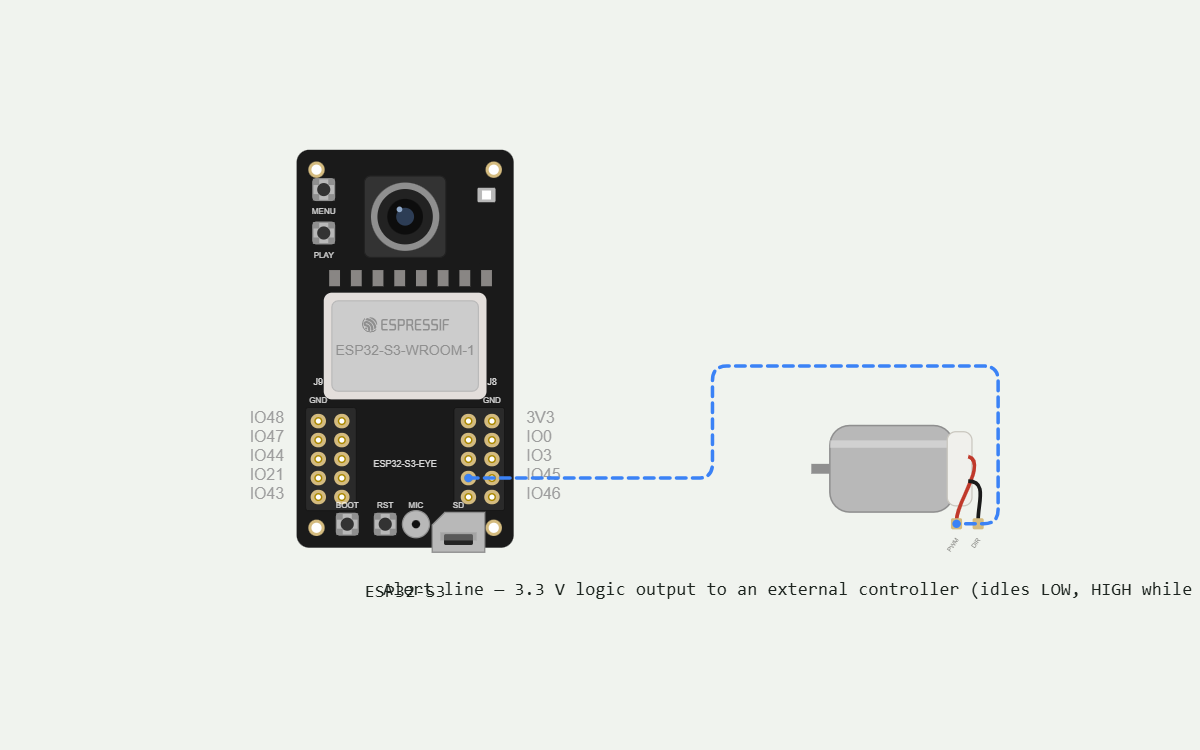
- Alert on a GPIO line — a 3.3 V logic output held HIGH while an unrecognized face is in view and released when it leaves, so an external controller acts on presence rather than a one-shot pulse
- On-device storage — captured faces, enrolled faces and stranger events are kept on the board's microSD card and survive a power cycle
- Offline-first — face detection and the GPIO alert keep running with no Wi-Fi; the web page is only needed to curate faces and change settings
- Candidate retention — the same face seen repeatedly is stored once, and the oldest uncurated candidates are dropped when the card's candidate quota fills
- Live preview on the board LCD — the camera view with a box drawn around every detected face, so you can see at a glance that it is watching
- Status LED heartbeat — slow breathing while it is running and all is well, fast blinking while a stranger is in view (on-board LED, GPIO 3)
- Stranger event log — every alert is recorded on the SD card with a real date and time, and listed in the web page
- Clock set from the browser — whenever a phone or laptop opens the web page it hands the camera the current time, so log timestamps are real without needing a router or internet
- Clear button — a button on the board wipes all uncurated candidate faces so the card stays tidy, without touching the enrolled faces
- Factory reset — hold the BOOT button for 10 seconds to forget every face, every event and the access-point settings and start clean
- Built on the ESP32-S3-EYE — the board's own OV2640 camera, microSD slot, status LED, screen and buttons are used; only the alert line is wired externally. USB-powered, no battery
Manual
Device Type
A standalone, on-device AI vision security camera. It watches a fixed area continuously, keeps a gallery of the faces it has been told to trust, and asserts a digital output line whenever a face it does not recognize is present. All recognition runs locally on the ESP32-S3 — no cloud, no router, no companion app required. The problem it solves: a self-contained 'someone unfamiliar is here' signal that a separate controller or alarm panel can act on, with the owner in control of exactly which faces count as familiar.
Hardware
chip: ESP32-S3 — board: ESP32-S3-EYE — gpios: alert_output: GPIO45 — alert line to the external controller. Idles LOW, driven HIGH while an unrecognized face is in view. 3.3 V logic, no external parts. — status_led: GPIO3 — the board's own status LED (on-board, do not wire). — boot_button: GPIO0 — the board's BOOT button, used for factory reset (on-board, do not wire). — clear_button: ADC button group on the board — one of the board's own buttons is the 'clear uncurated candidates' button (on-board, do not wire). — peripherals: OV2640 camera on the board (DVP) — the only image source. · microSD card on the board (SDMMC) — stores candidate faces, enrolled face descriptors, the stranger event log, and the web page assets. · ST7789 LCD on the board plus its PWM backlight — live preview with face boxes. · Status LED on GPIO3 and the board's buttons — all on-board. · The only external connection in the build is the alert wire on GPIO45 to the other controller; GPIO45 is a strapping pad held LOW at reset, which matches this output's LOW idle level. — models: Face detection and face recognition run on-device with Espressif's esp-dl components (human_face_detect for detection, human_face_recognition for descriptors/Matching). Both need the board's 8 MB PSRAM.
Inputs
kind: camera — label: Camera frames — hardware: On-board OV2640, DVP interface, QVGA/VGA grayscale-friendly frames for the detector — behavior: Frames are captured continuously and passed to the face detector on every frame that the pipeline can keep up with. Detection is what drives everything else — capture, comparison and the alert line. · kind: button — label: Clear candidates button — hardware: One button of the board's ADC button group — behavior: Short press wipes all uncurated candidate faces from the SD card. Enrolled (trusted) faces are never touched. The LCD briefly confirms the wipe. · kind: button — label: Factory reset — hardware: On-board BOOT button, GPIO0 — behavior: Held for 10 continuous seconds, erases the enrolled face gallery, the candidate store, the stranger log and any access-point naming, then reboots into a clean state. A hold of 1–9 seconds does nothing. · kind: web — label: Browser session — hardware: Wi-Fi access point + built-in HTTP server — behavior: The web page is the only way to enroll or discard faces and to read the event log. Opening it also supplies the current time to the device.
Outputs
kind: digital_output — label: Alert line — hardware: GPIO45, 3.3 V push-pull logic output — behavior: LOW whenever only known faces or nobody is in view. Driven HIGH as soon as a face is classified as unrecognized, and held HIGH for as long as an unrecognized face remains in view. Released LOW about 2 seconds after the last unrecognized face leaves the frame, so brief detection dropouts do not chatter the line. A face crossing from stranger to recognized (e.g. after curation) drops the line at once. · kind: led — label: Status LED — hardware: On-board LED, GPIO3 — behavior: Slow breathing while the device is running normally with no stranger present. Fast blinking while the alert line is asserted. A short double-flash on boot confirms startup; a distinct rapid stutter repeats while the SD card is missing or unwritable. · kind: display — label: LCD live preview — hardware: On-board ST7789 LCD with PWM brightness — behavior: Shows the live camera image with a rectangle drawn around every detected face. A small overlay line shows state (WATCHING / STRANGER) and the count of enrolled faces. Faces classified as known are boxed in green, unrecognized ones in red. · kind: web_ui — label: Web page — hardware: HTTP server on the camera's own access point — behavior: Three areas: Candidates (thumbnails of collected faces, each with Enroll and Discard), Enrolled (the trusted gallery, each with Remove), and Events (the timestamped stranger log). Also shows the access point name and lets the user rename it.
Connectivity
stack: wi-fi — transport: SoftAP — the camera always broadcasts its own Wi-Fi access point with a fixed default SSID/password, serving HTTP on the usual port. — purpose: Serving the face-curation and event-log web page. It is an administrative channel only and is not required for detection or alerting.
Commissioning
method: open access point — payload: No consumer-supplied device data is needed at flash time. The AP name and password are compiled in as defaults; the user may rename the AP from the web page. — instructions: Insert a FAT32 microSD card, power the board over USB, and wait for the LCD preview and the LED breathing. Join the camera's Wi-Fi access point from a phone or laptop, open the printed address in a browser, and confirm the page loads with an empty Candidates list. Then walk in front of the camera and refresh: your face should appear as a candidate. Press Enroll. The LED stops showing that face as a stranger afterwards.
Business Logic
powerOnBehavior: Boots in under a few seconds: camera and SD card init, the last enrolled face descriptors are loaded from the card into RAM, the AP starts, and the LCD begins the live preview with the LED breathing. Enrollment is instantly armed — an unrecognized face within the first seconds of boot still asserts the alert line, because the gallery is loaded before detection starts. — automationRules: Every detected face is turned into a feature descriptor and compared against the enrolled gallery at a fixed recognition threshold. · If the best gallery match is below threshold, the face is 'unrecognized': the alert line goes HIGH and a stranger event is appended to the log (with the current date/time), rate-limited to one log entry per face-episode rather than one per frame. · An unrecognized face that is not similar to an existing candidate is saved as a new candidate thumbnail (one image per new face, deduplicated by descriptor similarity). · If the face matches a gallery entry above threshold, it is 'known': the alert line is released and no log entry is written. · Each new face episode re-arms logging, so a stranger who returns an hour later is logged again. — dayToDayOperation: The camera sits in a corner and watches. Nothing needs to be done to it. When a household member walks past, nothing happens. When a stranger walks past, the LED blinks, the LCD boxes the face in red, the alert line goes HIGH for as long as they are there, and a timestamped entry is written to the log. When the owner later wants to teach it a new face, they join its Wi-Fi, look at the Candidates list, press Enroll on the person who should be trusted (and Discard on the rest), and that person stops raising alerts from then on. — candidateRetention: Candidates live until curated. The store is capped (a few hundred faces); when full, the oldest uncurated candidates are dropped first. Clear-button press empties the whole uncurated store. — clock: There is no internet and no RTC. The device keeps time from boot and is corrected to real wall-clock time (Europe/Berlin, with daylight saving) whenever a browser opens the web page. Log entries written before the first browser contact are marked with their boot-relative time; once the clock is set, later entries carry real dates and times.
Factory Reset
trigger: Hold the BOOT button for 10 seconds. — effect: Deletes the enrolled face gallery, all candidate faces, the stranger event log and any custom access-point name; the alert line is driven LOW; the device reboots and starts over as if new. Detection resumes immediately with an empty gallery, so every face is a stranger until enrolled.
Failure Modes
scenario: microSD card missing, loose, or unwritable — behavior: The device keeps detecting and keeps driving the alert line — recognition still works from the in-RAM gallery if it loaded, but with an empty gallery after a power cycle every face reads as a stranger. The LED stutters and the LCD shows 'NO SD'. Nothing is permanently lost beyond the uncaptured candidates. · scenario: Nobody joins the access point for a long time — behavior: Normal operation. Detection, the alert line, the log and candidate capture all continue; only curation and clock correction wait. The event log is written from boot-relative time until a browser corrects the clock. · scenario: Power blip / unplanned reboot — behavior: The gallery is reloaded from the SD card at boot and detection resumes with the same trust set. The alert line returns to LOW during boot and asserts again on the first unrecognized face. Any partially written candidate file is discarded on mount. · scenario: Camera or detector initialization fails — behavior: The alert line is forced HIGH and held, so the alarm side fails loud rather than silently blind; the LCD shows an error and the LED stutters until a power cycle fixes it. · scenario: Face is seen in poor light / at a sharp angle — behavior: Detection confidence is low, so the detector may miss the face entirely (no alert) or fire a weaker detection. The recognition threshold is tuned toward 'prefer a false alert over a missed stranger'; borderline faces are logged as strangers and land in the candidate list for the owner to enroll. · scenario: Enrolled person is misread as a stranger — behavior: The alert line asserts and the face lands in the candidate list. The owner can press Enroll on it again to widen that person's gallery entries; recognition uses multiple descriptors per person so the set improves over time. · scenario: Access point is accidentally forgotten / renamed — behavior: Factory reset (10 s on BOOT) restores the default access point so the owner can get back in.
Power Management
batteryPowered: false — sleepMode: None — the device is continuously powered over USB and must keep watching, so it never sleeps.
Custom Behavior
The face enrollment model is deliberately owner-curated rather than automatic: the camera never decides on its own that someone is trusted. It only collects candidates, and a human promotes them. This keeps a stranger from being 'learned' just by loitering in front of a camera. The alert is a presence-level line (HIGH while a stranger is in view) rather than a pulse, so the downstream controller can decide whether to sound a siren, take a photo, or simply count. Recognition, gallery and logging are entirely local: there is no cloud service, no account, and no internet requirement.
Published 26 Oct 2026
Firmware and source licensed Apache-2.0; photos and text CC-BY-4.0.
The firmware includes open-source software — open-source licences and notices; some components may be used only with Espressif chips.
Built with ESP ZeroCode AI — describe a device, get production firmware.
Terms of Service · Privacy Policy