ESP ZeroCode AI · Community
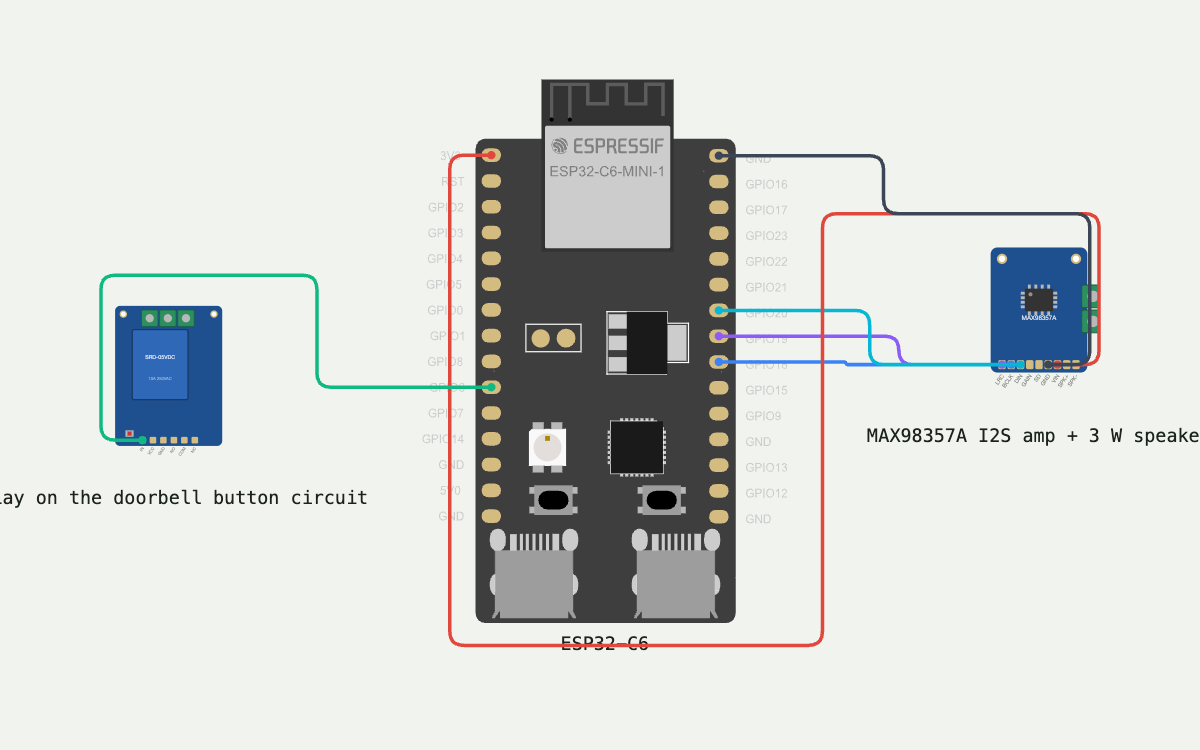
Doorbell Chime
An indoor chime box for my doorbell. When someone presses the button at the door, this box should play a pleasant ding-dong and flash a little light — loud enough to hear from the kitchen. Being able to mute it at night from my phone would be great.
What it does
- Ding-dong chime — plays a pleasant two-tone chime through a MAX98357A I2S amp + 3 W speaker when the door button is pressed, loud enough to hear from the kitchen
- Flash light — the board's built-in RGB LED flashes in time with the chime (an external status LED was dropped after review)
- Mute from phone — silence the chime (e.g. at night) from the Matter app, without unplugging it
- Matter over Wi-Fi (Thread as an option) pairing by QR code or manual pairing code
- Built-in RGB LED also shows state: dim green idle, amber while muted, bright flash during a chime
- Mute is a switch in the phone app plus an automatic night window (default 22:00–07:00, Europe/London) when the chime stays quiet — window times configurable from the app
- While muted the LED still flashes on a press (visible but silent); presses are not queued or replayed
- Existing wired door button / doorbell transformer is the press input, sensed electrically through a relay module whose contacts mirror the button
Manual
Device Type
An indoor doorbell chime box. The existing wired door button (fed by the house doorbell transformer) is sensed through a relay module; when it closes, the box plays a pleasant ding-dong through a small I2S amplifier and 3 W speaker loud enough to be heard from the kitchen, and flashes the board's RGB LED. It is a Matter device on the phone, so the household can mute the chime from the app — either manually as an on/off switch, or automatically during a configurable night window (default 22:00–07:00 local UK time).
Hardware
chip: ESP32-C6 (ESP32-C6-DevKitM-1) — gpios: GPIO18: I2S BCLK → MAX98357A BCLK — GPIO19: I2S LRCLK → MAX98357A LRC — GPIO20: I2S DIN → MAX98357A DIN — GPIO6: relay module IN (active-high module input; the board pulls it high only after boot) — GPIO8: board's built-in WS2812 RGB LED (already fitted — flash light / status) — GPIO9: board's built-in BOOT button (already fitted — used for factory reset) — peripherals: MAX98357A I2S class-D amplifier + 3 W / 4 Ω speaker, powered from the board's 3V3 rail (amp gain left at default, ~9 dB; chime audio is normalised to full scale for maximum loudness) · Single-channel relay module with opto-isolated input and active-high trigger (3.3 V logic compatible). The module's COM/NO contacts are wired ACROSS the existing doorbell push button, so the box listens on the same loop as the mechanical chime. The coil side is 5 V — feed it from the board's 5V pin, not 3V3; the input signal comes from GPIO6 and the module and board share GND. · One protection detail: the button loop carries the transformer's ~8–24 V AC. The relay contacts must be the only part of the box touching that loop — never connect the loop's AC to the board's GND or any GPIO. If the module has no galvanic isolation, an optocoupler or a series resistor + TVS on the input is added, but the chosen module is opto-isolated, which covers it. · USB 5 V supply (phone charger) — the box is mains-powered, always on
Inputs
kind: wired doorbell press — label: Door button / transformer — hardware: Relay module contacts across the existing push button loop; module IN on GPIO6 — behavior: The button press energises the relay coil; its contacts close, pulling GPIO6 high (module output, active high; a 30 ms debounce and a 1.5 s lockout prevent double-triggering from chattering AC). A contact closure lasting ≥ 40 ms counts as a press. Each press starts the chime unless muted. · kind: button — label: BOOT button on the board — hardware: On-board GPIO9 button — behavior: Momentary press has no user function in normal use. Hold for 10 s → factory reset (see factoryReset). · kind: app — label: Matter app controls — hardware: Phone, via the Matter controller — behavior: Mute on/off (a switch), night-window on/off and start/end times (configurable attributes).
Outputs
kind: speaker — label: Ding-dong chime — hardware: MAX98357A + 3 W speaker — behavior: A two-tone 'ding-dong' (about 1.5 s, warm sine/triangle partials, ~660 Hz then ~520 Hz with a long decay) plays once per accepted press, at full output. It plays to the end even if another press arrives; a new press while it is playing is only logged. Silent while muted or inside the night window. · kind: led — label: Built-in RGB LED — hardware: On-board WS2812 on GPIO8 — behavior: Dim green breathe = idle and armed. Solid dim amber = muted (manually or by the night window). Bright white flash, 3 pulses in step with the chime, = a press is being announced. On mute, the amber flash still happens 3 times so a visitor is visibly noted. Fast red blink = Wi-Fi/network not connected. Blue pulse = commissioning/pairing mode. · kind: matter — label: Matter state to the app — hardware: Wi-Fi (Thread optional) — behavior: Reports current mute state and the last press (timestamp attribute) so the app shows the chime is alive and when the door was last rung.
Connectivity
stack: Matter — transport: Wi-Fi (2.4 GHz); Thread supported if the controller provides a Thread border router — purpose: Commissioning, mute control, night-window configuration, last-press reporting
Commissioning
method: Matter QR code on the device label (manual pairing code as fallback) — payload: Standard Matter onboarding payload, generated at flash time — instructions: Power the box with the USB supply; it shows a blue pulse. In the Matter app (Apple Home, Google Home, Alexa, Home Assistant …) choose 'Add accessory', scan the QR code from the label and pick the room. The chime then turns dim green. Network name/password are passed by the controller — no separate setup. If the box is later moved to a new network, factory reset and re-add.
Business Logic
powerOnBehavior: On power-up the RGB LED pulses blue while the stack starts, then shows fast red blinking until joined to a network, then dim green. Audio starts immediately after boot; a press during the first ~2 s boot period may be missed. — automationRules: Press accepted: debounce 30 ms, lockout 1.5 s → if not muted and not inside the night window, play ding-dong and flash the LED; otherwise flash the LED only. Last-press timestamp updated either way. · Mute = manual mute switch OR (night window enabled AND local time within window). Both are reported in the Matter mute state so the app reflects an auto-mute. · Night window: default 22:00–07:00 in Europe/London (UK local time, DST handled by the timezone; time from SNTP, falls back to 'window inactive' until time is known). Times are configurable from the app in 15-minute steps; a window may cross midnight. · No queuing or replay: a press that arrives while muted is not replayed when the mute is lifted. — dayToDayOperation: Leave it plugged in at the end of a USB supply, near the kitchen. It is silent until the door button is pressed, then plays ding-dong once with a white flash. At night it goes quiet on its own, or the user mutes it from the phone (e.g. during a nap). The app shows whether it is muted and when the door was last rung.
Factory Reset
trigger: Hold the board's BOOT button 10 s (blue LED confirmation) — the Matter-network reset also clears mute and the night window back to defaults. — effect: Leaves the Matter fabric, erases stored Wi-Fi credentials and app configuration, returns mute to off and the night window to 22:00–07:00, then reboots into pairing mode (blue pulse).
Failure Modes
scenario: Wi-Fi down / hub offline — behavior: The doorbell keeps working locally: presses still chime and flash. The LED shows fast red blinking; on reconnect the last-press timestamp syncs. Mute and night window stay at their last values (night window uses the last known/synced time). · scenario: Power blip / unplugged — behavior: Reboots in ~2 s and chimes again. Settings are stored in NVS, including manual mute and night window. A press during the boot window is lost. · scenario: Doorbell transformer / button wire disconnected — behavior: No presses are seen — the box stays idle (dim green); the user can see in the app that no press has been recorded, which points at the door wiring. · scenario: Time not yet synced after boot — behavior: The night window is treated as inactive (chime will sound) rather than risk silently missing a press; corrected once SNTP completes. · scenario: Speaker disconnected / amp fault — behavior: LED still flashes on a press and the app still records it, so the press is not lost to the household in a noisy way; the fault is visible as a silent chime.
Power Management
batteryPowered: false
Custom Behavior
The relay is used in the input direction: its isolated contacts mirror the mechanical doorbell button so the box can 'hear' the press without touching the transformer's AC. GPIO6 is read with a pull-down, so a floating or absent relay module reads as 'not pressed' and can never produce phantom chimes.
Published 12 Nov 2026
Firmware and source licensed Apache-2.0; photos and text CC-BY-4.0.
The firmware includes open-source software — open-source licences and notices; some components may be used only with Espressif chips.
Built with ESP ZeroCode AI — describe a device, get production firmware.
Terms of Service · Privacy Policy