ESP ZeroCode AI · Community
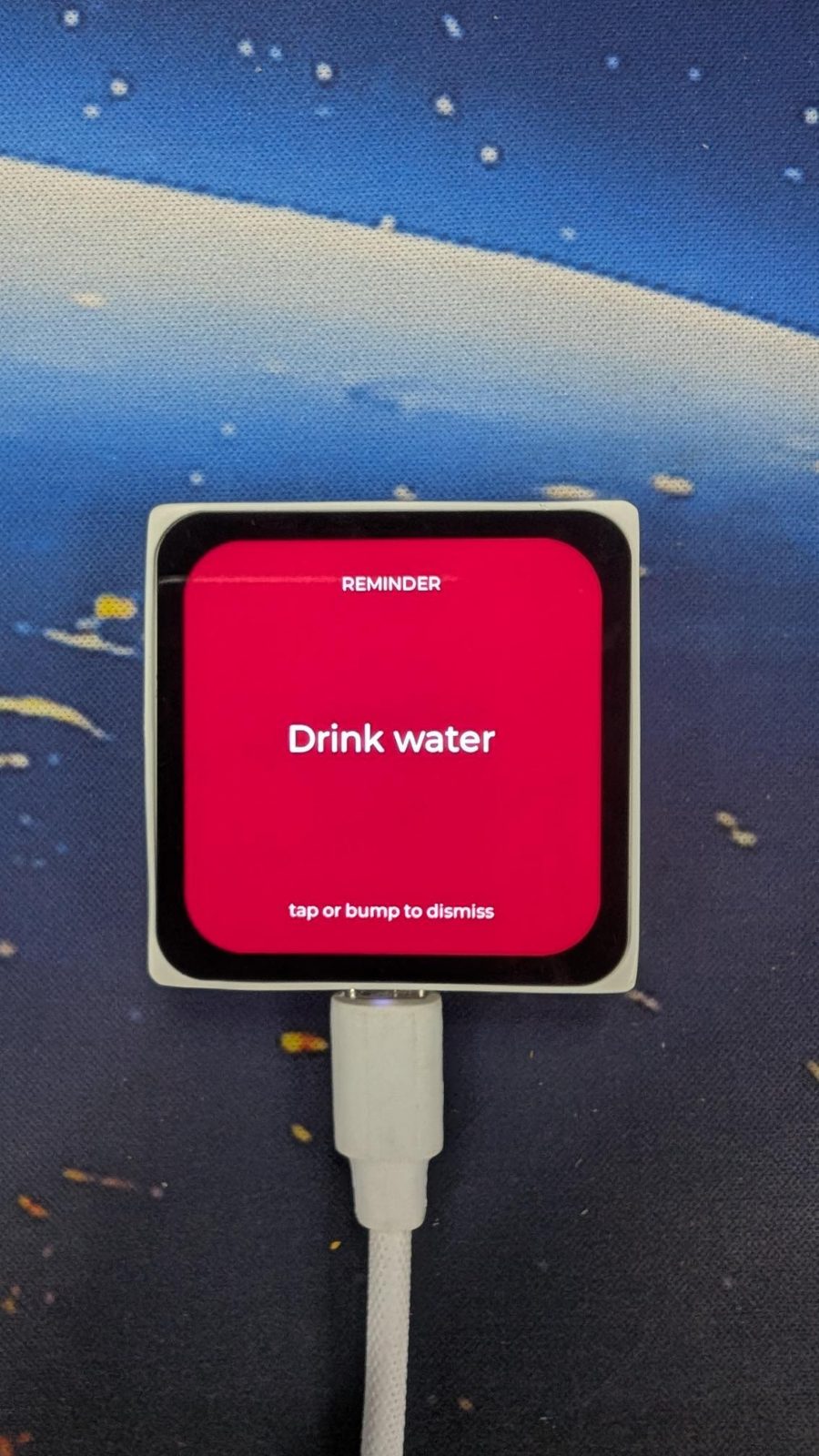
Desk Buddy
I want to create a desk assistant on Mosaico board that I have. It will remind me to get up, drink water, etc. The time for these reminders should be configurable in settings. Also play a notification sound. Clicking the screen dismisses the notification. When idle, it can show a random thing. Like, sometimes a random quote. A random fact. A face, maybe, with some expression. I can also \"hit\" it, or hold in hand and shake it to change this random thing. The random thing also automatically changes after some time. It will be powered on always.
Reminds me to stay healthy when I am too engrossed in work. This is now a permanent Buddy on my desk. I might add some fun things to it later. Feel free to fork and add it yourself.— @chiragDownload the firmware Open-source licences Fork it in the studio
What it does
- Reminder schedule — named recurring reminders (get up, drink water, ...) on intervals the user configures in Settings (e.g. every 45 minutes); each interval counts from power-on, no clock needed
- Reminder notification — pops up full-screen with the reminder's label and plays its notification sound once on the on-board speaker; stays on screen (silently) until dismissed
- Dismiss a reminder — a tap on the touchscreen or a hit/bump on the device clears the active reminder notification
- Idle random item — when no reminder is showing, the screen shows one random item: a quote, a fun fact, or a face with an expression; drawn from a set bundled in the firmware, so it works with no network
- Change it now — tapping the device or picking it up and shaking it swaps in another random item (on-board IMU detects the hit/shake)
- Auto-advance — the idle random item changes on its own after a set interval
- Settings — on-device settings screen: add, edit, delete, enable/disable reminder intervals, set the idle auto-advance interval, and set the notification volume
- Always on — runs continuously, never sleeps or blanks the screen off; mains/USB powered
- Open Settings — pressing the on-board AI button opens/closes the Settings screen
- Reminder haptic — a brief buzz on the on-board vibration motor when a reminder fires
- First-run defaults — ships with two ready-made reminders, "Stand up" every 45 minutes and "Drink water" every 60 minutes, both switched off until you enable them
- Restore defaults — a Settings row wipes reminders, intervals and volume back to the factory state; the only reset path, no button combination
Manual
Device Type
Desk Buddy 2 — a small always-on desk companion built on the ESP-Mosaico board. It solves two things: nudging you out of long sitting stretches (recurring interval reminders with a chime) and being a pleasant thing to glance at the rest of the time (rotating quotes, fun facts and expressive faces that you can bump for another). No phone app, no cloud, no network: everything is configured on the device's own touchscreen and everything it shows is stored on the device.
Hardware
chip: esp32s31 — board: esp-mosaico — gpios: external: none — the product wires no external part; every peripheral it uses is already on the Mosaico — peripherals: part: display_lcd (CO5300) — on_board: true — role: the whole user interface: idle random item, full-screen reminders, Settings · part: lcd_touch (CST9217) — on_board: true — role: tap input: change the idle item, dismiss a reminder, operate Settings · part: audio_dac (ES8311) — on_board: true — role: notification chime through the on-board speaker · part: vibration_motor — on_board: true — role: brief haptic buzz when a reminder fires · part: imu_sensor (BMI270) — on_board: true — role: detects a hit/bump and a pick-up-and-shake · part: ai_button — on_board: true — role: opens and closes Settings — not_used: boot_button — leave for the ROM bootloader · camera — not part of this product · magnetometer (BMM150 x2) — not part of this product · battery_monitor (BQ27220) — device is USB/mains powered, battery state is not shown · microphone path of the codec — no voice input in this product
Inputs
kind: touch — label: Screen tap — hardware: on-board capacitive touch panel (CST9217) — behavior: Reminder on screen → dismiss it. Idle → swap in another random item. Settings → normal UI navigation (lists, value pickers, on-screen keyboard for reminder names). · kind: motion — label: Hit or bump — hardware: on-board IMU (BMI270) acceleration threshold — behavior: A sharp acceleration spike (tapping the case, knocking it) is treated exactly like a screen tap: dismisses a showing reminder, otherwise swaps in another random item. · kind: motion — label: Pick up and shake — hardware: on-board IMU (BMI270) sustained shaking — behavior: Same result as a hit or a tap — another random item. Debounced so one shake produces one change, not a burst. · kind: button — label: AI button — hardware: on-board AI button (GPIO 7) — behavior: Short press toggles the Settings screen open/closed. Pressing it while a reminder is showing dismisses the reminder and opens Settings.
Outputs
kind: display — label: Screen — hardware: on-board LCD (CO5300), 2D framebuffer rendering via the display framework — behavior: Three screens. (1) Idle: one random item, large and readable across a desk — a quote with its author, a fun fact, or a face with an expression. (2) Reminder: takes over the whole screen with the reminder's name and a large 'tap or bump to dismiss' hint. (3) Settings: scrollable list of reminders with on/off switches and interval values, the auto-advance interval, volume, and Restore defaults. The screen is never dimmed and never blanks. · kind: speaker — label: Notification chime — hardware: on-board ES8311 codec driving the speaker, through the sound framework — behavior: One short chime plays when a reminder fires, at the volume set in Settings. It plays exactly once per reminder — an ignored reminder stays on screen silently. Nothing else in the product makes a sound. · kind: haptic — label: Reminder buzz — hardware: on-board vibration motor (GPIO 8) — behavior: A brief buzz at the same moment as the chime, so the reminder registers even if the room is loud or the volume is turned down.
Commissioning
method: none — no network, no account, no pairing — instructions: Power the device over USB. It boots straight into the idle screen. Open Settings with the AI button, switch on 'Stand up' and 'Drink water' or add your own, and it starts reminding you. There is no phone app and nothing to install; the bundled quotes and facts work out of the box.
Business Logic
powerOnBehavior: Boots directly to the idle random item — no splash wizard, no first-run setup. Reminder settings are restored from NVS. The two shipped reminders ('Stand up' every 45 minutes, 'Drink water' every 60 minutes) exist but are switched off, so the device is quiet until the user enables one. Every enabled reminder's interval starts counting from boot. — automationRules: Each enabled reminder has an interval in minutes; when its interval elapses the reminder fires (full-screen, chime, buzz) and its timer restarts from that moment. · Reminder intervals count elapsed time since power-on — there is no clock, so an interval is a duration, not a time of day. · Only one reminder is on screen at a time. If another comes due while one is still showing, it does not stack: it is skipped and simply runs again on its next interval. · A reminder that comes due while the user is in Settings still takes over the screen; dismissing it returns to Settings where the user left off. · The idle item auto-advances on its own after the configured interval (default 5 minutes); any tap, hit or shake resets that timer. · The idle item rotates across the three kinds (quote, fact, face) so the same kind rarely repeats twice in a row. — dayToDayOperation: The device sits on the desk showing a quote, a fun fact, or a face. Glancing at it is the point — the item changes every few minutes by itself, and a tap, a knock on the case or picking it up and shaking it deals a new one immediately. When a reminder is due, the screen switches to that reminder's name with a chime and a buzz; a tap or a bump clears it and the idle item comes back. To change when reminders happen, press the AI button, edit the interval (or add a new reminder with its own name) on the touchscreen, and close Settings — the new interval is counted from that moment. Settings survive power cycles.
Factory Reset
trigger: The 'Restore defaults' row at the bottom of the Settings screen, confirmed by a second tap on the screen. — effect: Erases all stored reminders, intervals, auto-advance interval and volume from NVS and recreates the factory state: the two shipped reminders ('Stand up' 45 min, 'Drink water' 60 min) present but switched off, default auto-advance interval, default volume. The device returns to the idle screen. There is deliberately no button combination to remember — this row is the only reset path, so a device with a frozen UI needs a reflash.
Failure Modes
scenario: No network — behavior: Not applicable by design — the product has no radio, no Wi-Fi provisioning and no cloud dependency. Quotes, facts and faces are bundled in the firmware, so it behaves identically offline and online. There is no 'offline' state to show the user. · scenario: Power cut or unplugged — behavior: The device restarts at the idle screen. All settings and reminder definitions are restored from NVS; the interval timers restart from zero, so the first reminder after a power-up comes one full interval later. · scenario: Corrupted or unreadable settings storage — behavior: NVS read failure falls back silently to the factory state (two shipped reminders, off) rather than refusing to boot; the idle screen still comes up. · scenario: Screen or UI hangs — behavior: Recover by power-cycling the device (unplug/replug or the board's reset). Settings persist. If the UI is hung so badly that Settings cannot be reached, Restore defaults is unavailable, since the user chose to have no button combination — that device needs a firmware reflash. · scenario: Very quiet or loud room / volume turned to zero — behavior: The haptic buzz still fires with every reminder, so a missed chime does not mean a missed reminder; the reminder also stays on screen until dismissed. · scenario: Speaker fault or audio path failure — behavior: A reminder still appears on screen and buzzes; the chime is the only part lost, and the rest of the product keeps working. · scenario: Accidental bump, or the device gets nudged — behavior: Thresholds for 'hit' and 'shake' are tuned above normal desk vibration so typing on the same desk does not constantly change the item; any false positive is harmless (it only deals another quote) and never dismisses a reminder without a deliberate touch. · scenario: Battery — behavior: Not applicable — the device is USB/mains powered and always on. The battery gauge is not read and no low-battery state is shown.
Power Management
batteryPowered: false — sleepMode: none — the screen never dims or blanks and the device does not enter light sleep, since the product's whole value is being glanceable
Custom Behavior
The face is the personality touch and needs its own small renderer: a simple drawn face (eyes, mouth) with a handful of expressions — e.g. neutral, happy, sleepy, surprised, bored — picked at random for each face turn, so 'a face with some expression' varies rather than repeating. Reminder names are free text entered on the touchscreen keyboard and stored with their interval. The IMU's hit/shake detection is a shared input primitive feeding both 'swap the item' and 'dismiss the reminder'.
Published 16 Oct 2026
Firmware and source licensed Apache-2.0; photos and text CC-BY-4.0.
The firmware includes open-source software — open-source licences and notices; some components may be used only with Espressif chips.
Built with ESP ZeroCode AI — describe a device, get production firmware.
Terms of Service · Privacy Policy