ESP ZeroCode AI · Community
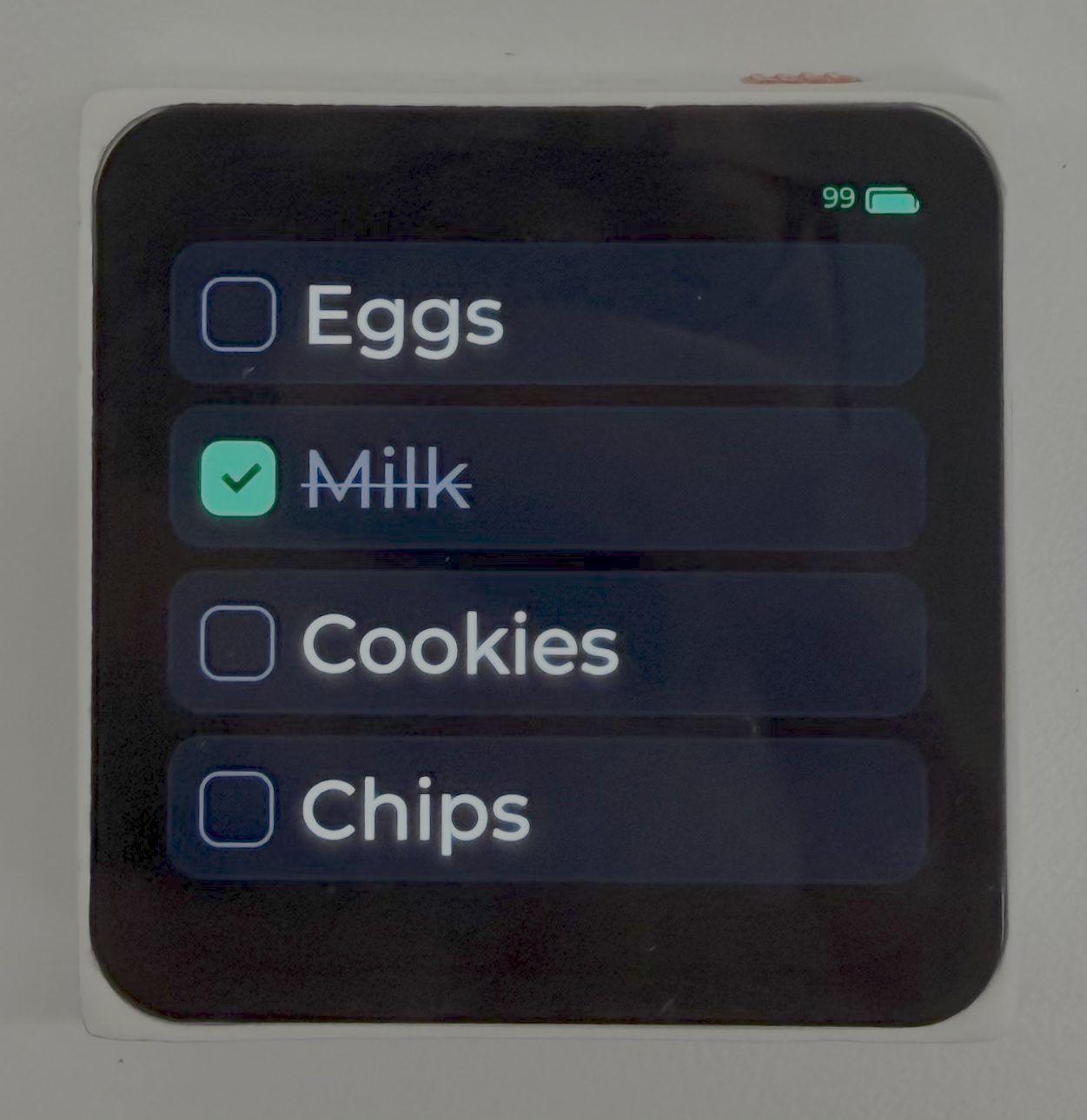
TODO Tracker
I want to create a device which can store my TODO list that I can scroll. It should show a tick-mark which I can tick (and it scratches that particular item) when I tick it. Top-level fields TODO list entries can have 1 level nested entries (that need not be ticked). Use ESP Mosaico with smooth scrolling for scrolling the list up and down. What I don't know is how to transfer my TODO list to the device, once hte firmware is running
A post-it that I can quickly scratch and reuse— @kedarsDownload the firmware Open-source licences Fork it in the studio
What it does
- TODO list — shown on the board's own 480x480 AMOLED, one card per top-level entry
- Smooth scroll — swipe up/down with kinetic, momentum scrolling through the list
- Nested entries — a top-level entry may carry one level of sub-entries, shown indented under it and not tickable themselves
- Tick an entry — tap its tick mark and the entry is crossed out (strikethrough) as done, in place, without moving or re-ordering
- Un-tick — tapping a crossed-out entry again clears its tick, so a mistaken tap is easy to undo
- Load the list over USB — paste markdown into the serial console on the board's USB-C port; up to 2 KB of text, no network involved
- `todo set` — puts the console into paste mode: paste the markdown, finish with an empty line, and that list becomes the device's list
- `todo get` — prints the list back to the console as markdown, with [x] on every entry you have ticked, so you can save it before pasting a new one
- Markdown format — `- item` for a top-level entry, a two-space-indented `- ` for a sub-entry, `- [x]` for an entry already done, `- [ ]` or plain `-` for open
- Paste summary — after a paste the console reports how many entries and sub-entries it read, and the screen confirms the list was updated
- List saved on the device — the last pasted list survives power-off and is what you see when it boots
- Ticks remembered — tapping an entry is saved within a second, so struck-through items are still struck after a reboot
- No smart-home stack — standalone device: no Wi-Fi, no MQTT, no Home Assistant
- Pocket device on its own cell — runs on the board's 65 mAh Li-ion battery and charges over USB-C
- Screen sleeps when idle — after 30 seconds without a touch the display goes dark and the device drops into low-power sleep
- Wake on a tap or the front button — touching the screen or pressing the AI button lights it up again
- Resumes where you left it — the list comes back at the same scroll position with every tick still in place
- Battery level on screen — a small battery badge in the corner, driven by the board's fuel gauge
- Tick feedback — a short buzz from the board's vibration motor when an entry is ticked or un-ticked
- Empty state — before any list is stored the screen tells you to paste one over USB, instead of showing a blank page
- Unstick it without a computer — holding the AI button for 5 seconds wipes the list and settings and restarts fresh
Manual
Device Type
summary: Cue Cards is a pocket, battery-powered card deck of your TODO list — a single-purpose device that shows one markdown list you paste into it over USB, lets you scroll it with your thumb and cross items out with a tap, and remembers everything across power cycles. No account, no app, no Wi-Fi, no cloud: your list never leaves the device. — problem: Paper TODO lists get lost and phone task apps hide your list behind unlock screens and notifications. Cue Cards is a glanceable, always-with-you list you load once from your computer and then work through by tapping.
Hardware
board: esp-mosaico (ESP-Mosaico, module ESP32-S31NRV16: 16 MB flash, 128 MB NAND, 16 MB in-package PSRAM) — chip: esp32s31 — power: USB-C (5 V) for charging and the console; 65 mAh Li-ion cell for use away from a cable — gpios: signal: AMOLED QSPI bus — pins: GPIO9 (CS), GPIO35 (SCLK), GPIO36 (SIO0), GPIO42 (SIO1), GPIO44 (SIO2), GPIO50 (SIO3), GPIO51 (RESET) — note: on-board CO5300 480x480 panel, no D/C line, 480x480 · signal: Panel power control — pins: GPIO60 — note: on-board lcd_power_ctrl — cuts the panel supply when the screen sleeps · signal: Touch interrupt / reset — pins: GPIO6 — note: on-board CST9217 capacitive touch, I2C on the board's internal bus (GPIO3/GPIO56) · signal: AI button — pins: GPIO7 — note: on-board, active-low, used to wake and for the 5 s reset hold · signal: Vibration motor — pins: GPIO8 — note: on-board gpio_ctrl, active-high · signal: Fuel gauge — pins: I2C (GPIO3/GPIO56), BQ27220 — note: on-board battery_monitor, no extra pin · signal: Boot button — pins: GPIO61 — note: left alone — ROM download button, only touched to flash — peripherals: part: CO5300 480x480 AMOLED — role: the list, always the main screen · part: CST9217 capacitive touch — role: swipe to scroll, tap to tick, tap to wake · part: User (AI) button — role: wake, and hold 5 s to reset · part: Vibration motor — role: tick / un-tick confirmation · part: BQ27220 fuel gauge — role: battery badge — externalParts: None. Nothing is wired to the free pins (GPIO38, 39, 46, 47 remain free and unused) — every peripheral is already on the board. — storage: The list and its ticks are one ~2 KB blob in a product NVS namespace on internal flash; screen brightness and scroll position sit beside it. The 128 MB NAND is not used.
Inputs
kind: touch — label: Swipe the list — hardware: CST9217 touch panel — behavior: A vertical drag moves the list with the finger and, on release, keeps coasting with momentum and friction until it settles, held inside the top and bottom of the list. A quick flick scrolls further; a slow drag scroll-moves exactly with the finger. Diagonal drags scroll vertically too — the list is the only scrollable thing on screen. A tap that does not become a drag is treated as a tap, not a scroll. · kind: touch — label: Tick an entry — hardware: CST9217 touch panel — behavior: A tap anywhere on a top-level entry's row (its tick box or its text) toggles it: an open entry gets a filled tick box and a line struck through its text, a ticked entry goes back to open. Taps on sub-entry rows do nothing — sub-entries are notes under an entry, never tasks of their own. Taps on empty space below the list do nothing. A tick change is echoed with a short motor buzz and a subtle row press animation. · kind: touch — label: Tap to wake — hardware: CST9217 touch panel, GPIO6 interrupt — behavior: When the screen is dark, the first tap only wakes the device: the panel lights up, the list appears at the scroll position and with the ticks it had, and the tap does NOT tick anything. The next tap is a normal tap. · kind: button — label: AI button — hardware: on-board button on GPIO7 — behavior: While asleep, a press wakes the device (no tick, no action). While awake, a short press does nothing; holding it for 5 seconds starts the reset — the screen shows a filling ring from the first second and 'Keep holding to clear' — and completing the hold wipes the list, ticks, scroll position and brightness, then restarts into the empty state. Releasing early cancels and nothing is lost.
Outputs
kind: display — label: The list (480x480 AMOLED) — hardware: CO5300 AMOLED, brightness set by the panel driver's brightness command — behavior: A dark, high-contrast list on black — legible in a pocket. Each top-level entry is a rounded card: a tick box on the left, the text on the right, wrapping to at most two lines and then ellipsizing. A ticked entry shows a filled box and the text drawn with a horizontal line through it and slightly dimmed; it stays exactly where it was in the order. Sub-entries sit indented under their parent card in smaller, dimmer text with no box, and scroll together with it. A thin battery badge sits in the corner. Scrolling shows a few pixels of overscroll and a soft bounce at the ends. Nothing animates while the screen is off. · kind: display — label: Empty state — hardware: CO5300 AMOLED — behavior: With no stored list the screen shows the device name and 'No list yet — connect USB and paste one: todo set', plus the keyboard-shortcut hint, instead of an empty page. This is what a freshly assembled device shows on first power-up. · kind: display — label: Update confirmation and reset feedback — hardware: CO5300 AMOLED — behavior: After a successful paste the screen briefly shows 'List updated — N entries, M sub-entries' and jumps back to the top of the new list. While the reset hold is in progress it shows a filling ring with 'Keep holding to clear'; on cancel it shows 'Cancelled' for a second. · kind: haptic — label: Tick confirmation — hardware: vibration motor on GPIO8 — behavior: A ~40 ms buzz on every tick and un-tick. Nothing on scroll, nothing on wake, nothing on paste. · kind: console — label: USB serial console — hardware: USB-C CDC console plus the built-in `reboot`, `mem` and `factory_reset` commands — behavior: Prints command results and errors: the paste prompt and summary, `todo get` output, and a clear message when a paste is refused or the list is empty.
Commissioning
method: usb-console-paste — payload: markdown TODO list, up to 2048 bytes — instructions: 1) Put the build on the board (or use it as shipped) and plug it into a computer over USB-C. 2) Open the board's USB serial port in any terminal program (it is a CDC port — no baud rate to set; 115200 if the tool insists). 3) Type `todo set`. The device answers 'Paste your list, then an empty line'. 4) Paste your markdown — for example:
```
- Buy milk
- Call the dentist
- ask about Friday
- [x] Pay the electricity bill
```
5) Press Enter twice (an empty line ends the paste). 6) The console prints 'List updated — 3 entries, 1 sub-entry' and the screen shows the same. Unplug and use it. Running `todo set` again replaces the list and its ticks; run `todo get` first if you want to keep the ticked state.
Business Logic
powerOnBehavior: The board boots in about a second to the list it had stored, at the scroll position it was left at, with all ticks intact, and the badges and brightness it remembers. With nothing stored it shows the empty state. Power-up never requires a connection to anything. — automationRules: Idle 30 s (no touch, no button, no paste activity) → the panel fades out over ~200 ms and its supply is cut, then the device enters deep sleep. · Wake source: touch interrupt on GPIO6 or the AI button on GPIO7; either one lights the display straight to the list — no splash, no home screen. · Ticks are committed to flash within a second of the last change (coalesced, so a burst of taps is one write), and the scroll position is committed on screen-off rather than on every swipe — flash wear stays trivial. · Pasting over USB while awake never lets the device fall asleep mid-paste; the idle timer is suspended until the paste finishes or times out (8 s of silence). — dayToDayOperation: Keep it in a pocket. Tap the screen to see your list; scroll with your thumb; tap an item to strike it through and hear a small buzz; tap it again if you ticked it by mistake. The screen goes dark on its own. Once a week (or whenever the list is stale) plug it into a computer, `todo get` if you want to keep the record, `todo set` and paste a new list.
Factory Reset
trigger: Hold the AI button for 5 seconds while the device is awake (ring fills on screen, 'Keep holding to clear'); or the built-in `factory_reset` console command over USB. — effect: Erases the stored list, all ticks, the saved scroll position and brightness, and reboots into the empty state. The firmware itself is untouched — the device still works, it just has no list, so paste a new one. Nothing on the list is recoverable afterwards, which is why the hold needs an explicit ring and release-to-cancel.
Failure Modes
scenario: The pasted list is bigger than 2 KB — behavior: The paste is refused at the byte cap: the console says 'List too long — 2048 bytes max, nothing changed', the previous list and its ticks stay exactly as they were. · scenario: The paste is interrupted (cable pulled, terminal closed) — behavior: Nothing is committed until the closing empty line arrives, so the old list survives untouched. The next `todo set` starts clean. · scenario: The markdown is messy — behavior: Parsing is forgiving: any line starting with `-` or `*` is a top-level entry; a line indented two or more spaces under a bullet is a sub-entry of the entry above it; deeper indents are flattened to one level; `[x]`/`[X]` means done, `[ ]` or none means open; a non-bullet, non-empty line becomes a top-level entry so a plain pasted list still works; blank lines and `#` heading lines are skipped. The console summary reports what was read, so a wrong parse is visible immediately. · scenario: A single entry is very long — behavior: It wraps to two lines and then ellipsizes; the full text is still in `todo get` output. · scenario: No console is available on the USB port (a machine or driver that cannot open it) — behavior: The console command reports that reading input is unsupported and changes nothing; the stored list keeps working on the device, so a laptop-less user is never blocked from using it. · scenario: Battery runs flat — behavior: The display fades and the device simply stops; the list is already on flash, so charging over USB-C brings it back exactly as left. In the last few percent the badge turns red as a warning. · scenario: Fuel gauge does not answer (I2C fault) — behavior: The battery badge is hidden rather than showing a wrong level; everything else keeps working. · scenario: The panel fails to initialise at boot — behavior: The device retries the panel init twice, then restarts; if it still fails the console reports it and the device keeps running with a dark screen so a paste over USB can still be made. · scenario: The device seems stuck or the wrong list is on it — behavior: Hold the AI button 5 s to wipe and start over — no computer needed.
Power Management
batteryPowered: true — battery: 65 mAh Li-ion on the board, charged over USB-C — sleepMode: Display off after 30 s idle, then deep sleep with the panel supply cut. Be honest about the ceiling: this board keeps drawing current even in deep sleep (regulator and LEDs stay powered, which firmware cannot switch off), so expect roughly a couple of days of standby and a few hours of lit use per charge, not weeks — a weekly charge is the realistic habit. The spec deliberately avoids promising more. — wakeSources: CST9217 touch interrupt (GPIO6) and the AI button (GPIO7).
Custom Behavior
The paste format IS the product's data model: markdown bullets, one level of indentation for sub-entries, `[x]` for done. There is no other editor, no companion app and no sync — the terminal paste is the whole transfer story, which is why `todo get` (markdown back out) matters as much as `todo set`. · Ticked entries stay in place and stay struck; the list order is always the pasted order and the device never reorders, hides or archives anything. Only a new paste changes the list. · Each 2 KB paste is the full state: a paste replaces the list and clears all ticks (line-level `[x]` in the pasted text is honoured instead).
Published 25 Nov 2026
Firmware and source licensed Apache-2.0; photos and text CC-BY-4.0.
The firmware includes open-source software — open-source licences and notices; some components may be used only with Espressif chips.
Built with ESP ZeroCode AI — describe a device, get production firmware.
Terms of Service · Privacy Policy