ESP ZeroCode AI · Community
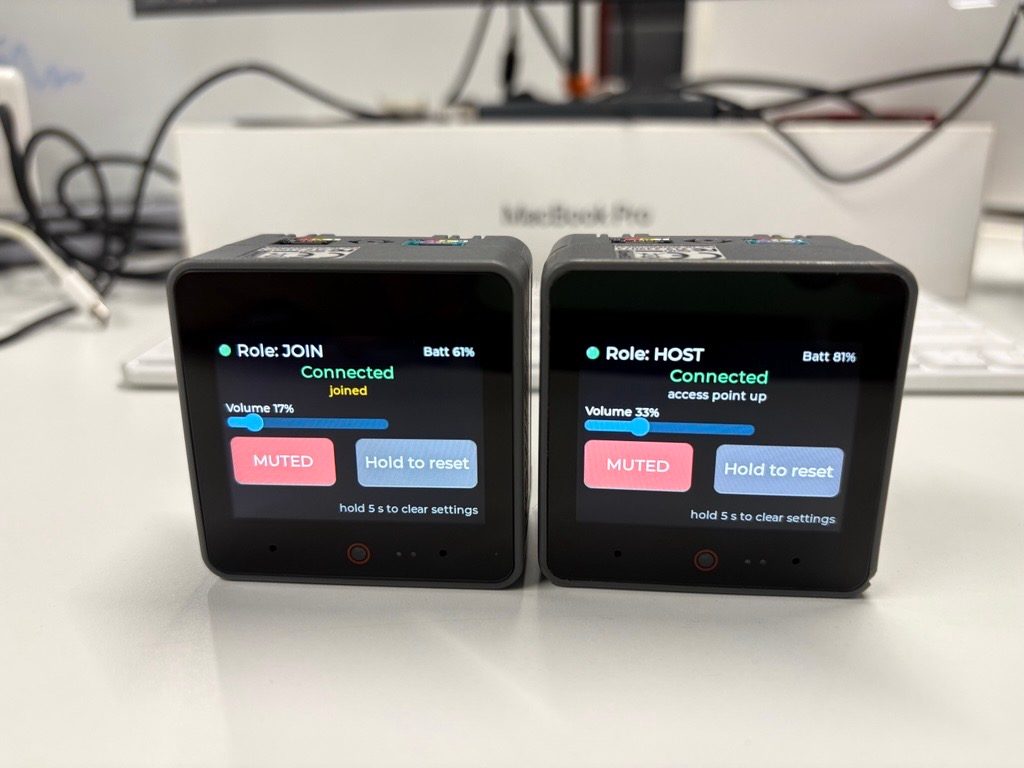
Core-S3 Walkie-Talkie
Full-Duplex Low-Latency Wi-Fi Intercom (ESP32-S3 + UDP) Design and implement a low-latency, full-duplex wireless voice intercom system utilising two identical ESP32S3 based M5 Stack Core S3. The system establishes a bidirectional live audio stream simultaneously in both directions without requiring a Push-To-Talk (PTT) button. The screen can shows connections, make a device AP/STA.
What it does
- Full-duplex voice link — each unit continuously streams its mic to the other over Wi-Fi (UDP); both people can talk and be heard at the same time, no push-to-talk.
- On-board dual-mic capture — voice is picked up by the CoreS3's built-in ES7210 mic array; no external microphone.
- On-board speaker playback — the partner's voice comes out of the CoreS3's own speaker via the AW88298 codec.
- Link screen — the built-in 2.0" LCD shows whether the partner unit is connected and which Wi-Fi mode the unit is in (host or joined).
- Host / Join pairing — on start-up the touch screen asks the user to pick which unit is Host and which is Join; Host raises its own access point, Join attaches to it, and the screen then reports the live connection state.
- AP/STA mode — a unit can either host its own Wi-Fi access point for a direct unit-to-unit link, or join an existing network.
- Touchscreen controls — the call screen carries an on-screen volume slider and a microphone mute toggle, driven by the CoreS3's built-in capacitive touch panel.
- Battery status — the link screen shows the CoreS3's battery level and charging state, read from the on-board AXP2101 power manager.
- Always on — both units stay awake at full CPU clock the whole time they are powered, so the live link never drops; no sleep or standby.
- Link-loss handling — if the partner disappears (switched off, out of range, host access point gone) the unit chimes, shows "Link lost" on screen, and keeps reconnecting by itself until the partner returns.
- Settings reset — a long press on the on-screen reset control clears the stored role and Wi-Fi settings, so the next boot starts at the Host/Join picker again.
- Echo guard — while the partner's voice is playing, the local mic feed is attenuated so the open speaker cannot howl back into the open mic.
Manual
Device Type
name: Core-S3 Walkie-Talkie — whatItIs: A pair of identical M5Stack CoreS3 handheld units that act as an always-open, full-duplex wireless intercom. Each unit carries one person's voice to the other continuously — no push-to-talk, no call button, no phone. Power both units on, pick Host on one and Join on the other, and the two people are in a live conversation. — problemItSolves: Removes the turn-taking friction of conventional walkie-talkies and the setup friction of phone calls/voice apps: rooms, workshops, kitchens, a house and an outbuilding — anywhere two people want a channel that is simply open the whole time, with no handset to pick up and no button to hold. — formFactor: Two self-contained handheld units (each an M5Stack CoreS3, roughly a deck of cards, on its internal 500 mAh-class battery or USB-C power). No wiring, no external parts, no enclosures to build.
Hardware
chip: ESP32-S3 (Xtensa dual-core, 240 MHz) — one per unit — board: M5Stack CoreS3 — used as-is; every peripheral the product needs is already on the board — perUnit: ES7210 4-channel audio ADC — dual-microphone array capture · AW88298 audio DAC / class-D amplifier plus on-board speaker — playback · ILI9341 2.0" 320x240 LCD — status and controls · FT5x06 capacitive touch panel — all user input · AXP2101 power-management IC — battery level, charging state, power rails · AW9523 GPIO expander — used by the board support package, no product pins · On-board Wi-Fi (2.4 GHz) — the only link between units · On-board battery + USB-C charging — gpios: No external GPIO assignments. Every product signal is internal to the CoreS3 (I2S audio to the ES7210 and AW88298, SPI to the LCD, I2C to the touch panel and power manager). GPIO 43/44 (UART console) and the camera pins stay free and unused. — note: Zero extra hardware. The camera, IMU, RTC and microSD on the board are not used by this product.
Inputs
kind: touch — label: Host / Join picker — hardware: FT5x06 capacitive touch panel on the 2.0" LCD — behavior: At start-up the screen shows two large targets. Tapping Host puts the unit into access-point mode; tapping Join makes it scan for and attach to a partner's access point. The unit remembers the choice, so a normal power-on goes straight back to the last role. · kind: touch — label: Volume slider — hardware: FT5x06 capacitive touch panel — behavior: The call screen shows a slider that sets local speaker volume in steps, from silent to maximum. The level is remembered across reboots. · kind: touch — label: Microphone mute — hardware: FT5x06 capacitive touch panel — behavior: Toggles this unit's outgoing mic feed. While muted the sender transmits silence (the partner hears nothing) and the screen shows a clear muted state — so the live link stays up but the room goes private. Tap again to unmute. · kind: touch — label: Reset settings — hardware: FT5x06 capacitive touch panel (long press) — behavior: Holding the on-screen reset control for 5 seconds clears the stored role and Wi-Fi settings; the screen confirms, and the next boot shows the Host/Join picker. · kind: microphone — label: Voice capture — hardware: ES7210 ADC with the CoreS3's dual-mic array — behavior: The mic array runs continuously whenever the unit is powered and not muted; there is no wake word, no voice command and no gate — the input is the product. · kind: power — label: Power / reset — hardware: CoreS3 on-board power button — behavior: Holding the board's side power button turns the unit on or off, as standard for the hardware. There is no in-product power control on screen.
Outputs
kind: speaker — label: Partner's voice — hardware: AW88298 DAC/amp + on-board speaker — behavior: Plays the incoming stream continuously. Volume follows the on-screen slider; output is attenuated while the local mic is hot (echo guard) and fully silent when nothing is arriving. · kind: speaker — label: Link-lost chime — hardware: AW88298 DAC/amp + on-board speaker — behavior: A short two-tone chime plays once when the partner disappears, so the user notices without having to look at the screen. Distinct short chime when the link comes back. · kind: display — label: Link screen — hardware: ILI9341 2.0" LCD — behavior: The default screen whenever a link is up or being established. Shows: unit role (Host / Join), Wi-Fi state (access point up / joined / searching), partner connected or lost, battery level and charging, and live signal/latency indication. Colors carry the state — green for connected, amber for connecting, red for link lost. · kind: display — label: Call screen overlay — hardware: ILI9341 LCD + FT5x06 touch — behavior: The same screen carries the volume slider and the mute toggle, plus a muted badge when the mic is off. There is no separate menu to navigate.
Connectivity
stack: Wi-Fi 2.4 GHz SoftAP — transport: 802.11 b/g/n access point raised by the Host unit — purpose: Gives a direct, router-free unit-to-unit link. The Host's SSID and password are fixed and derived from the device, so there is nothing to type — the Join unit attaches to the first unit whose SSID matches the product's pattern. · stack: Wi-Fi 2.4 GHz STA — transport: Station mode on the Join unit (and on a Host that has been told to join an existing network) — purpose: Attaches the unit to the partner's access point, or to a home Wi-Fi network when the two units cannot be near each other. The AP/STA role is the whole of the network configuration. · stack: UDP over IPv4 — transport: Two peer-to-peer audio streams, one per direction, on a fixed port — purpose: Carries the live voice. UDP is chosen over TCP because occasional lost packets are inaudible while retransmission delay is not. · stack: No cloud, no account, no internet — transport: n/a — purpose: The product is entirely local. It works with the internet down, works on an isolated site, and sends nothing anywhere.
Commissioning
method: Two-tap Host / Join pairing on the touch screen — no app, no account, no credentials typed. — instructions: Power on both units. Each shows the Host / Join picker. · On the first unit, tap Host. It raises its access point and the screen shows 'Waiting for partner'. · On the second unit, tap Join. It scans, finds the partner, and attaches. · Within a few seconds both screens show Connected and the live audio link opens in both directions at once. — payload: None required from the user — the unit keeps only its own role, the peer address, its speaker volume and its mute state. — notes: The chosen role persists across reboots, so a normal power-on re-establishes the same link without touching the screen. Re-pairing with a different unit means tapping the other role, or holding the reset control for 5 seconds to clear settings.
Business Logic
powerOnBehavior: Power on → board support initialises audio codec, speaker amp, LCD and touch → the unit re-enters its remembered role (or shows the picker on first boot) → it re-establishes the Wi-Fi link → the call screen appears and the two-way audio stream starts on its own. From power-on to talking is a few seconds. Nothing has to be tapped in the normal case; audio does not begin until the link is actually up, so the user never hears silence and assumes the device is broken. — automationRules: Audio streams start automatically as soon as the peer is reachable — no call initiation step exists. · Mic is live whenever the unit is powered and not muted; there is no wake word and no push-to-talk. · If the peer becomes unreachable, the local unit chimes, marks the screen 'Link lost', and retries continuously at a few-second interval with no user action. Audio goes quiet rather than playing error tones into the room. · When the peer returns, the link re-establishes by itself and a short rising chime confirms it. No re-pairing, no tap. · Mute and volume are local-only: muting one unit never affects the other unit's audio or its ability to be heard. · Echo guard: while the partner's audio is playing, the outgoing mic feed is attenuated (and the speaker is briefly ducked on loud incoming audio) so that an open mic and an open speaker on the same small handheld do not howl. When the partner stops talking the mic gain returns to normal immediately. — dayToDayOperation: Both units sit powered on wherever the two people are. Voices simply happen — you talk and the other person hears you mid-sentence; there is nothing to press. Each unit's screen quietly shows the link is green and the battery is fine. To quiet the room, tap mute on the caller's unit; to quiet your own unit, drag the volume slider to zero. To stop for the day, hold the side power button; both units can go off and the first to come back waits for the other. — audioPath: Capture at 16 kHz / 16-bit mono from the ES7210 mic array, framed in ~20 ms blocks, sent over UDP with a small sequence number; the receiver holds only a couple of frames of jitter buffer before pushing them to the AW88298, and drops late frames rather than delaying audio. This keeps mouth-to-ear latency in the low tens of milliseconds, which is what makes open full-duplex conversation feel natural. Capture and playback run on separate tasks/cores so neither starves the other.
Factory Reset
trigger: Hold the on-screen reset control for 5 seconds (or a long press on the board's power button if the touch panel is unresponsive). — effect: Clears the stored role, peer address, volume and mute settings and re-opens the Wi-Fi configuration. The unit reboots into the Host / Join picker, exactly as a first-ever boot. No firmware is changed and the unit cannot be bricked this way.
Failure Modes
scenario: Partner unit powered off or carried out of range — behavior: Local unit plays the link-lost chime, screen turns red with 'Link lost', audio output goes silent, and reconnection is retried automatically every few seconds. Nothing to tap; when the partner comes back the link and audio resume by themselves. · scenario: Host unit's access point disappears (host powered off or reset) — behavior: The Join unit loses the network, shows 'Link lost — waiting for host', and keeps scanning for the host's access point, attaching automatically when it reappears. It does not fall back to the picker, so the user is not asked to make a decision they already made. · scenario: Wi-Fi environment congested or a third access point with a similar name appears — behavior: The units stay paired to the specific peer they know by its address, and the audio stream keeps going even at reduced throughput because lost UDP packets are dropped rather than retried. If audio quality degrades, the screen reflects a weak link; the user can move the units closer or switch the Host unit to join a home network instead. · scenario: No internet / home router down — behavior: No effect. The product never uses the internet; the direct unit-to-unit link is unaffected. · scenario: Power blip or battery runs flat — behavior: The unit loses power and drops the link; the partner chimes and waits. On power-up the unit returns to its remembered role and rejoins automatically — a fast, hands-off recovery once the unit is on the charger. · scenario: Acoustic feedback (both units loud in the same room, or a unit left next to the other speaker) — behavior: The echo guard attenuates the mic feed while incoming audio plays and ducks the speaker on loud incoming sound, preventing a howl. In extreme cases the user pulls the volume slider down or separates the units; the link itself stays healthy. · scenario: Screen frozen / touch unresponsive — behavior: Audio is independent of the display path, so the conversation keeps running. A side power-button cycle restores the screen; settings can be cleared with the power-button long press.
Power Management
batteryPowered: true — batterySource: CoreS3 internal battery, charged over USB-C — sleepMode: None. Both units stay fully awake the entire time they are powered — light sleep or Wi-Fi modem sleep would break the continuous stream, and reconnection gaps are exactly what this product exists to avoid. Radio and CPU stay at full throttle for the whole session. — runtime: Continuous talk time is bounded by the CoreS3's internal battery, on the order of a few hours of live streaming; USB-C power sustains it indefinitely. Battery level and charging state are always shown on the link screen so a run-down unit is visible before it goes quiet. — notes: No power management beyond the board's own AXP2101 charging. A low-battery warning appears on screen before the unit shuts down, and the partner is told via the link-lost chime if it drops.
Custom Behavior
noPushToTalk: The defining non-standard behaviour: there is no transmit button and no floor control. Both microphones are live at once, both speakers play at once, and both people can talk over each other like a phone call. Everything else in the product is in service of that. — selfHostedPairing: The host unit's access point credentials are fixed and derived from the device rather than typed, so pairing is two taps and nothing is written down. This is what lets a non-technical user set the pair up in under a minute. — silentPersistence: Role, volume and mute survive reboots, so the device is a 'leave it on' appliance rather than something configured each time. — noCloud: Deliberately no accounts, no cloud, no companion app, no matter/voice-assistant integration — the value is a private, instant, always-open channel between exactly two devices.
Published 2026-09-24
Built with ESP ZeroCode AI — describe a device, get production firmware.
Terms of Service · Privacy Policy