ESP ZeroCode AI · Community
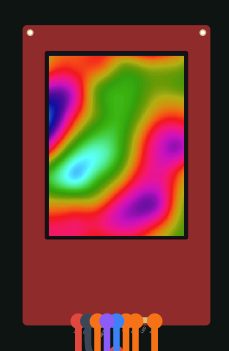
Cool Animation Display
A cool animation Display
What it does
- Animated display — runs procedurally generated color effects (plasma / matrix / particles) on an ILI9341 240x320 SPI TFT, rendered in real time with no stored image assets
- Display wiring — SPI on GPIO12 (SCK), GPIO11 (MOSI), GPIO13 (MISO), GPIO10 (CS); GPIO9 (DC), GPIO8 (reset); 3V3 power, backlight tied on
- On-board WS2812 LED strip (GPIO 38) is deliberately unused — display is the only light source
- Effect selection — BOOT button (GPIO 0) steps to the next effect, with on-screen name shown while switching
- Boot behavior — always starts on the default effect (plasma); the last selection is not remembered across power cycles
- Recovery — holding the BOOT button through power-up keeps the board in ROM download mode, so the device can always be reflashed
Manual
Device Type
Standalone animated desk/display product. A 2.4" 240x320 color TFT driven by an ESP32-S3 renders procedurally generated animated effects in real time — art, ambient decor, or an animation showcase. It is self-contained: no network, no app, no cloud. The problem it solves is showing continuous, non-repetitive motion graphics on a cheap SPI panel with nothing but a devkit and one jumper-wired display.
Hardware
chip: esp32s3 — board: esp32-s3-devkitc-1 — gpios: gpio: 12 — role: TFT SPI SCK · gpio: 11 — role: TFT SPI MOSI (SDI) · gpio: 13 — role: TFT SPI MISO (SDO) · gpio: 10 — role: TFT chip select (CS) · gpio: 9 — role: TFT data/command (DC) · gpio: 8 — role: TFT reset · gpio: 0 — role: BOOT button — effect selection (on-board) · gpio: 38 — role: On-board WS2812 LED strip — wired but intentionally unused — peripherals: part: ILI9341 240x320 color TFT module (SPI, with microSD socket left unused) — bus: SPI2 — notes: Board 3V3 for logic and backlight; backlight (LED pin) tied to 3V3, so brightness is not software-controllable in this build · part: ESP32-S3-DevKitC-1 on-board BOOT button on GPIO0 — notes: Active-low, uses the chip's internal pull-up. GPIO0 is a strapping pin — it is idle-high in normal operation, which matches the required boot level, and holding it through reset is what enters ROM download mode. · part: ESP32-S3-DevKitC-1 on-board WS2812 LED strip on GPIO38 — notes: Present but deliberately not driven
Inputs
kind: button — label: BOOT button — hardware: On-board BOOT button, GPIO0, active-low with internal pull-up — behavior: Momentary. Short press (>=40 ms, debounced, released) advances to the next effect in the rotation and shows the new effect's name on screen for ~1 second. Presses are ignored while the effect-change transition is playing. A press held from before power-up is not interpreted as an effect change at all — it selects ROM download mode instead. No long-press, double-press or combo behaviour is assigned.
Outputs
kind: display — label: ILI9341 color TFT (240x320) — hardware: SPI2: SCK GPIO12, MOSI GPIO11, MISO GPIO13, CS GPIO10, DC GPIO9, RST GPIO8; 3V3 power, backlight hard-wired on — behavior: Continuously renders one procedural effect at a time. Effects in rotation: (1) Plasma — smooth interpolated color fields; (2) Matrix rain — falling glyph trails on a dark field; (3) Particles — hundreds of additive particles drifting and flocking; (4) Metaballs — merging colored blobs; (5) Tunnel — perspective color tunnel. Frames are composed in a PSRAM framebuffer and pushed to the panel over DMA SPI, target 30+ fps at 240x320. Because only procedural effects are used, there is no image asset storage and no SD-card dependence.
Business Logic
powerOnBehavior: On power-up the firmware initialises the SPI bus and the ILI9341 panel (hardware reset, then full init sequence), clears the screen to black, and immediately begins rendering the default effect, plasma. There is no splash screen, no pairing step, and no WiFi involvement — the display is animating within a couple of seconds of power being applied. No stored settings are read, so every power cycle is identical. — automationRules: Boot into the default effect (plasma) unconditionally — the last-selected effect is not persisted. · BOOT button short press advances the effect pointer in a fixed loop (plasma -> matrix -> particles -> metaballs -> tunnel -> plasma). — dayToDayOperation: The device runs untouched, animating whatever effect is showing. Pressing BOOT briefly cycles to the next effect and the name appears on screen for about a second before the overlay fades and the new effect takes over. Powering it off and on returns it to plasma. There is no on/off control in software — it animates whenever it has power.
Factory Reset
trigger: None required. The device keeps no persistent state, so there is nothing to reset — a power cycle is already a full factory reset and always returns the unit to the default plasma effect. — effect: Not applicable.
Failure Modes
scenario: TFT not responding on SPI at boot (loose jumper, wrong panel) — behavior: Firmware detects that panel initialisation did not complete, does not block or hang, and periodically retries initialisation while the application stays alive, so reconnecting the panel recovers the picture without a power cycle. · scenario: Power blip / brownout — behavior: Device reboots and restarts the default effect from scratch; no settings or animation state are lost because none are stored. · scenario: Framebuffer allocation fails (PSRAM unavailable) — behavior: Firmware falls back to a reduced rendering mode — lower resolution or a smaller buffer — rather than failing to show anything, so the display still animates. · scenario: Accidentally left in download mode (BOOT held during power-up) — behavior: Screen stays black and nothing animates. This is expected ESP32 behaviour and is fixed by power-cycling without holding BOOT — the real reason the button's reset-time level matters.
Power Management
batteryPowered: false — notes: USB-powered only (DevKitC-1 5V input). No sleep or power-saving modes — the panel and CPU run continuously so animation never stalls.
Custom Behavior
There is no persistence layer at all: no NVS writes, no config file, no SD card. This is deliberate — it keeps the design simple and makes the device's behaviour on every boot predictable and identical. The WS2812 strip on GPIO38 is physically present but deliberately never driven, and the panel's backlight is hard-wired on, so the device has exactly one light source and no brightness control.
Published 7 Oct 2026
Firmware and source licensed Apache-2.0; photos and text CC-BY-4.0.
The firmware includes open-source software — open-source licences and notices; some components may be used only with Espressif chips.
Built with ESP ZeroCode AI — describe a device, get production firmware.
Terms of Service · Privacy Policy