ESP ZeroCode AI · Community
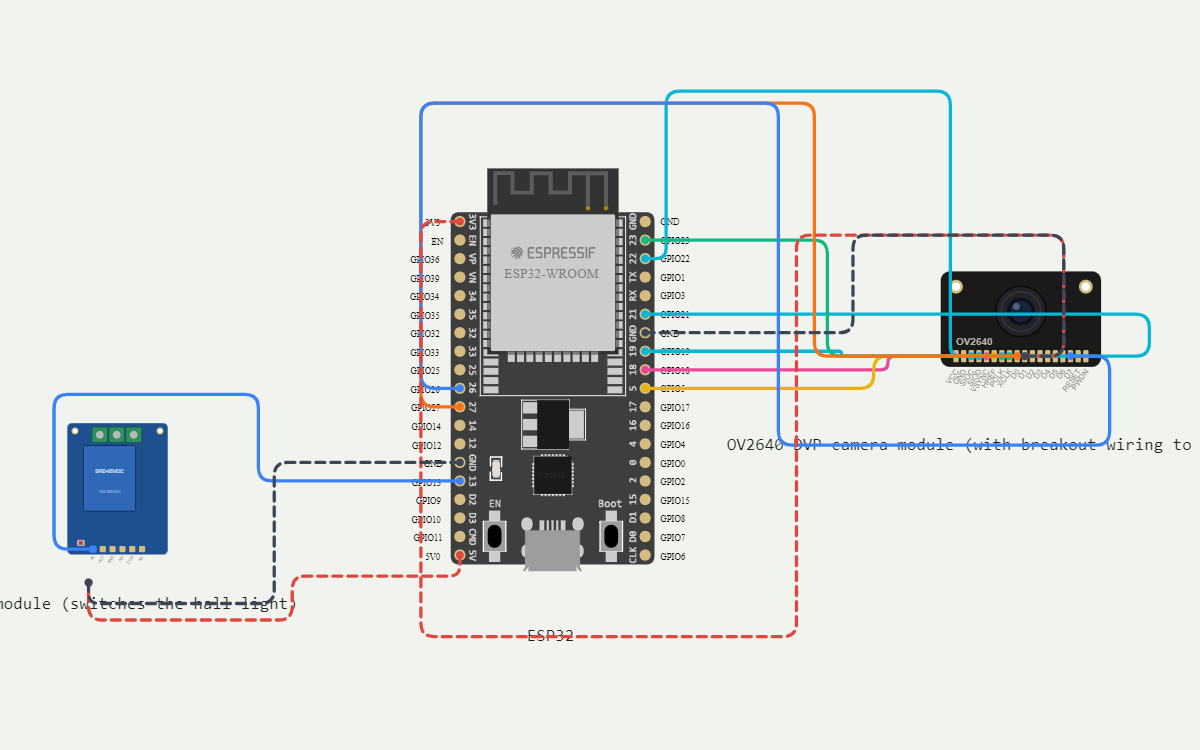
Camera Motion Sensor
I want a little camera in the hallway that notices when someone walks past and tells Home Assistant, without any video ever leaving the house. It should turn the hall light on when it sees someone, and I would really like it to stop triggering every time the cat wanders through.
What it does
- Person detection — frames from the OV2640 are analysed on the ESP32; a person event is published to Home Assistant (MQTT discovery)
- Pet rejection — the cat walking through does not count as a person (the same on-device person detector, no extra hardware); a cat carried at person height will count as a person
- Hall light on after the last person is seen — relay on GPIO 13 switches the light; hold time adjustable from Home Assistant (number entity, default 2 minutes, 5 s – 30 min)
- Privacy — no video or stills are uploaded; frames are only consumed locally on the device
- Wi-Fi + MQTT onboarding over the serial console (mqtt-setup: Wi-Fi, then broker address and credentials)
- Relay exposed to Home Assistant as a switch (MQTT discovery) — on/off from HA, actual state reported back
- Manual override — switching the light off from Home Assistant suppresses automatic switching until the hallway is seen clear again (no person for ~10 s)
- Hold-time setting exposed to Home Assistant (MQTT number, default 120 s) and stored on the device so it survives a reboot
Manual
Device Type
A hallway presence light. An ESP32-DevKitC with an OV2640 camera watches the hallway, decides on the device whether a person walked past (the household cat does not count), switches the hall light through a relay for a while, and reports everything to Home Assistant over MQTT. The point of the product is that no video or image ever leaves the device — only the "person seen" event and the relay state are published.
Hardware
chip: esp32 — board: esp32-devkitc — gpios: gpio: GPIO22 — role: Camera SCCB clock (SIOC) · gpio: GPIO21 — role: Camera SCCB data (SIOD) · gpio: GPIO19 — role: Camera pixel clock (PCLK) · gpio: GPIO18 — role: Camera VSYNC · gpio: GPIO5 — role: Camera HREF · gpio: GPIO23 — role: Camera master clock (XCLK) · gpio: GPIO27 — role: Camera data line D0 · gpio: GPIO26 — role: Camera data line D7 · gpio: GPIO13 — role: Relay module input (IN) — active high, drives the hall light · gpio: 3V3 — role: Camera supply · gpio: 5V — role: Relay module supply (typical 5 V coil module) · gpio: GND — role: Common ground for camera and relay module — peripherals: part: OV2640 DVP camera module — role: The only sensor. Captures frames for on-device person detection. Gives the device its "eyes"; nothing is streamed or stored. — wiring: SIOC→GPIO22, SIOD→GPIO21, PCLK→GPIO19, VSYNC→GPIO18, HREF→GPIO5, XCLK→GPIO23, D0→GPIO27, D7→GPIO26, plus power and ground. The module is the standard OV2640 breakout (ribbon + adapter board) — chosen by the expert because the user had not settled on a module; order one with the matching 2x10/DVP wiring bundle. Note the DevKitC has no camera connector, so every line is a jumper wire. — notes: The DevKitC exposes only 8 data-line positions as wired here (D0 and D7 are the lines the firmware must know); the wiring above is the reference pin set for the 8-bit DVP bus. · part: Relay module (mains-rated contact, 5 V coil) — role: Switches the hall light. The dry contact sits in the light's own circuit; only IN/5V/GND are wired to the board. — wiring: IN→GPIO13, 5V→5V, GND→GND — notes: GPIO13 is a plain output-safe pad (not a strapping pad), so the relay cannot pull a boot strap at reset. A relay board with an optocoupler input is preferred. The mains side of the light is connected by the user/an electrician — the spec never asks the board to carry mains.
Inputs
kind: camera — label: Hallway view — hardware: OV2640 DVP camera module — behavior: Frames are analysed continuously on the device by the person detector. A frame containing a person-shaped subject raises a person event; a cat walking past does not. Detection does not depend on the network. · kind: home_assistant_command — label: Relay switch / hold-time number — hardware: MQTT (broker running on the Home Assistant host) — behavior: Home Assistant can switch the light on or off at any time and can change the hold time (default 120 s, range 5 s – 30 min). A switch-off from HA is treated as a manual override (see businessLogic). · kind: button — label: BOOT button (board's own) — hardware: On-board BOOT button, GPIO0 — behavior: Not used for product behaviour; leave it for flashing.
Outputs
kind: relay — label: Hall light — hardware: Relay module on GPIO13 — behavior: Energised (light on) whenever a person has been detected within the hold window, or when switched on from Home Assistant. De-energised (light off) when the hold expires with no further detection, or when switched off from HA. · kind: mqtt_entity — label: Person (motion) sensor in Home Assistant — hardware: MQTT discovery, binary_sensor device class motion — behavior: on while a person is present; off once the hallway has been clear for ~10 s. This is the entity to automate other things from (notifications, logging). · kind: mqtt_entity — label: Hall light switch in Home Assistant — hardware: MQTT discovery, switch — behavior: Shows the relay's actual state; commands from HA are honoured. State is always reported back, so HA never shows a stale value. · kind: mqtt_entity — label: Hold time in Home Assistant — hardware: MQTT discovery, number — behavior: Current hold time in seconds; changeable from HA, persisted on the device.
Connectivity
stack: Wi-Fi — transport: 2.4 GHz station, credentials stored in NVS — purpose: Network link to the Home Assistant host · stack: MQTT 3.1.1 — transport: TCP to the local broker (default port 1883; TLS only if the broker URI says so) — purpose: Home Assistant discovery and all state/commands — the only data that leaves the device
Commissioning
method: Serial console (USB) — mqtt-setup — payload: Wi-Fi SSID + password; MQTT broker URI, optional username and password — instructions: Flash over USB, open the serial monitor, run `mqtt-setup`: it asks first for the Wi-Fi network, then for the broker URI (e.g. mqtt://192.168.1.10:1883) and its credentials. The device then joins Wi-Fi, connects to the broker and announces itself in Home Assistant through MQTT discovery: a motion sensor, a switch (the hall light) and a hold-time number. Individual commands `mqtt-wifi <ssid> <password>` and `mqtt-broker <uri> [user] [password]` exist to change one of them later.
Business Logic
powerOnBehavior: On power-up the relay stays de-energised (light off) while the camera, detector and Wi-Fi initialise. Stored Wi-Fi/MQTT settings are loaded; the stored hold time is loaded (default 120 s). Once the broker is reached, discovery is republished and the switch entity reports the real (off) state. If the light is needed immediately after a power cut, the next person detection turns it on within a second or two of the camera being ready. — automationRules: Person detected → relay on, motion entity on, hold timer (hold time, default 120 s) restarted on every further detection. · No person detected for the hold time → relay off. · Hallway clear for ~10 s (no person across consecutive detections) → motion entity off; this is also what ends a manual override. · Switch command 'on' from Home Assistant → relay on (the automatic hold then keeps running as usual). · Switch command 'off' from Home Assistant → relay off and manual override armed: automatic switching is suppressed until the hallway has been seen clear (~10 s with no person), so someone standing in the hallway does not immediately switch the light back on. Leaving and re-entering ends the override and lights return to normal. · Hold-time number written from Home Assistant → new value applied to the next detection and saved so it survives a reboot. — dayToDayOperation: The device simply runs. Someone walks into the hallway: the light comes on and a motion event appears in Home Assistant. They keep moving — it stays on; they leave — it goes off after the hold time. The cat wandering through changes nothing. If someone switches the light off from their phone (or Home Assistant turns it off), it stays off until they have walked away and come back. Changing the hold time is a number change in HA, no reflashing. There is no user-facing indicator LED — that is deliberate so the hallway stays dark; the device's only visible sign of life is the relay clicking and the entities in Home Assistant.
Factory Reset
trigger: Re-flash the board, or use the console to re-run `mqtt-setup` / `mqtt-wifi` with new values. A full wipe of stored settings is done by erasing the chip's NVS over USB. — effect: Deletes Wi-Fi credentials, broker settings and the saved hold time; the relay goes off; the device reboots into the serial setup prompt and republishes discovery once it is configured again. Home Assistant keeps the old entities until the device reconnects and announces itself.
Failure Modes
scenario: Wi-Fi drops while a person is present — behavior: The light still works: detection and the relay are entirely local. The motion event for that period is lost (no buffering/backfill), and the relay state change cannot be reported to HA until the link returns, at which point the current state is published. · scenario: Home Assistant / broker unreachable — behavior: Detection and automatic switching continue normally. The device retries the MQTT connection in the background; on reconnect it republishes discovery and the current state. Commands cannot be received while disconnected, so the last automatic rule keeps applying. · scenario: Power blip — behavior: The relay drops out with the board (light off) and the light comes back on at the next detection after reboot. Stored settings (Wi-Fi, broker, hold time) survive; no manual intervention needed. · scenario: Camera disconnected or failing — behavior: Detection is not possible: the device never energises the relay on its own and logs the fault on the console. The switch and hold-time entities stay available so the light can still be switched manually from Home Assistant. · scenario: Hallway fully dark — behavior: The detector needs light. In a dark hallway the light must come on by another means (a manual switch or an HA automation); the camera only works with the hallway lit.
Custom Behavior
Pet rejection is achieved by using the on-device person detector alone — the product does not arm on general motion, so the cat does not trigger it. A cat carried at person height will be detected as a person; the household confirmed the cat always walks on its own, so no extra exclusion was added. Privacy: the firmware never uploads, stores or snapshots frames — there is no image entity, no stream and no local recording.
Published 16 Nov 2026
Firmware and source licensed Apache-2.0; photos and text CC-BY-4.0.
The firmware includes open-source software — open-source licences and notices; some components may be used only with Espressif chips.
Built with ESP ZeroCode AI — describe a device, get production firmware.
Terms of Service · Privacy Policy