ESP ZeroCode AI · Community
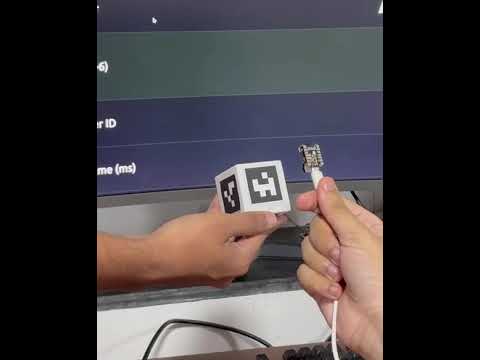
ArUco Cube Tracker
An on-device ArUco cube tracker built with the Seeed XIAO ESP32-S3 Sense. Using its onboard camera, it detects ArUco markers on a six-faced cube, identifies the visible face in real time, and displays the marker ID, face number, and detection latency on a Wi-Fi-hosted dashboard. Everything runs locally on the ESP32-S3, with no cloud processing or external hardware required.
What it does
- On-device ArUco detection — 320×240 frames from the onboard OV3660 camera, parsed locally; no cloud inference, no external processing, no internet
- Cube face mapping — ArUco 4x4 markers 13–18 on the six cube faces map to faces 1–6
- ArUco Marker — ACTIVE while a valid marker is in view, clear when no valid marker is found
- Cube Face — shows 1–6 for the face currently toward the camera, and 0 when no valid marker is in view
- ArUco Marker ID — shows 13–18 for the visible marker, and 0 when no valid marker is in view
- Detection Time — per-frame detection time in milliseconds
- Native ZeroCode Web UI served by the ESP32 on its own Wi-Fi access point on every boot — no home network, no internet; dashboard at http://192.168.4.1/
- Password-protected access point — a unique password is generated on first boot and stored in NVS; the ZeroCode-XXXX network (XXXX is the final two MAC address bytes in uppercase hexadecimal) and dashboard at http://192.168.4.1/ are up on every boot with no home Wi-Fi or internet required
- USB powered — no battery; boots straight into tracking
- Only the largest marker in frame is reported — cube Face and Marker ID display numeric 0 when the cube is out of view
- Live dashboard — the page polls the ESP32 about every 2–3 s and refreshes all four readings every poll, even when the face has not changed; no manual refresh
- Serial readout — the SSID and stored password are printed to the USB serial console on every boot, so a forgotten password can be recovered without regenerating it
- Full reset — erasing flash and reflashing generates a fresh password on first boot
Manual
Device Type
Aruco Cube — a tabletop ArUco cube face reader. A Seeed Studio XIAO ESP32-S3 Sense with its onboard DVP camera (OV3660 on current units, OV2640/OV5640 on earlier batches, probed at runtime) watches a 5 cm cube whose six faces carry unique ArUco 4x4 markers (IDs 13–18). Every frame is decoded on the ESP32 itself; the device's only job is to answer 'which face of the cube is toward me right now?' and to show that answer on a web dashboard it hosts over its own Wi-Fi access point. No cloud inference, no external processing, no internet connection — the whole loop is local and deterministic, which is what makes it usable as a physical input device for demos, education, and lab fixtures.
Hardware
chip: esp32s3 — board: xiao-esp32s3-sense — gpios: camera: on-board OV3660 on the Sense expansion board (earlier units of this board shipped OV2640/OV5640) — driven by the native esp32-camera driver using the DVP wiring in app_config.h, no external wiring — freePins: none used — the product needs no external components — peripherals: part: Onboard DVP camera (OV3660 on current units; OV2640/OV5640 on earlier batches) — interface: internal camera bus (on the Sense expansion board) — role: captures 320×240 frames for ArUco decoding · part: 5 cm printed cube with six ArUco 4x4 markers — interface: passive — optical — role: the tracked object; marker IDs 13–18 map to faces 1–6 · part: USB cable + 5 V supply — interface: USB — role: power and the serial console
Inputs
kind: sensor — label: Camera frames — hardware: onboard DVP camera (probed at runtime), 320×240 grayscale/threshold path — behavior: Continuous capture while the device is powered. Each frame is scanned for ArUco 4x4 markers. Only marker IDs 13–18 are accepted; when several are visible the largest by marker area wins. Marker IDs outside 13–18, and frames with no decodable marker, are treated as no detection.
Outputs
kind: web dashboard — label: ArUco Marker — hardware: native ZeroCode Web UI, polled over the device's own access point — behavior: Shows 'ACTIVE' while a valid marker (ID 13–18) is decoded in the current frame; shows 'clear' when no valid marker is present. · kind: web dashboard — label: Cube Face — hardware: native ZeroCode Web UI — behavior: Shows the face number 1–6 corresponding to the detected marker ID (13→1, 14→2, 15→3, 16→4, 17→5, 18→6). Displays numeric 0 when the status is clear. · kind: web dashboard — label: ArUco Marker ID — hardware: native ZeroCode Web UI — behavior: Shows the raw detected marker ID, 13–18 only. Displays numeric 0 when the status is clear. · kind: web dashboard — label: Detection Time — hardware: native ZeroCode Web UI — behavior: Shows the time the most recent detection pass took, in milliseconds (the on-device processing time for the frame, not the age of the reading). Reported on every poll, including when the face has not changed; on a clear frame that still contained a decoded pass it reports the time of that failed pass, and when camera capture fails so that no frame was processed at all it reports 0 ms. · kind: serial console — label: Boot banner — hardware: USB CDC serial — behavior: On every boot prints the access-point SSID and the current password held in NVS, so an owner who has lost the password can recover it without resetting the device.
Connectivity
stack: webui — transport: wifi — purpose: The ESP32 runs its own Wi-Fi access point for the lifetime of every boot and serves the native ZeroCode Web UI dashboard there. The network is named ZeroCode-XXXX, where XXXX is the final two MAC address bytes in uppercase hexadecimal, and the dashboard is always at http://192.168.4.1/. It never joins a home network, and it has no internet or cloud dependency.
Commissioning
method: softap — payload: ssid_pattern: ZeroCode-XXXX — password: generated on first boot (random), stored in NVS, printed to the USB serial console on every boot — instructions: Power the device over USB. On first boot it creates its access point, named ZeroCode-XXXX where XXXX is the final two MAC address bytes in uppercase hexadecimal, and generates a unique password, which it stores in NVS and prints to the serial console (SSID and password, once per boot). Join that ZeroCode-XXXX network from a phone or laptop with the printed password, then open http://192.168.4.1/ — the dashboard appears with the four readings and starts updating on its own. Point the camera at the cube; no other setup step exists. — userManual: network: The device broadcasts its own Wi-Fi network named ZeroCode-XXXX, where XXXX is the final two MAC address bytes in uppercase hexadecimal (for example ZeroCode-0001). It never joins a home network and needs no internet. The password is unique per device and is generated on first boot. — findThePassword: The SSID and the stored password are printed in full on the USB serial console on every boot, so a forgotten password can be recovered by reconnecting the USB cable — without erasing or reconfiguring the device. Only a full flash erase issues a new password. — findTheDashboard: Join the ZeroCode-XXXX network, then open http://192.168.4.1/ in any phone or laptop browser. The page updates on its own every 2.5 seconds; there is nothing to install and nothing to press. — readingTheDashboard: There are exactly four readings. ArUco Marker shows ACTIVE while one of the cube's markers is in view and clear when none is. Cube Face shows 1-6 for the face pointing at the camera, or 0 when nothing is detected. ArUco Marker ID shows 13-18 for the visible marker, or 0 when nothing is detected. Detection Time shows how long the most recent detection pass took, in milliseconds; it reads 0 if no frame could be captured at all. — usingIt: Place the cube in front of the camera on a desk and rotate it face by face. Within a couple of seconds the dashboard shows the new face and marker ID with ACTIVE in the status row. Lift the cube away and the status falls to clear while Cube Face and ArUco Marker ID both drop to 0. If two faces are visible at once the larger marker in the frame wins, so the face pointing most directly at the camera is reported. — markerMapping: Each marker identifies one face: 13 -> 1, 14 -> 2, 15 -> 3, 16 -> 4, 17 -> 5, 18 -> 6. Markers with any other ID are ignored, so a stray printed marker cannot be mistaken for a cube face. — ifNothingHappens: If the dashboard stays clear, check that the cube is fully in frame and reasonably lit, and read the serial console — the boot log prints the camera sensor it actually detected and the `aruco` console command reports how many frames were decoded and how many were dropped, which distinguishes a camera problem from a marker-detection problem. — resetting: There is no in-product reset button. Erasing the flash and reflashing (the tools' erase-then-flash flow) clears NVS, so the next boot generates and prints a fresh password. — supersedes: This manual is the authoritative owner-facing documentation for the shipping firmware. artifacts/001-product_description.json is the original description this product was generated from and is superseded by this spec wherever the two differ.
Business Logic
powerOnBehavior: On power-up the ESP32 initialises the camera, prints the AP SSID and stored password to the serial console, brings up its Wi-Fi access point, starts the web server, and begins capturing and decoding frames immediately. There is no pairing step, no button to press, and no idle 'waiting to be configured' state — the dashboard at http://192.168.4.1/ is live and showing the latest detection within a few seconds of power-on. — automationRules: For each captured frame at 320×240, run ArUco 4x4 decoding and time the pass in milliseconds. · Keep detections whose marker ID is 13–18; discard anything else. · If one or more valid markers are present, select the one with the largest area in the image. · Map the selected marker ID to a cube face: 13→1, 14→2, 15→3, 16→4, 17→5, 18→6. · Publish {status, face, markerId, detectionTimeMs} as the current reading, overwriting the previous one. · If no valid marker is present, publish status = clear with face = 0 and marker ID = 0, keeping the measured detection time of that pass. · Dashboard polls every ~2–3 s and replaces all four displayed values on every poll, whether or not the face changed. — dayToDayOperation: The cube sits on a desk, the device points at it from USB power. A user rotates the cube face by face; within a couple of seconds the dashboard shows the new face and marker ID, with ACTIVE in the status row and the detection-time figure ticking. Lift the cube away and the status flips to clear while the face and marker ID fall to 0. Nothing needs to be pressed, refreshed, or reconnected — the browser tab can be left open indefinitely and keeps updating.
Factory Reset
trigger: No in-product button. Erase the flash / NVS partition and reflash the firmware (the tools' erase-then-flash flow). — effect: NVS is cleared, so the next boot generates a fresh unique Wi-Fi password, prints it to the serial console, and starts the access point with it. There is no BOOT-button recovery path by design — the password is always readable from the serial console on boot, so the erase is only needed for a full clean slate.
Failure Modes
scenario: No internet / no home Wi-Fi — behavior: No effect at all — the device never uses either. Its own access point is the only network path and works identically offline. · scenario: Cube out of frame, too far away, badly lit, or motion-blurred — behavior: No marker decodes, so status reads clear with face and marker ID at 0; the detection-time figure still reports the pass. Normal operation resumes on the next good frame. · scenario: A marker outside IDs 13–18 is in view (a stray printed marker, a phone screen) — behavior: Ignored — only 13–18 are accepted, so the dashboard stays clear instead of reporting a bogus face. · scenario: Two faces visible at once (cube tilted toward the camera) — behavior: The largest marker in the frame is reported, so the face pointing most directly at the camera wins; the reading may flick between the two while the cube is held at roughly 45°. · scenario: USB power blip / unplug — behavior: Device restarts and comes straight back up: same stored password, same access point, dashboard live within a couple of seconds. Open browser tabs recover on their next poll. · scenario: Camera init fails (bad FPC connection, damaged Sense board) — behavior: The device still boots, prints its SSID and password, and serves the dashboard, but no frames are captured so the status stays clear, the face and marker ID remain 0, and the detection time reads 0 because no frame was processed. Normal operation resumes if the camera recovers. · scenario: Someone has lost the Wi-Fi password — behavior: Reconnect a USB cable and read the SSID and password from the serial console at boot — the stored password is unchanged. Only a full flash erase issues a new one.
Power Management
batteryPowered: false
Custom Behavior
ArUco detection is the product's whole value, and the ZeroCode vision framework only ships a motion detector — the ArUco 4x4 decode path (thresholding, connected-component quad extraction, bit extraction, dictionary match against the 4x4 50-marker set, ID filtering to 13–18, largest-area selection) and the face mapping table are the custom part of this product. The camera is brought up by the native esp32-camera driver on PIXFORMAT_GRAYSCALE / FRAMESIZE_QVGA, with one framebuffer in PSRAM, and frames are mirrored horizontally before decoding to compensate for the Sense camera's reversed image; the DVP wiring is declared in the product's own app_config.h, and the sensor model is probed at runtime (OV2640/OV3660/OV5640 all supported) rather than hard-coded, so earlier and current Sense batches both work.
KNOWN DETECTOR LIMITATION — not AprilTag-equivalent, and not claimed to be. Host regression tests pass 16/16, but against a 120-case OpenCV-generated image suite this detector recognised 84 of 120 while the OpenCV reference recognised all 120. The misses cluster on strong slant, keystone (perspective) distortion, and a marker rotated 45 degrees. The likely causes are the connected-component corner-extraction method (corners are taken as the extremes of x+y and x-y, which degrades as the quad rotates toward 45 degrees) and bilinear rather than projective sampling of the module grid. Under those poses the reading may simply stay clear rather than report a wrong face, which is the safer failure. Detecting a cube held squarely in front of the camera works; extreme angles are a known gap and any decoder rewrite must be validated against the same image suite before it is trusted.
Published 13 Nov 2026 · version 3
Firmware and source licensed Apache-2.0; photos and text CC-BY-4.0.
The firmware includes open-source software — open-source licences and notices; some components may be used only with Espressif chips.
Built with ESP ZeroCode AI — describe a device, get production firmware.
Terms of Service · Privacy Policy