ESP ZeroCode AI · Community
Air Mouse
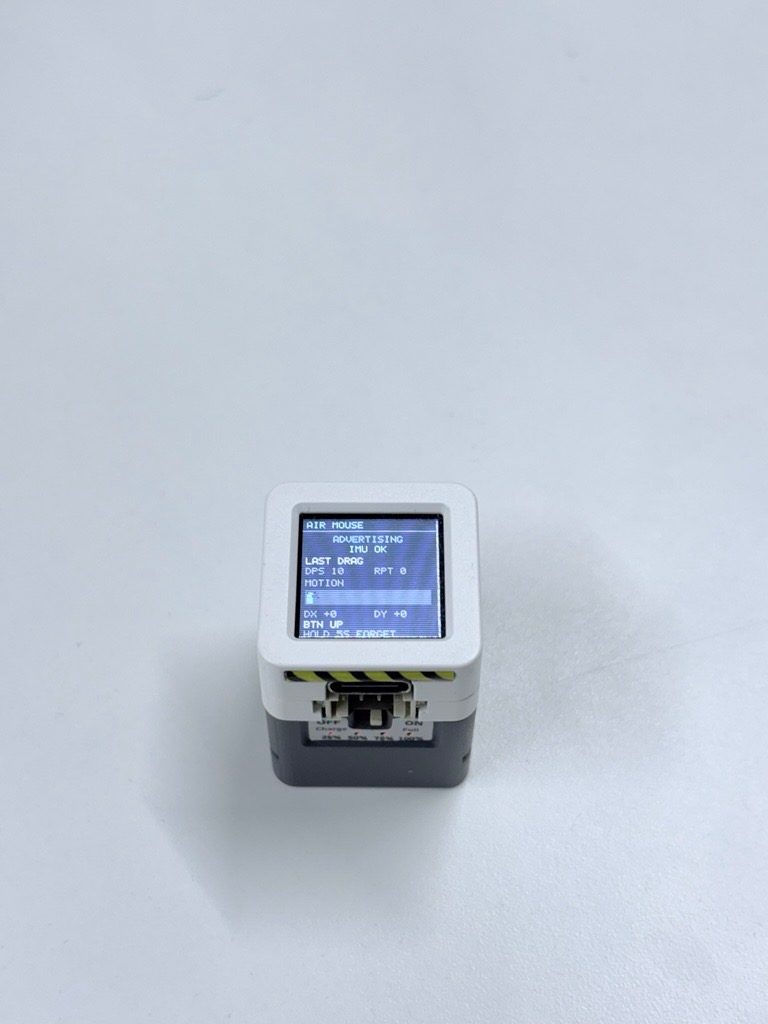
- Bluetooth air-mouse — pairs to the host (phone, tablet, PC) as a BLE HID mouse; no app or driver needed - Rotate-to-aim pointer — gyro yaw/pitch from the Atom S3's built-in MPU6886drives relative pointer motion; holding still keeps the cursor still - Left click — short press of the Atom S3's on-board button (GPIO41) - Click-and-drag — press and start rotating to drag; the pointer keeps tracking while held, release to drop - Right-click — press, hold the device still for half a second (LED turns amber to confirm), then release - Status LED — the Atom S3's on-board WS2812 RGB LED (GPIO35) is the always-on glanceable indicator: blue pulse while advertising, green while connected, white flash on left click, amber while right-click is armed - On-demand status screen — pressing the button wakes the 128×128 LCD (backlight GPIO16), which shows connection state, IMU health, a live motion meter and what the last gesture did; it blanks itself 3 s after the button is released and stays dark the rest of the time
I never thought this was possible, I just had this Idea in my mind about making something like a ring or an S-pen that could control your cursor. I was super impressed when ZeroCode AI made a working prototype so fast!— @chinmay-lonkarDownload the firmware Open-source licences Fork it in the studio
What it does
- Bluetooth air mouse — pairs to a host (phone, tablet, PC) as a standard BLE HID mouse; no app or driver needed
- Rotate-to-aim pointer — the Atom S3's on-board 6-axis IMU (GPIO38/39) drives relative cursor motion; holding the device still keeps the cursor still
- Left click — short press of the on-board button (GPIO41)
- Click-and-drag — press and start rotating to drag; the pointer keeps tracking while held, release to drop
- Right-click — press, hold the device still for half a second (LED turns amber to confirm), then release
- Status LED — the on-board WS2812 RGB LED (GPIO35) is the always-on glanceable indicator: blue pulse while advertising, green while connected, white flash on left click, amber while right-click is armed
- On-demand status screen — pressing the button wakes the on-board 128x128 LCD (backlight GPIO16), which shows connection state, IMU health, a live motion meter and what the last gesture did; it blanks itself 3 s after the button is released and stays dark otherwise
- Battery powered — runs from a small LiPo clipped under the module (M5Stack Atomic Battery Base), topped up over USB-C; no cable to the host
- Battery-sipping idle — after a few minutes with no movement and no button press the air mouse goes into deep sleep; pressing the button brings it straight back, so one charge lasts days of standby
- Battery at a glance — the Atomic Battery Base's own LED level indicator shows remaining charge, and its dip switch picks charge vs. run mode; the firmware adds no battery gauge of its own
- Forget the host — holding the button for about 5 seconds clears the stored pairing (LED flashes red), then the mouse goes back to advertising so any phone, tablet or PC can pair from scratch
- Made for laptops and desktops first — macOS, Windows and Linux are the primary hosts and get the best pointer feel; phones and tablets can still pair but are a secondary target
- Accelerated pointer — slow rotations move the cursor in fine steps for precision, fast rotations send it across the screen; the cursor stops the instant the device does
Manual
Device Type
Air Mouse — a palm-sized, battery-powered Bluetooth HID pointer. Rotating the device in your hand moves the host's cursor, so it drives a laptop, tablet or TV from the sofa, across the room, or standing up, without a flat surface. It presents itself to the host as an ordinary Bluetooth mouse: no app, no driver, no dongle.
Hardware
chip: esp32s3 — board: m5-atoms3 (M5Stack AtomS3), plus M5Stack Atomic Battery Base for portable power — gpios: gpio: 38 — role: IMU SDA (I2C to the on-board MPU6886) · gpio: 39 — role: IMU SCL (I2C to the on-board MPU6886) · gpio: 41 — role: on-board button — the product's only input · gpio: 35 — role: on-board WS2812 RGB status LED · gpio: 16 — role: LCD backlight (brightness control) · gpio: 15, 17, 21, 33, 34 — role: on-board 128x128 GC9A01 LCD (SPI + control) — peripherals: part: MPU6886 6-axis IMU — type: on-board — pins: GPIO38 SDA / GPIO39 SCL — purpose: gyro used for relative pointer motion · part: WS2812 RGB LED — type: on-board — pins: GPIO35 — purpose: always-on status indicator · part: 128x128 IPS LCD (GC9A01) — type: on-board — pins: SPI + backlight GPIO16 — purpose: on-demand status screen · part: push button — type: on-board — pins: GPIO41 — purpose: clicks, drag, wake, pairing reset · part: M5Stack Atomic Battery Base — type: accessory, clips under the module — pins: none (no host-visible gauge) — purpose: 200 mAh LiPo, charge circuit, charge/run dip switch, level LEDs
Inputs
kind: motion — label: Rotate the device to aim — hardware: MPU6886 gyroscope (yaw/pitch), I2C on GPIO38/39 — behavior: Angular motion is integrated into relative cursor movement. A deadzone and drift correction keep the cursor still when the device is held still. Response is accelerated: slow rotation = fine steps, fast rotation = large sweeps. No absolute pointing and no re-centring gesture — the pointer moves only while the device moves. · kind: button — label: On-board button (GPIO41) — hardware: single momentary push button — behavior: Short press and release with no rotation = left click (LED flashes white; the press also wakes the status screen). Press and rotate = click-and-drag, cursor keeps tracking until release. Press and hold still for 0.5 s = arms right-click (LED turns amber); releasing while armed sends the right-click, releasing after moving sends a left-click instead. Hold ~5 s = forget the paired host (LED flashes red, returns to advertising). In deep sleep, this button is the wake source.
Outputs
kind: led — label: On-board WS2812 RGB status LED (GPIO35) — hardware: addressable RGB LED — behavior: Always on, glanceable from across a room. Blue slow pulse = advertising / not paired. Solid green = connected to a host. White brief flash = left click / drag release. Amber = right-click armed. Red flash pattern = pairing cleared. Dark = deep sleep. · kind: display — label: On-board 128x128 LCD status screen — hardware: GC9A01 IPS LCD, backlight on GPIO16 — behavior: Off by default to save power. Wakes while the button is held and for 3 s after release: shows connection state (advertising / connected + host name), IMU health, a live motion meter responding to rotation, and what the last gesture did. Backlight fades to zero 3 s after release; the panel stays dark the rest of the time.
Connectivity
stack: ble_hid — transport: BLE (HID over GATT) — purpose: Presents a standard Bluetooth mouse to the host — no app or driver. Advertising when unpaired, auto-reconnects to the last bonded host on power-up. macOS, Windows and Linux are the primary targets; iOS and Android can pair and will honour moves and left/right click, but some advanced pointer behaviour is host-controlled on those platforms.
Commissioning
method: bluetooth_pairing — payload: Device advertises as a Bluetooth mouse (BLE HID); the host shows it in its normal Bluetooth settings as 'Air Mouse' — instructions: Power the air mouse on (button press, or plug in USB-C to charge). The status LED pulses blue while advertising. On the laptop: Bluetooth settings -> Add device -> select 'Air Mouse'. It appears immediately as a mouse and is usable — move the device to see the cursor move, press the button to click. A second short use: press the button to hold and glance at the status screen if anything looks wrong. Pairing is remembered across power cycles and charges.
Business Logic
powerOnBehavior: On power-up the device starts advertising (blue pulse) and reconnects automatically to its bonded host within a second or two of that host coming in range (LED goes green). It does not advertise while it has an active connection. If nothing was ever paired, it advertises continuously and the blue pulse is the user's cue to pair. — automationRules: Connected = green LED; unpaired or reconnecting = blue pulse; nothing else changes on-screen, which stays dark. · Stillness gating: the pointer only moves in proportion to real rotation, so the device can rest on a couch arm or a knee without the cursor drifting. · Gesture disambiguation on the single button: rotation during the press decides drag vs. click, and holding still for 0.5 s arms right-click. — dayToDayOperation: Pick the device up and rotate it — the cursor follows. Tap to click, press-and-rotate to drag, tap-and-hold-still to right-click. The status LED is the only thing that needs to be observed in normal use: green means ready, blue pulse means it has lost its host and is looking for it. Charge from any USB-C charger; the status screen (button hold) doubles as the diagnostic view if a gesture or the pointer feels wrong. After a few minutes idle the device sleeps and goes dark — one button press brings it back.
Factory Reset
trigger: Hold the on-board button for about 5 seconds. — effect: The stored pairing (bonding information) is erased and any active connection is dropped. The LED flashes red to confirm, then returns to the blue advertising pulse. The device is now discoverable by any host as a fresh mouse and the next host that pairs becomes the remembered one. The user can then pair from the new device's Bluetooth settings.
Failure Modes
scenario: Host out of range or powered off — behavior: The device keeps advertising (blue pulse) and reconnects automatically when the host returns. It stays fully functional, just with nowhere to send motion; LED shows the unpaired/advertising state. · scenario: Pairing lost or the host was removed from its Bluetooth list — behavior: The user holds the button ~5 s to clear the pairing (red flash) and pairs again from the host. This always works without a computer or a cable. · scenario: IMU not responding at start-up — behavior: The device still advertises and connects, and the status screen flags the IMU as unhealthy with no motion meter; clicks still work, so the failure is visible rather than silent. · scenario: Battery drained — behavior: The device sleeps or shuts down; the Atomic Battery Base's level LEDs show the pack is empty. Plugging in USB-C powers and charges it. Nothing is lost — pairing survives, and it reconnects on the next power-up. · scenario: Device left untouched for a long time — behavior: It deep-sleeps (LED dark). One button press wakes it to the previous state and it reconnects to its host. · scenario: Host applies its own pointer acceleration — behavior: On macOS/Windows the host may stack its own acceleration curve on top of the device's; the firmware keeps making its own relative motion available so the feel stays close to a normal mouse on the primary targets.
Power Management
batteryPowered: true — battery: M5Stack Atomic Battery Base — 200 mAh LiPo with its own charge circuit, charge/run dip switch and level LEDs, clipped under the AtomS3 module (no host-visible gauge) — sleepMode: Deep sleep after a few minutes with no movement and no button press; no connection is maintained while asleep (the host simply sees the mouse disappear until wake) — wakeSources: button press (GPIO41) — notes: The mandatory power drain is BLE during awake use plus the LED; the LCD is fully off except during button-hold viewing, and the backlight (GPIO16) is driven to zero the rest of the time. Charging is handled entirely by the battery base; USB-C connection also powers the device directly and makes the charge/run dip switch irrelevant while plugged in.
Custom Behavior
Gesture vocabulary on a single button — click, click-and-drag, right-click arm, and pairing reset are all distinguished by press duration plus whether the device is rotating during the press. This keeps the device to one physical control, which is what makes it pocketable and usable while held in the air. · LED-as-language — the WS2812 carries the whole status vocabulary (blue pulse/green/white/amber/red) so the user never needs the screen to know whether the mouse is ready. · On-demand screen — the LCD stays dark by default and only lights while the button is held, which keeps the device's idle drain low while still giving a diagnostic surface and a motion meter for tuning the feel.
Published 13 Oct 2026
Firmware and source licensed Apache-2.0; photos and text CC-BY-4.0.
The firmware includes open-source software — open-source licences and notices; some components may be used only with Espressif chips.
Built with ESP ZeroCode AI — describe a device, get production firmware.
Terms of Service · Privacy Policy