ESP ZeroCode AI · Community
AI Mosaico
我现在想让你帮我做一个智能语音对话的桌面宠物,类似于可以跟人进行语音对话。这个桌面宠物背后的 AI 提供者可以使用乐鑫 mosaico 的 claw 的 算力。 最终的成果需要实现以下功能: 1. 正常语音对话:我每说一句话,它都能给我返回一些信息。 2. 硬件控制:通过对话,它可以控制我板子上的一些 LED 灯; 利用板子上的摄像头,我跟它对话时,它可以帮我去拍一张照片。
What it does
- Pet face — a cartoon creature (round face, two big eyes, a mouth) on the board's 480x480 screen; it blinks and breathes while idle, widens its eyes when listening, shows "..." while thinking, and its mouth moves as the answer is written out.
- Chat with the Mosaico AI agent over Wi-Fi — the agent's personality and knowledge live in the Agents dashboard, not on the device.
- Voice-only input — the fifteen phrases are the only things the pet can hear, but its answers are free-form text generated by the AI agent: the phrase picks the question, the LLM writes the answer. The pet never speaks.
- Wake word "hi esp" — the pet widens its eyes, gives one short vibration and listens for exactly one phrase for 6 seconds, offline on the device.
- Light control by voice — "turn on the light" / "turn off the light" switches RGB LED 1 of the interaction module, and the pet nods.
- Light state by voice — "is the light on" makes the pet nod "Yes" or shake "No"; the same state is available to the AI agent through its light_state tool.
- Take a photo — "take a photo" grabs one frame from the left-slot camera, shows it full-screen for 4 seconds, then the face comes back; the picture is never stored, streamed or sent.
- Haptic feedback — the vibration motor pulses once when the pet wakes and twice when an answer arrives.
- AI button (GPIO 7) — a short press starts listening without saying the wake word; holding it for 6 seconds factory-resets the pet.
- Power — USB only: the screen stays on and the pet is always listening; the battery is not used as a runtime source.
- Chit-chat phrases — eleven of the fifteen spoken phrases are questions sent to the AI agent as chat messages; the agent (the Mosaico LLM behind the device) composes a free-form answer that is shown as a text bubble.
- No on-screen keyboard — the screen shows the pet's face and its text replies only; nothing is typed on it and the touch layer is unused.
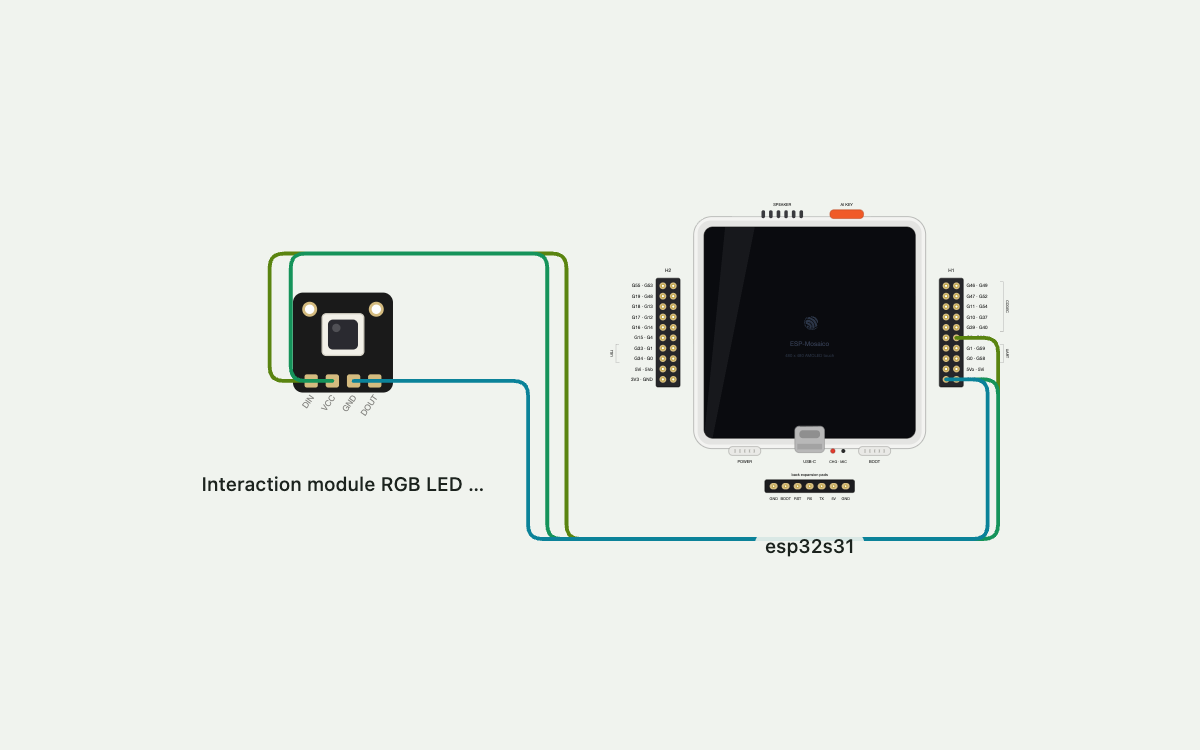
- ESP-Mosaico interaction module in the right slot — six WS2812 LEDs on one data line (GPIO 38); only LED 1 is driven, the other five stay dark.
- Unrecognised speech — if the phrase is not one of the fifteen, the pet shakes its head and shows "I didn't catch that" for 2 seconds, then goes back to idle.
- Offline behaviour — without Wi-Fi the light and photo phrases still work; a chit-chat phrase instead shows "I can't reach my brain right now".
- Boot — the pet fades in on its screen and shows "say 'hi esp'" for the first 5 seconds.
- Fifteen spoken phrases — four run on the device (turn on the light / turn off the light / is the light on / take a photo) and eleven go to the AI agent (what's the weather / any news / make me laugh / tell me a story / give me a fun fact / how are you / what can you do / what's your name / do you like me / I'm tired / I'm bored).
- DECIDED — the pet stays on its fifteen spoken phrases and answers in text on its screen; the platform's audio mode (ask anything, spoken reply) is deliberately deferred.
- DEFERRED — light control is parked for the current milestone: LED 1 stays wired and lit-verified, but the three spoken light phrases have never been recognised on the real board, so they are not part of the build target.
- DEFERRED — photo is parked for the current milestone: the camera stays in the product, but the captured frame shows blank white and is not part of the build target.
- Current build target — one path only: say "hi esp" plus a chat phrase, and the AI agent's answer appears as text on the face. Nothing else must work for this milestone.
Manual
Device Type
name: AI Mosaico — what: A desk pet: a small creature that lives on the ESP-Mosaico board's 480x480 round-faced screen, perched on a desk and powered from USB. It listens for its wake word, takes one short English phrase at a time, and either does something physical (switch its light, take a photo) or asks the Mosaico AI agent behind it a question and writes the agent's answer on its face. — problem: It turns a bare development board into something you actually want on your desk: a companion you speak to instead of a keyboard, whose answers come from a real LLM on Mosaico compute, and whose two physical outputs (its own RGB light, its camera) prove the conversation reached the hardware. — notThis: Not a voice assistant that understands free speech, and not a talking device — it never plays voice, and the only things it can hear are its fifteen registered phrases.
Hardware
chip: esp32s31 — board: esp-mosaico — gpios: gpio: GPIO38 — role: WS2812 data line of the interaction module (right slot H1, pin 11); drives LED 1 only — note: A boot-strapping pad and fixed by the module's own wiring — it cannot be moved. The line idles low, which is the safe level. · gpio: GPIO7 — role: AI (function) button input, active low — note: On-board; short press = listen, 6 s hold = factory reset · gpio: GPIO8 — role: Vibration motor, active high — note: On-board, driven through a low-side MOSFET — peripherals: part: esp-mosaico (board itself) — provides: 480x480 CO5300 QSPI display + CST9217 touch, ES8311 codec with the on-board LMA2718B331-OE1 microphone and NS4150B speaker amplifier, vibration motor, AI button, BOOT button, BQ27220 fuel gauge, BMI270 IMU, 2x BMM150, 16 MB PSRAM, 16 MB NOR + 128 MB NAND · part: ESP-Mosaico camera module, LEFT slot (H2) — provides: DVP parallel camera on GPIO 0/1/4/12/13/14/15/16/17/18/19/33/48/53/55; the only slot a camera may use · part: ESP-Mosaico multi-function interaction module, RIGHT slot (H1) — provides: 6x WS2812 RGB LEDs on the single data line GPIO38; also carries a PIR (GPIO5), LDR (GPIO46), IR emitter (GPIO47) and two key/touch pads (GPIO10/GPIO11) that this product does NOT use — note: Module discovery via its AT24C02 EEPROM at I2C address 0x51 on the external I2C1 bus (SDA GPIO0 / SCL GPIO1). Only LED 1 of the six is driven. · part: USB-C cable to a 5 V source — provides: Power and the USB CDC console/serial port — notUsed: Speaker and audio output path, touch panel, IMU, both magnetometers, the fuel gauge's charge logic, the interaction module's PIR / LDR / IR / keys, GPIO 39/46/47 (free but unused).
Inputs
kind: voice — label: Spoken phrases — hardware: On-board microphone (LMA2718B331-OE1) -> ES8311 ADC -> I2S (MCLK GPIO54, BCK GPIO37, WS GPIO49, DIN GPIO52). All recognition runs on the ESP32-S31, offline. — behavior: The wake-word engine runs continuously while the screen is on. On hearing "hi esp" the pet enters a 6-second window in which it recognises exactly ONE phrase from its registered list of fifteen. A phrase heard outside that window is ignored. Recognising nothing within 6 seconds returns it to idle without any complaint (only a misheard phrase inside the window earns the "I didn't catch that" shake). The phrase list is the firmware's command table; it is the only speech the product will ever act on. · kind: button — label: AI button — hardware: On-board function button on GPIO7, active low, on the back of the core board. — behavior: Short press (under 1 s): opens the same 6-second listening window as the wake word, so the owner can talk without saying "hi esp". Hold for 6 seconds: factory reset (see factoryReset). A press while the pet is already listening restarts the 6-second window.
Outputs
kind: display — label: The pet's face — hardware: Board's own 480x480 QSPI CO5300 panel, always on at full brightness while powered. The CST9217 touch layer is not used by this product. — behavior: A cartoon creature — round face, two large eyes, a simple mouth — drawn on a soft solid background. States: IDLE (blinks every 3-6 s, slow breathing scale of 2-4 %, eyes half-lidded occasionally); LISTENING (eyes widen, a small listening ring appears at the top for the 6 s window); THINKING (eyes look up, a "..." bubble animates while the network round trip is in flight); ANSWERING (a text bubble grows above the face and the reply is revealed left to right, mouth moving, the bubble then holds for 12 s before fading); PLEASED (a quick nod / eye-arc when a light command succeeded); CONFUSED (head shake plus "I didn't catch that" for 2 s); OFFLINE (grey eyes plus "I can't reach my brain right now" for 6 s); PHOTO (see below). All text is English only — the product ships a Latin font, no CJK glyphs. — photoMode: On "take a photo" the pet looks surprised for a beat, the camera captures one QVGA-or-better frame, and that frame fills the 480x480 screen (cropped to a square) for 4 seconds with a small "snap" label; it is then freed and the face returns. Nothing is written to flash, SD, NAND or the network — the frame lives only in PSRAM for those 4 seconds. · kind: light — label: RGB LED 1 — hardware: First WS2812 of the interaction module in the right slot, data on GPIO38. A one-pixel frame is sent at 800 kHz; the other five LEDs are always sent as black. — behavior: Off by default. "turn on the light" sets it to a warm white at about 40 % brightness; "turn off the light" sets it to black. Its colour does not track the pet's mood, so the owner can always tell the light's own state by looking at it. State survives a reboot. · kind: haptic — label: Vibration motor — hardware: GPIO8, active high. — behavior: One 80 ms pulse when the pet wakes (wake word or AI button). Two 80 ms pulses when an answer has arrived and started being written. Nothing for local light commands, so the owner is not buzzed at every switch.
Connectivity
stack: agents — transport: Wi-Fi 2.4 GHz (on-board antenna) + WebSocket — purpose: Carries the eleven chit-chat phrases to the Mosaico AI agent and streams its text answer back. The agent — its personality, knowledge and tool configuration — lives on the ESP Private Agents dashboard (agents.espressif.com), not on the device. Each phrase is sent as one chat message in the same conversation, so the pet keeps context between questions until it is reset or restarted. The service is the ESP Private Agents platform at api.agents.espressif.com, reached by WebSocket with the access token fetched over HTTPS from the refresh token; the device authenticates with an agent id plus that refresh token and needs NO external LLM API key — no OpenAI, Anthropic or other provider key appears anywhere in this product, and nothing is pasted into the flash page.
Commissioning
method: USB serial console (USB-C, CDC) — the Agents framework's own onboarding, no phone app and no QR code — instructions: 1. Plug the board into a computer with a USB data cable (this is also the product's normal power source). · 2. On agents.espressif.com create the pet's agent, give it its personality and knowledge, and copy its agent ID and refresh token. · 3. In that agent's configuration add three tools with exactly these names, so the conversation can reach the hardware: light_on, light_off, light_state. · 4. Open the board's serial console and run: agent-wifi <ssid> <password> · 5. Run: agent-id <agent id> · 6. Run: agent-token <refresh token> (with no argument and paste the token when the console line is too short for it). · 7. Run: agent-status to confirm the Wi-Fi link and the WebSocket are up; the pet's eyes turn from grey to normal once the agent is reachable. · 8. Before involving the microphone at all, prove the API path from the console: agent-say what's the weather — the answer prints on the console as [agent] …. If that line appears, the platform, the credentials and the network are all proven and only voice is left to check. · 9. Now say "hi esp", then a chat phrase; the same answer should appear as a bubble on the face. — noCredentialsInFirmware: No API key or token is compiled into the product: Wi-Fi details, the agent ID and the refresh token are entered at setup and kept in NVS.
Business Logic
powerOnBehavior: The screen comes on with the pet faded in, a "say 'hi esp'" bubble for 5 seconds, then IDLE. If no Wi-Fi credentials are stored, the bubble instead says "ask my owner to set me up" and the eyes stay grey; the pet still answers the four on-device phrases and still switches its light. — dayToDayOperation: The owner says "hi esp" (or taps the AI button). The pet widens its eyes, buzzes once and opens a 6-second window. One of the fifteen phrases is heard: the four on-device ones act immediately (light on / light off / light state as a nod or shake / one photo shown for 4 s); the eleven chat ones become a message to the agent, the face shows "..." while it waits, then the answer is written into a bubble that stays 12 s. A second "hi esp" during the answer cancels the bubble and re-arms listening. If nothing intelligible is heard in the window the pet just goes back to idle; if something was heard but is not one of the fifteen, it shakes its head and says "I didn't catch that". — agentTools: light_on / light_off switch LED 1 and answer with the new state; light_state answers whether LED 1 is on. The agent may call them mid-answer ("I turned the light on for you"), so the light and the spoken-phrase path share exactly one state variable. — discoverability: "what can you do" makes the agent list the pet's abilities, so the owner discovers the other phrases by asking rather than by reading a manual.
Factory Reset
trigger: Hold the AI button (GPIO7) for 6 seconds while the pet is not listening. — effect: During the hold the screen shows a growing white ring and the LED fills white; releasing early cancels and returns to normal. On completion everything stored is erased — Wi-Fi credentials, agent ID and refresh token, the light's saved state — the pet reboots and comes up unconfigured, asking to be set up. The console's own factory_reset command does the same thing.
Failure Modes
scenario: Wi-Fi down or the router unreachable — behavior: The eleven chat phrases fail: eyes go grey and a bubble says "I can't reach my brain right now" for 6 s. The four on-device phrases keep working at full speed — the light still switches and the camera still takes photos. · scenario: Agent credentials wrong, expired or billed-out — behavior: Same grey-eye "I can't reach my brain right now" bubble; the console's agent-status reports the refused connection so the owner knows it is the account, not the device. · scenario: Slow or stalled agent reply — behavior: The "..." face holds; after 20 s the pet gives up with "my brain is slow, ask me again" and returns to idle rather than staying stuck. · scenario: Camera module missing or fails to start — behavior: The pet boots and everything else works; "take a photo" shows a sad face and "I can't see anything" for 3 s. Repeated failures stop re-trying the camera on every request. · scenario: Interaction module not detected (pulled out, or in the left slot) — behavior: The pet boots normally, the AI button, voice and chat all work, and the light phrases answer "I have no light" on screen instead of silently doing nothing. · scenario: Someone talks but no phrase matches — behavior: Head shake plus "I didn't catch that" for 2 s — never a wrong action. · scenario: Power unplugged — behavior: The device stops immediately; there is no battery runtime by design. On replug it boots as at power-on with the light's saved state restored.
Power Management
batteryPowered: false — note: Runs from USB 5 V only. The 65 mAh on-board cell is not a runtime source: an always-on 480x480 screen, a continuous wake-word engine and a Wi-Fi link would flatten it in well under an hour. The screen is never dimmed or slept by the product, because the pet's face IS the product and the wake word must always be listening.
Custom Behavior
phraseBridge: The product's own glue: a recognised phrase carries an action id; four ids are handled locally (light on / light off / light state / photo) and eleven ids are turned into a chat message string sent to the agent client, whose text answer is pushed into the face's bubble. This mapping — not the recogniser and not the agent — is what defines the pet, and it is where a new phrase is added (one line in the command table plus one action id). — oneStateOfTruth: The light has exactly one state variable shared by the voice path, the agent's tools and the screen's nod/shake, so a light switched by the LLM is reported correctly by "is the light on" a second later. — privacy: In the shipped text mode no audio leaves the device: recognition is entirely on-chip and only the eleven phrase texts are sent. The platform's audio mode would reverse this — the owner's voice would then be streamed to the agents platform for recognition. No image ever leaves the device: the photo exists only in PSRAM for 4 seconds and is never written to storage or sent anywhere. — knownLimits: The ON-DEVICE recogniser matches a fixed command table (up to ~200 short English phrases); it does not transcribe speech, so free speech is out of its reach. CORRECTION to an earlier draft of this spec: that is a limit of the recogniser, not of the platform. The agents SDK in this very product supports an audio conversation mode — ESP_AGENT_CONVERSATION_SPEECH with esp_agent_send_speech(), AUDIO_STREAM_START/END, SPEECH_START/END and DATA_TYPE_SPEECH events, and conversationType "audio" in the handshake — so free-form questions and a spoken reply can run on the board's own mic and speaker, with no third-party ASR and no credential beyond the agent's refresh token. What ships here is text mode as a CHOICE (the product's conversation capability was selected as text). Unverified, to confirm on the agent before promising it: which spoken languages the platform's recogniser accepts — Chinese support is not documented in the SDK. — openDecisions: howTheOwnerTalks: decision: DECIDED (owner): stay on the fifteen spoken phrases and answer in text on the screen; light control and photo are parked, and the only thing this milestone has to prove is 'say a chat phrase → the agent's answer appears as text'. The platform's audio mode is understood and available but is deferred, not rejected. — question: Does the pet stay on the fifteen phrases (answer as text), or move to the platform's audio mode (ask anything, answer spoken)? — optionA_audioWithVoice: Owner says anything; the board streams the mic to the agents platform; the platform recognises it, the LLM answers, and the answer comes back as BOTH text on the face and synthesized speech through the on-board NS4150B amplifier and speaker. Biggest change: the pet gains a voice and stops being limited to fifteen questions. — optionC_audioListenOnly: Same pipeline, but the synthesized speech is discarded: only the recognised text and the written answer are used. The pet understands anything but stays silent. Cheaper on data, quieter on a desk, and keeps the face-only personality. — optionB_textNow: Nothing changes this round: fifteen phrases, text answers. Lowest risk, ships on proven paths, audio mode can follow later. — unverified: Audio mode is present in the SDK but unused by this firmware, so it means real new firmware (mic streaming with endpointing, playback task, barge-in) and it has never been run on this board. The platform's recognition language support is undocumented in the SDK — Chinese is NOT confirmed. — tradeoffs: Audio mode sends the owner's speech off the device and adds one network round trip before the answer starts; the phrase mode does neither but cannot be asked anything new. — lightPhraseWords: question: Which words switch the light, given 'turn on the light' / 'turn off the light' / 'is the light on' have never been recognised on the board while 'light up' / 'lights out' / 'light status' are built and untested? — status: DEFERRED — light control is parked for the current milestone; when it returns, one board session saying each phrasing decides the wording. The alternative wordings light up / lights out / light status stay in the firmware behind a switch that defaults to off, so a factory unit registers exactly the spec's fifteen.
Published 25 Nov 2026
Firmware and source licensed Apache-2.0; photos and text CC-BY-4.0.
The firmware includes open-source software — open-source licences and notices; some components may be used only with Espressif chips.
Built with ESP ZeroCode AI — describe a device, get production firmware.
Terms of Service · Privacy Policy